
Participant
October 18, 2022
Question

Alt + click clipping not working

  • October 18, 2022
  • 4 replies
  • 781 views

Hi there, I have a problem with clipping layers.

I have tried to clip the "ADJ" folder to the "IMG" folder, this is something I normally do using Alt+Click between the two folders, when the little arrow facing down shows up. But now, when I click alt and my cursor is located between the two folders, the little arrow doesn't appear and I can't use the clipping function.
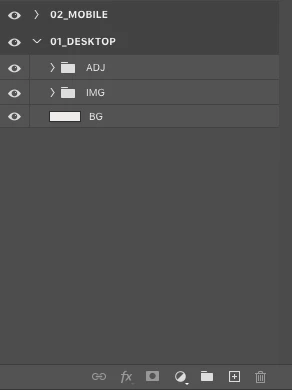
 

This happened suddenly, a few weeks ago I was doing it. What could have gone wrong?

Thank you in advance.

4 replies

Participant
February 14, 2025

It happened to me for many months and I don't know the reason. The ALT+click in the layers panes to use a layers as a mask is no longer an option. It's happening only in Windows 10, and it's a bug. But for many months is still happening.

Trevor.Dennis
Community Expert
Community Expert
February 14, 2025

The shortcut is Alt Ctrl G.  That will clip the selected layer to the layer beneath it in the stack.

Alt Ctrl G will also unclip a currently clipped layer.

Trevor.Dennis
Community Expert
Community Expert
February 14, 2025

Thinking about this some more, if you say this is not working, can you see the shortcut if you right click the layer? I am not sure that would be conclusive — I have repurposed shortcuts, and they still appear in the menus against their original function.

c.pfaffenbichler
Community Expert
Community Expert
October 18, 2022

An alternative to a Clipping Mask, as far as Adjustment Layers are concerned, is putting them above the pixel content in a Group with the Blend Mode »Normal«. 

c.pfaffenbichler
Community Expert
Community Expert
October 18, 2022

No, it didn’t happen suddenly, Groups cannot be Clipping Masked to other Layers/Groups. 

Trevor.Dennis
Community Expert
Community Expert
October 18, 2022

The only way I can think of doing that with Grouped layers, is to make the clipping Group a Smart Object.