
Inspiring
March 10, 2017
Answered

Alt-click not working for clone stamp. Frustration ++++

  • March 10, 2017
  • 19 replies
  • 30184 views

Ridiculous levels of frustration.

Alt-click has stopped selecting area of image when using the clone stamp. Any image, any layer and in images with ony background layer.

I am using a yoga 12 with wacom digitizer, Win 10 x64, i5 with 8gb Ram

Problem occurred previously and a rollback of an apparently unrelated software installation cured it.

Have tried (as per plethora of suggestions):

  • reset tool
  • reset preferences
  • uninstall recent software x3
  • reinstall Photoshop CC
  • in Clone source box "clipped" is selected but layer title does not appear when trying to select.
  • Brush dynamics set to off
  • target does appear when alt-clicking but on trying to subsequently clone error message pops up

"Could not use the clone stamp because the area to be cloned could not be defined. (Alt click to define a source point)"
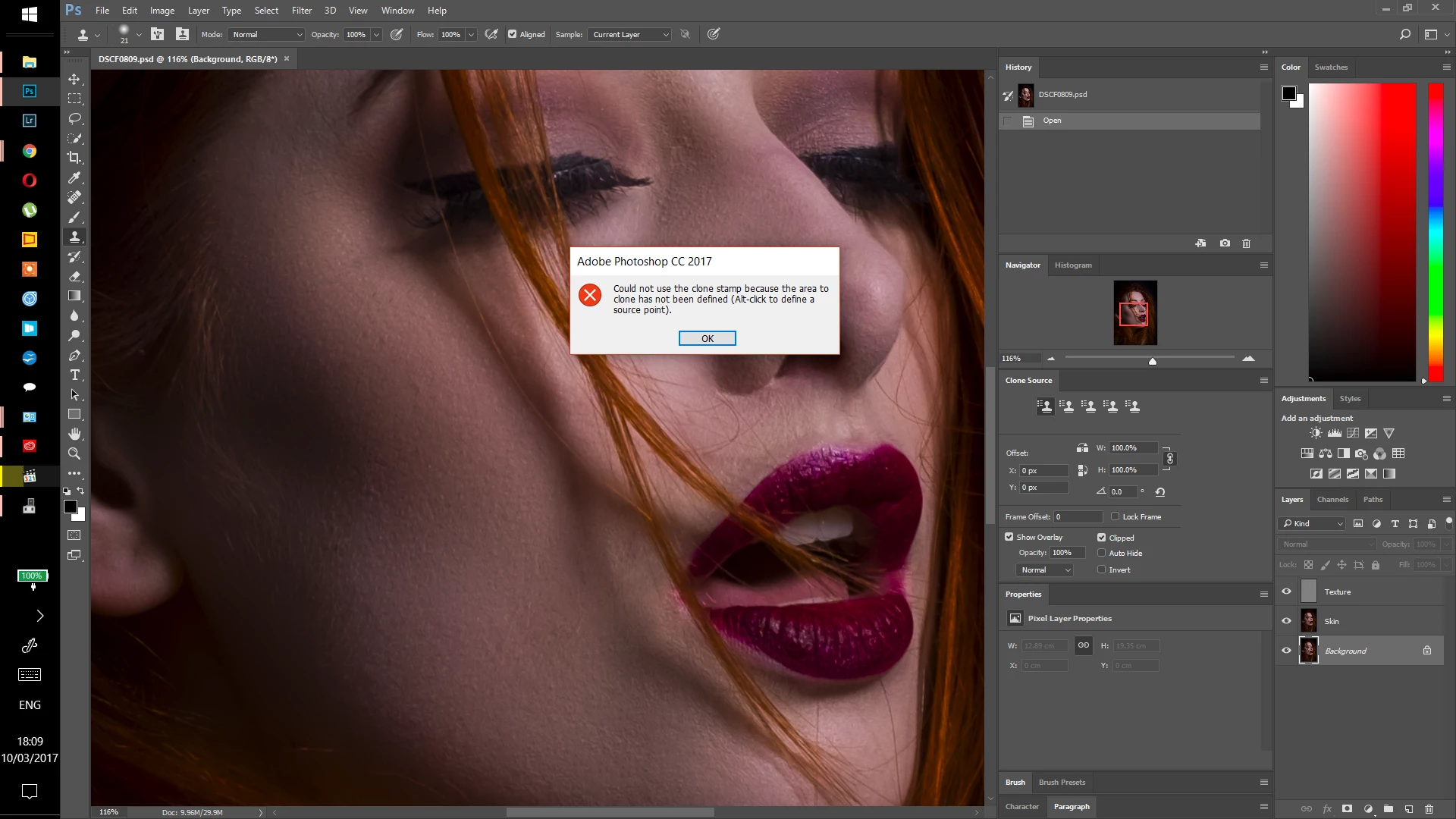
Any other ideas??? All assistance greatly appreciated.

    Correct answer MarkJosephAnthony

    Hi everyone,

    If you are having same problem. On Photoshop CC at least. The solution as given to me from Adobe is if you get this problem.

    With clone stamp selected - press alt key by itself and release. Then try to select clone area,(alt-click) you should find that it works. It has worked for me after trying every other possible solution.

    (From reading various forums the problem seems to be that other software associates itself with the alt key making it unavailable to photoshop, perhaps the single alt key press re-associates it)

    This does not appear to be documented anywhere on forums or elsewhere.

    Thanks to those above that made helpful suggestions.

    19 replies

    Participant
    January 9, 2024
    Beatmaker 77 has come up with an answer which works.........

    "I've been having that problem and just realised that if I use the Alt key left of the space bar vs the right Alt key next to the space bar, it works.... Simple solution hopefully"


    Participant
    November 8, 2023

    Having the same issues with Photoshop 2024.

    Participant
    November 8, 2023

    I'm having the same problem ever since I upgraded to Adobe Photoshop 2024. All my alt keys stopped working. HELP!!!!


    Kevin Stohlmeyer
    Community Expert
    Community Expert
    November 8, 2023

    @Peter26317478ei6h your replying on a 6 year old thread. Go to Apple system preferences/Security and Privacy/Full Disk Access and add and allow Photoshop to this list. PS does not have permissions to do an on-screen record (opt+click).

    Inspiring
    July 23, 2022

    Solution given below does not work.

    Participating Frequently
    June 26, 2022

    Estou com o mesmo problema sem solução a meses, última versão da esse erro, a anterior não , quando clico alt e carimbo ele aparece a mensagem de erro do programa e não consigo mais mexer em nada , tendo que finalizar tarefa . Lamentável 

    Participant
    March 13, 2022

    Hello everyone! I found a temporary fix that can help you. So my case is a little different from everyone else's. I am on a school Chromebook and the only way I can access Adobe Illustrator/Photoshop is through this specific program that lets me log in from this Chromebook onto a physical computer at school. I also found that when I try to use alt-click from the school Chromebook it won't work. What I did is I just went to windows settings on a physical computer and opened the "On-screen keyboard" app. After, I pressed alt and could use the stamp tool perfectly fine. I really hope this helps a lot of people. You don't have to necessarily click on the physical alt key. Just use the pop-up keyboard and it will do the trick!!!!

    Participant
    January 7, 2023

    Thank you! This fixed the problem for me.

    Participant
    December 18, 2020

    I was having this trouble using my Wacom tablet, but not when I used my mouse. When I went into my Wacom Tablet Properties under Mapping and turned off "Use Windows Ink" it now works properly with my Wacom when I alt-click.

    Participant
    December 19, 2020
    I was using a mac through an online portal to a PC at work. Some commands
    were not working (neither command for mac or control for PC). I discovered
    if i used the command key on my mac instead alt-click it worked! (not ideal
    but a simple fix). 🙂
    Participant
    June 29, 2020

    Finally cracked it! Drove me crazy It's as simple as using Command-Click instead of Alt-click)

    Participant
    April 25, 2019

    go to

    setting - Ease of Access  -  Narrator  -  (Use the narrator to read and interact with your device) OFF

    la_poll
    Participant
    April 10, 2019

    Just in case this works as a fix for anyone who has tried the above solutions and still cannot get alt + click to work (like myself), try alt option + alt + click.

    This works for me.