
Answered
Alt click to define a source point
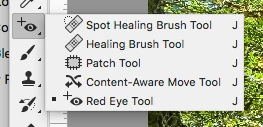
I am new to Photoshop. When I first started using it I would use the Healing Brush Tool to erase parts of an image with no problems? Now I must have clicked on something by mistake and now when I click on the Healing Brush a command comes up "Alt click to define a source point to be used to repair the image" I am not sure what this means?
I would appreciate any advice as to how to get back to how it was ?
Thank you
Jenny
 AdChoices