
Giedriuqaz
Participant
May 7, 2019
Answered

Alt drag to copy an object - locked layer

  • May 7, 2019
  • 4 replies
  • 3847 views

Hello,

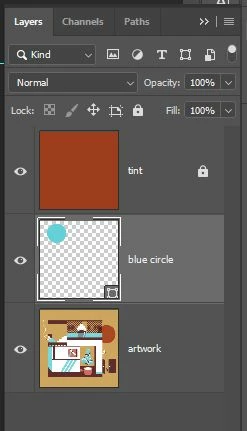
I try to alt drag to copy "blue circle" but instead Photoshop grabs and tries to copy "tint" even tho its locked (apparently it does that by default to any locked layers anyway).

It's frustrating - now to do that I need to turn of "tint" layers viability then do alt drag to copy the circle.

Wouldn't it be more natural and convenient if you can not drag and copy locked layers?

What you guys think, do you have same problem or its just me, maybe there is a setting I can change?
Correct answer Michael Bullo

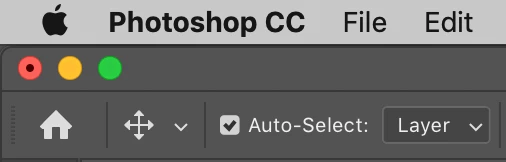
Could this issue be related to the Auto-Select option that appears in the options bar when you have the Move Tool selected? When this option is on Photoshop will grab the top most layer under the mouse. When this option is off Photoshop will move whatever is selected within the Layers panel.

4 replies

Giedriuqaz
Participant
May 7, 2019

Hello guys i made a quick rough video example of my issue here:

2019-05-07 19-15-04 - Streamable

It seems that Alt + Drag feature ignores lock and treats layers as normal stack order.

Michael point out Auto select - I guess work around would be (with  auto select) Select a shape then ctrl + alt + drag

Ctrl deselects auto select temporary while alt+drag copies the shape.

I found it weird that we copy layer even the layer is all locked.

Michael Bullo
Community Expert
Community Expert
May 7, 2019
I found it weird that we copy layer even the layer is all locked.

The various locks that can be applied to a layer are designed to protect that layer in different ways. Duplicating a layer doesn't harm the original layer in any way so it is allowed.

bandab58927736
Participant
May 8, 2019

i have the same problem i follow the process nothing changed

Michael Bullo
Community Expert
Michael BulloCommunity ExpertCorrect answer
Community Expert
May 7, 2019

Could this issue be related to the Auto-Select option that appears in the options bar when you have the Move Tool selected? When this option is on Photoshop will grab the top most layer under the mouse. When this option is off Photoshop will move whatever is selected within the Layers panel.

JJMack
Community Expert
Community Expert
May 7, 2019

I think you nailed their problem

JJMack
Michael Bullo
Community Expert
Community Expert
May 7, 2019

Thanks mate.

jane-e
Community Expert
Community Expert
May 7, 2019

Hi

There are four kinds of locks, in addition to Lock All (which has a slightly different icon). If you have locked for transparency, for instance, you would still be able to move the layer.

Two solutions:

  • Lock for move (or all)
  • In the options bar, turn off Auto Select (far left)

~ Jane

jane-e
Community Expert
Community Expert
May 7, 2019

Giedriuqaz

It suddenly occurs to ask:

Are you alt-dragging in the layers panel or in the document window?

May 7, 2019

Hi

Not seeing the issue with Photoshop CC 2019 what exact version do you have, have you tried resetting Photoshop preferences

Giedriuqaz
Participant
May 7, 2019

2019

20.0.4 release

Tired it.

I really think everyone's Photoshop does that and its not a wrong preferences thing.

May 7, 2019

I've tested and still can't replicate your issue, alt clicked on the circle layer and dragged it up to make a copy, works as expected, maybe I'm misunderstanding your issue