Participant
February 27, 2019
Question

Animation frame rate and Timeline view style

  • February 27, 2019
  • 1 reply
  • 500 views

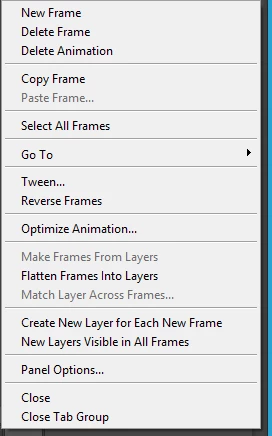
I'm trying to change very basic things like animation frame rate and style of the timeline in Photoshop.  Pretty much everything just says 'oh do this' but I don't seem to have any option to DO what they say.  Is my version of photoshop borked or something?  Attached is what my timeline and timeline menu look like.  What should I be clicking to change the framerate?

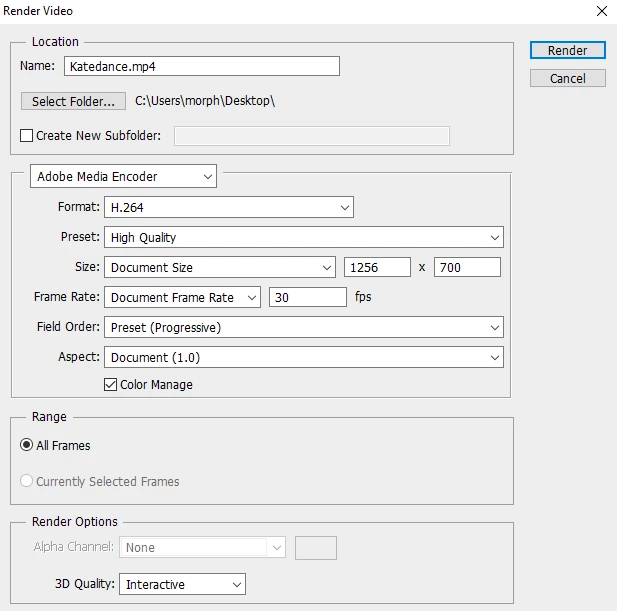
The only framerate option I can find is when I 'render movie' I can override the 'document settings' for framerate but if i do that then only one frame is rendered and all others are discarded for some reason.

This topic has been closed for replies.

1 reply

davescm
Community Expert
Community Expert
February 27, 2019

There are two timeline types in Photoshop. You choose which when you first create the timeline.

A video timeline in which you set a framerate.

Alternatively, a frame animation timeline (shown in your screenshot). In this timeline you set the time of each individual frame (they don't all have to be the same) by clicking where it shows 0 secs in your screenshot. You can select several frames together and set them all in one operation.

Dave

Participant
February 27, 2019

Is there a way to switch now that it exists? I've seen people say "just click this button" but i don't see the button they are referring to.

davescm
Community Expert
Community Expert
February 27, 2019

My version is CS6


Hi

I don't have CS6 installed on my desktop so I just fired up an old laptop with CS6 still installed and that button is in the timeline.

I don't know why you are not seeing it, but I would try resetting preferences : Press and hold Alt+Control+Shift (Windows) or Option+Command+Shift (Mac OS) as you start Photoshop. You are prompted to delete the current settings. The new preferences files are created the next time you start Photoshop.

Dave