
Participant
July 18, 2022
Answered

Annoying Importing Problem!

  • July 18, 2022
  • 2 replies
  • 287 views

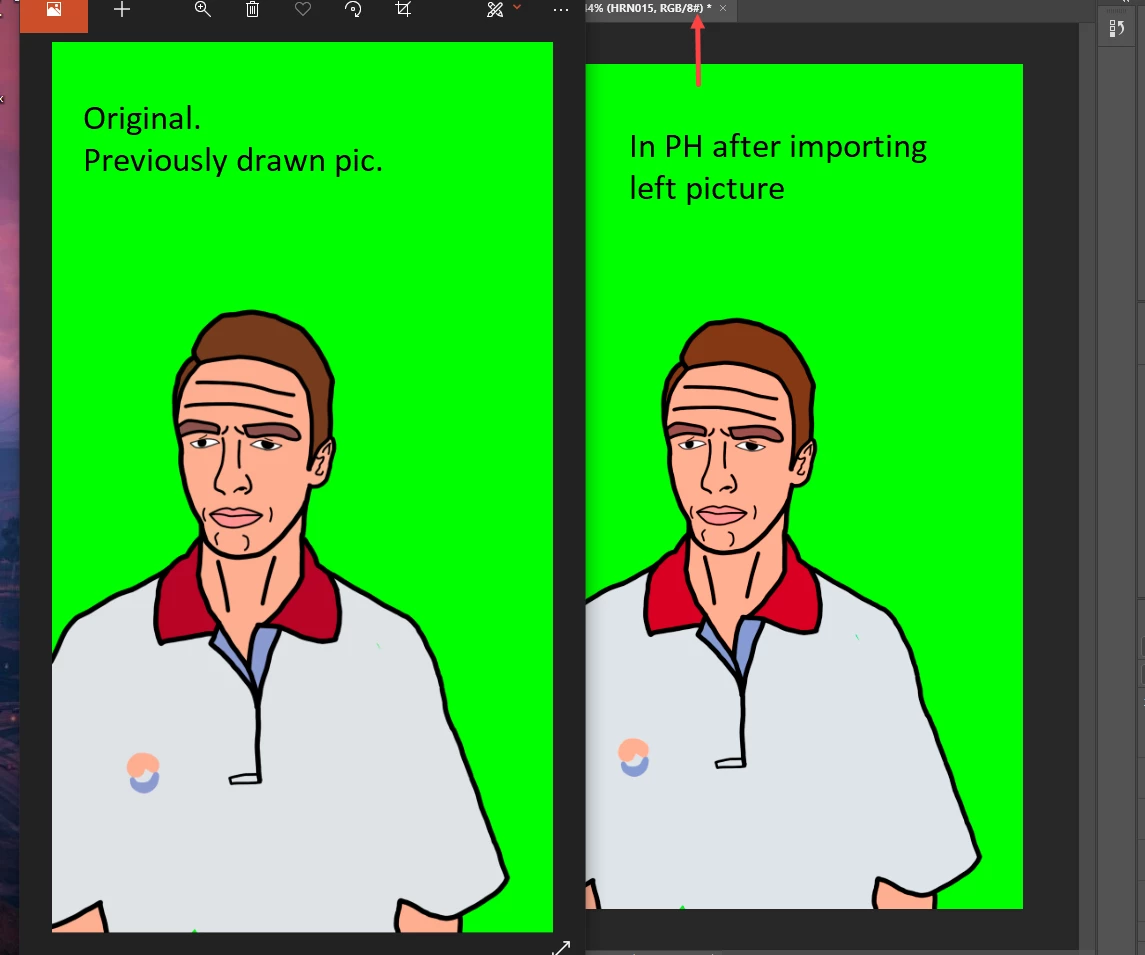
When after exporting a drawn png picture I try importing it back into PH it gets more saturated. Every basic viewing program on Windows opens it with original colors I made. Fun part begins when I drag the pic into PH. This process can repeat itself endlessly adding 2-5 % more brightness every time I import.


* scrnshot attached
 

This topic has been closed for replies.
Correct answer Per Berntsen

The # after RGB/8 in the document title bar indicates that the image is untagged (no color profile), and that's most likely the source of your problem.

Never work with untagged images. If you are creating these images using File > New, make sure to choose a color profile in the New dialog, like sRGB.

And when saving images, make sure that ICC profile is checked in the bottom right corner of the Save dialog.


For existing untagged files, assign the monitor profile (Edit > Assign profile), then convert to sRGB. (Edit > Convert to profile)


2 replies

Per Berntsen
Community Expert
Per BerntsenCommunity ExpertCorrect answer
Community Expert
July 18, 2022

The # after RGB/8 in the document title bar indicates that the image is untagged (no color profile), and that's most likely the source of your problem.

Never work with untagged images. If you are creating these images using File > New, make sure to choose a color profile in the New dialog, like sRGB.

And when saving images, make sure that ICC profile is checked in the bottom right corner of the Save dialog.


For existing untagged files, assign the monitor profile (Edit > Assign profile), then convert to sRGB. (Edit > Convert to profile)


DBudAuthor
Participant
July 18, 2022

OH MY GOD, YES! lol such a stupid mistake. Thank you!

Kevin Stohlmeyer
Community Expert
Community Expert
July 18, 2022

https://community.adobe.com/t5/photoshop-ecosystem-discussions/calibration-and-color-management/m-p/10188230#M210432

It depends on what your other programs have for color management. As the post above states - Windows oversaturates. Where are you creating the original drawing? If you are creating it in PS (Photoshop) first then exporting, why would you re-import the same png and not just open the original Photoshop file?

DBudAuthor
Participant
July 18, 2022

I'm working in EbSynth and it creates other png's on the base of the original. But that's not the issue. Windows opens the exported file as I need it. No complains about the quality of exported material. The problem is when I import previously exported pic back 🙂