
Annoying Photoshop Problems
Hello, First of all, I would like to say I am a Photoshop Expert and I always work fast and I use a lot of key combinations. So perhaps some of the problems below may cause due to latency or order overlapping perhaps..
1. Crashing issue: When I use Hand Tool to slide in the screen in a Large file SOMETIMES Photoshop crashes. This is really annoying.
2. After I finish to work for a layer, I press V key to select another layer in the screen, but it opens View menu on the top without touch ALT key.
3. When I select a Layer and then press 0 in numueric key. It reduce the opacity as 0. This is OK; but why I can't return back always 100 when I press again 0. Sometimes it works after press random keys to make it work. What is the logic behind?
4. Why we can't change a text or a shape color by pressing a color in a Swatch panel while we can do in Library Panel?
5. Why sometimes Library Panel doesn't bring my Library and shows connection problem?
6. This is not question; but I believe that this is a very important necessity, Often I need to change a color in a sentence. It would be great to select a word in a text layer then change the color by clicking a color in the Swatch or Library panel.
7. When I want to move a layer only 1 pixel. I press arrow key. It works perfect when the screen around %100 zoom. But Why it moves my asset 5-6 pixel when the window zoomed around %25? What is logic behind or is it a bug?
8. Why some vectors can't align with a Guide or a pixel? For example I have a vector square and I want to align exactly to the edge of a guide or pixel. But it snaps 0,03 pixel left or right.
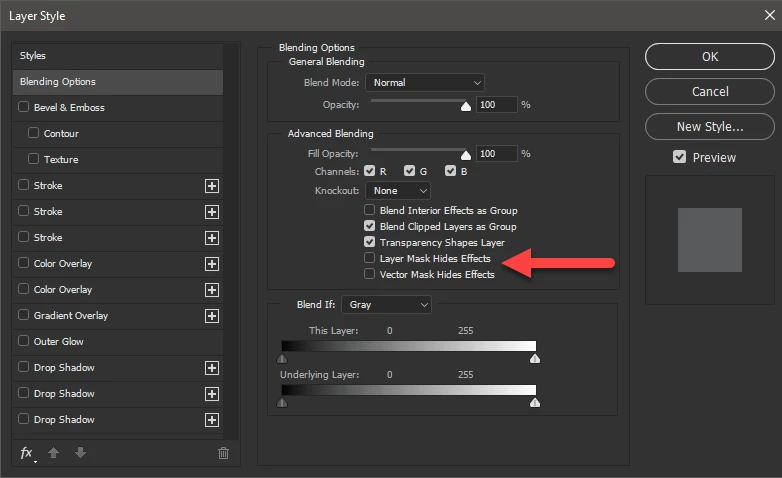
9. Why masks does not cover the shadows? Because I often,need to cut everything in a certain point by mask. But masks does not work for the FX, If my situation is an expection what is the solution that Photoshop offers? How can I cut stroke, shadow or other FX panel settings from a certain point?
Thank you,
Yusuf
 AdChoices