
Inspiring
November 1, 2017
Answered

Annoying tooltip box

  • November 1, 2017
  • 2 replies
  • 2729 views

After last PS update I get this annoying large tooltip box every time I enter a tool in my tools palette - where do I remove this? Again, wish Adobe could stop forcing stuff like this on us and instead inform people of new features instead. Let's say in a section called "new features" or something like that.
    This topic has been closed for replies.
    Correct answer Jeff Arola

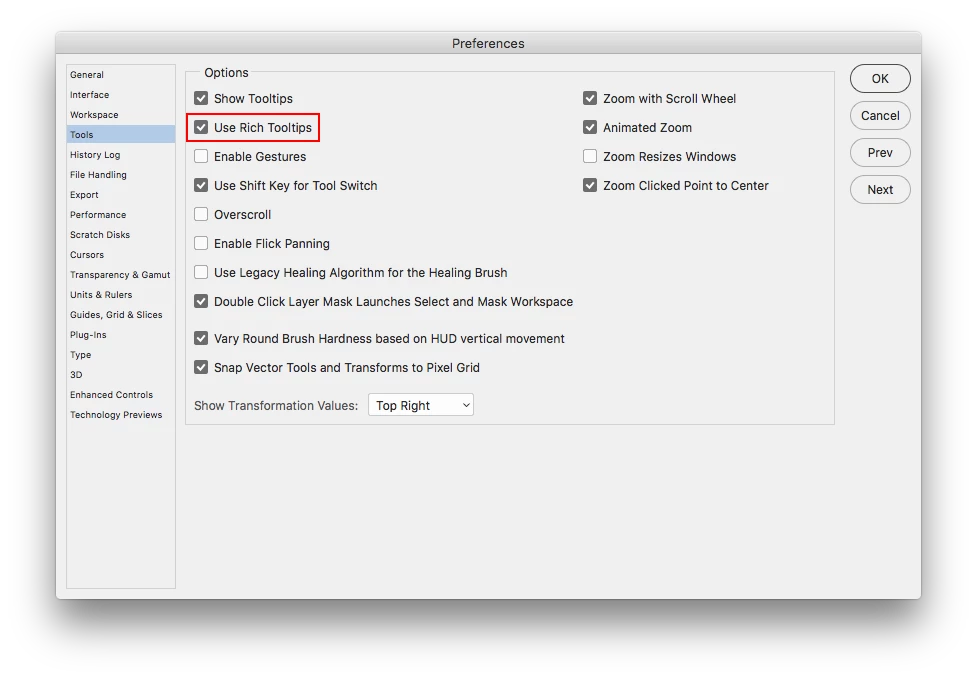
    In photoshop cc 2018 there is a new kind of tooltip called Rich Tooltips and that's what your seeing.

    https://helpx.adobe.com/photoshop/using/whats-new.html

    You can turn that off in the Photoshop CC (mac) or Edit (windows) Preferences>Tools>Use Rich Tooltips

    2 replies

    Jeff Arola
    Community Expert
    Jeff ArolaCommunity ExpertCorrect answer
    Community Expert
    November 1, 2017

    In photoshop cc 2018 there is a new kind of tooltip called Rich Tooltips and that's what your seeing.

    https://helpx.adobe.com/photoshop/using/whats-new.html

    You can turn that off in the Photoshop CC (mac) or Edit (windows) Preferences>Tools>Use Rich Tooltips

    perrybrusAuthor
    Inspiring
    November 2, 2017

    Thanks.

    Let's hope Adobe make these new features OFF default in the future and serve a text telling us about new stuff for instance on first launch after update instead of forcing them ON as default.

    Inspiring
    November 1, 2017

    Try this.  In PS Preferences, go to "Interface".  Under "Options", uncheck "Show Tool Tips".  I think that should take care of this particular annoyance.  If necessary, you can of course turn that Pref back on and then off again when you no longer need it.  I was having an issue with Camera Raw CS6 on High Sierra.  The tool tips were sticking and the only way I could get rid of them was to shut down PS.  The first reply to my post on the Adobe forum was the procedure I've mentioned above, and it worked perfectly.  I do keep that Pref checked until I know I'll be using Camera Raw, and then I uncheck it for that purpose only.  At first this seemed too simple to solve my problem, but of course it did.  It seems that sometimes the most obvious approach is the answer.  I hope this helps.

    Gary

    Known Participant
    September 26, 2024

    That's not it. Both Tool Tips and Rich Tool Tips were already turned off.

    Known Participant
    September 26, 2024

    This is new - in the last week.