
Known Participant
June 16, 2023
Question

Any script can make multiple mockup images ?

  • June 16, 2023
  • 5 replies
  • 4644 views

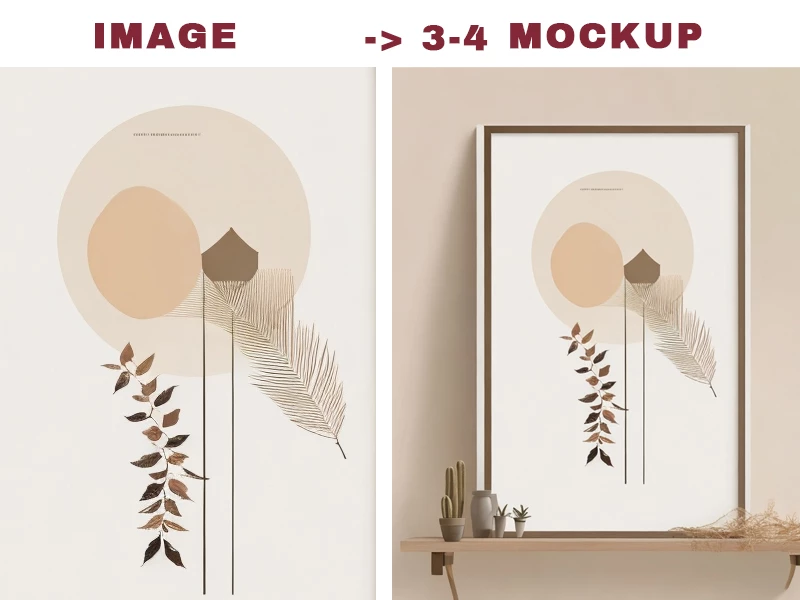
I want to make 3-4 mock-up/show cases images for each art photos, now I am process manually and very time consuming, any script can make these processing automatically


Like this sample effect (manually made, how to auto ?)
 

This topic has been closed for replies.

5 replies

c.pfaffenbichler
Community Expert
Community Expert
June 20, 2023

The Script from that thread could be modified – either to offer an additional file-selection dialog to select the templates or by hard-coding the templates’ paths into the Script. 

c.pfaffenbichler
Community Expert
Community Expert
June 22, 2023

I will find different aspect ratio mock-up files and group them, then 3:2 images will use 3:2 mock-up PSD, 5:7 will use 5:7 mock-up........


Appreciated if you can modify a bit make it like JJMack's BatchMockupTemplates.jsx point to 2 folder - images folder and mock-up folder, then finish 3-4 set mockup images automatically that will be a great help.


Sorry for too greedy to ask this, thank you.


// select template files, select images to be placed;
// place selected images in active smart object and save jpgs;
// 2023, use it at your own risk;
// Select Files;
if ($.os.search(/windows/i) != -1) {
    var theTemplates = File.openDialog("please select template files", "*.psd;*.tif;*.jpg", true)
} else {
    var theTemplates = File.openDialog("please select template files", getFiles, true)
};
if (theTemplates) {
if ($.os.search(/windows/i) != -1) {
    var theFiles = File.openDialog("please select image files", "*.psd;*.tif;*.jpg", true)
} else {
    var theFiles = File.openDialog("please select image files", getFiles, true)
};
if (theFiles) {
for (var x = 0; x < theTemplates.length; x++) {
    var myDocument = app.open(File(theTemplates[x]));
    var theName = myDocument.name.match(/(.*)\.[^\.]+$/)[1];
    var thePath = myDocument.path;
    var theLayer = myDocument.activeLayer;
// JPG Options;
    jpgSaveOptions = new JPEGSaveOptions();  
    jpgSaveOptions.embedColorProfile = true;  
    jpgSaveOptions.formatOptions = FormatOptions.STANDARDBASELINE;  
    jpgSaveOptions.matte = MatteType.NONE;  
    jpgSaveOptions.quality = 11;   
// Check if layer is SmartObject;
    if (theLayer.kind != "LayerKind.SMARTOBJECT") {
        alert("selected layer is not a smart object")
    } else {
// Select Files;
        if (theFiles) {
            for (var m = 0; m < theFiles.length; m++) {
                var theState = myDocument.activeHistoryState;
                var theSO = openSmartObject ();
                placeScaleRotateFile (theFiles[m], 0, 0, 100, 100, 0);
                scaleToCanvasSize ();
                theSO.close(SaveOptions.SAVECHANGES);
                var theNewName = theFiles[m].name.match(/(.*)\.[^\.]+$/)[1];
                // Save JPG
                myDocument.saveAs((new File(thePath + "/" + theName + "_" + theNewName + ".jpg")), jpgSaveOptions, true,Extension.LOWERCASE);
                myDocument.activeHistoryState = theState;
            }
        }
    }
}
}
};
// Get PSDs, TIFs and JPGs from files
function getFiles(theFile) {
    if (theFile.name.match(/\.(psd|tif|jpg)$/i) != null || theFile.constructor.name == "Folder") {
        return true
    };
};
// Replace SmartObject Contents
function replaceContents(newFile, theSO) {
    app.activeDocument.activeLayer = theSO;
    // =======================================================
    var idplacedLayerReplaceContents = stringIDToTypeID("placedLayerReplaceContents");
    var desc3 = new ActionDescriptor();
    var idnull = charIDToTypeID("null");
    desc3.putPath(idnull, new File(newFile));
    var idPgNm = charIDToTypeID("PgNm");
    desc3.putInteger(idPgNm, 1);
    executeAction(idplacedLayerReplaceContents, desc3, DialogModes.NO);
    return app.activeDocument.activeLayer
};
////// open smart object //////
function openSmartObject () {
    var desc2 = new ActionDescriptor();
    executeAction( stringIDToTypeID( "placedLayerEditContents" ), desc2, DialogModes.NO );
    return activeDocument;
    };
////// place //////
function placeScaleRotateFile (file, xOffset, yOffset, theXScale, theYScale, theAngle) {
    // =======================================================
        var desc5 = new ActionDescriptor();
        desc5.putPath( charIDToTypeID( "null" ), new File( file ) );
        desc5.putEnumerated( charIDToTypeID( "FTcs" ), idQCSt = charIDToTypeID( "QCSt" ), charIDToTypeID( "Qcsa" ) );
        var idOfst = charIDToTypeID( "Ofst" );
            var desc6 = new ActionDescriptor();
            var idPxl = charIDToTypeID( "#Pxl" );
            desc6.putUnitDouble( charIDToTypeID( "Hrzn" ), idPxl, xOffset );
            desc6.putUnitDouble( charIDToTypeID( "Vrtc" ), idPxl, yOffset );
        var idOfst = charIDToTypeID( "Ofst" );
        desc5.putObject( idOfst, idOfst, desc6 );
        var idPrc = charIDToTypeID( "#Prc" );
        desc5.putUnitDouble( charIDToTypeID( "Wdth" ), idPrc, theYScale );
        desc5.putUnitDouble( charIDToTypeID( "Hght" ), idPrc, theXScale );
        desc5.putUnitDouble( charIDToTypeID( "Angl" ), charIDToTypeID( "#Ang" ),theAngle );	
        desc5.putBoolean( charIDToTypeID( "Lnkd" ), false );
    executeAction( charIDToTypeID( "Plc " ), desc5, DialogModes.NO );
    return app.activeDocument.activeLayer;
    };
////// scale active layer to canvas dimensions //////
function scaleToCanvasSize () {
// scale smart object:
    var originalRulerUnits = app.preferences.rulerUnits;
    app.preferences.rulerUnits = Units.PIXELS;
    var ref = new ActionReference();
    ref.putEnumerated( charIDToTypeID("Lyr "), charIDToTypeID("Ordn"), charIDToTypeID("Trgt") );
    var layerDesc = executeActionGet(ref);
    var theBounds = layerDesc.getObjectValue(stringIDToTypeID('bounds'));
    var theX = theBounds.getInteger(stringIDToTypeID('left'));
    var theY = theBounds.getInteger(stringIDToTypeID('top'));
    var theX2 = theBounds.getInteger(stringIDToTypeID('right'));
    var theY2 = theBounds.getInteger(stringIDToTypeID('bottom'));
// determine the scale;
    var theSOProp = activeDocument.width/activeDocument.height;
    var theNewProp = (theX2 - theX)/(theY2 - theY);
    if (theNewProp >= theSOProp) {var theScale = activeDocument.width / (theX2 - theX) * 100}
    else {var theScale = activeDocument.height / (theY2 - theY) * 100};
// transform;
    var desc23 = new ActionDescriptor();
    var ref2 = new ActionReference();
    ref2.putEnumerated( charIDToTypeID( "Lyr " ), charIDToTypeID( "Ordn" ), charIDToTypeID( "Trgt" ) );
    desc23.putReference( charIDToTypeID( "null" ), ref2 );
    var idOfst = charIDToTypeID( "Ofst" );
      var desc24 = new ActionDescriptor();
      var idPxl = charIDToTypeID( "#Pxl" );
      desc24.putUnitDouble( charIDToTypeID( "Hrzn" ), idPxl, activeDocument.width/2 - (theX+(theX2-theX)/2) );
      desc24.putUnitDouble( charIDToTypeID( "Vrtc" ), idPxl, activeDocument.height/2 - (theY+(theY2-theY)/2) );
    desc23.putObject( idOfst, idOfst, desc24 );
    var idPrc = charIDToTypeID( "#Prc" );
    desc23.putUnitDouble( charIDToTypeID( "Wdth" ), idPrc, theScale );
    desc23.putUnitDouble( charIDToTypeID( "Hght" ), idPrc, theScale );
    desc23.putEnumerated( charIDToTypeID( "Intr" ), charIDToTypeID( "Intp" ), stringIDToTypeID( "bicubicAutomatic" ) );
    desc23.putEnumerated( stringIDToTypeID( "freeTransformCenterState" ), stringIDToTypeID( "quadCenterState" ), stringIDToTypeID( "QCSAverage" ) );
//            desc23.putBoolean( charIDToTypeID( "Cpy " ), true );
    executeAction( charIDToTypeID( "Trnf" ), desc23, DialogModes.NO );
    app.preferences.rulerUnits = originalRulerUnits;
    };
Stephen Marsh
Community Expert
Community Expert
June 17, 2023

There are many mock-up smart object replacement scripts on the forum if you search. It is hard for them to be generic or general purpose as they are usually created for a specific project.

Stephen Marsh
Community Expert
Community Expert
June 17, 2023
Stephen Marsh
Community Expert
Community Expert
June 17, 2023
Known Participant
June 17, 2023

I downloaded, but NO MOCK-UP template file in zip file, so I can not test


If you have a mock-up file work for this script (BatchMockupTemplates.jsx), please upload and let me test, thank you very much

Stephen Marsh
Community Expert
Community Expert
June 17, 2023

There are links to very specific simple instructions that the script requires for use.

c.pfaffenbichler
Community Expert
Community Expert
June 16, 2023

There have been several of threads on this issue. 

Please do a Forum search (»template replace script« for example) and if you have further questions provide the files or at the very least post meaningful screenshots that illustrate the template file’s Layer structure – did you set up the placed image as a Smart Object? 

Known Participant
June 16, 2023

My mock up file is like this

1. I open this file

2. The middle layer is linked to another PSD file, double click will open this file

3. Place the art image on this file and adjust size to fit (I did not set up the image as smart object)

4. Save and close and back to the mock up file

5. Save as jpeg


I need open 3-4 mock up files to repeat step 2-5, then I have 3-4 mock up images


Am I doing in stupid way ?

Any script can do it in batch?

Or any tutorial I can make my own script ?


Thanks

c.pfaffenbichler
Community Expert
Community Expert
June 16, 2023
quote

Am I doing in stupid way ?

Do all the replacement files have the same dimensions as the originally placed image?