
huil86486747
Participant
April 17, 2019
Answered

Any way to automatically link scale bar and measurement?

  • April 17, 2019
  • 2 replies
  • 962 views

In the previous version of Photoshop I had whenever I made a scale bar I could select the scale bar and it would drag the bar and the text next to the name. When I selected the text, the text would move but not the scale bar. This worked  well, I could quickly move the scale bar where it needed to be. Then I could select the number and move it separately if it was poorly positioned relative to the scale bar.

I accidentally deleted and reinstalled Photoshop, now the latest version appears to have broken this feature. If I drag the scale bar only the scale bar moves, the measurement stays behind. If I drag the text, only the text moves the scale bar stays behind. This is horrible, it doubles the amount of time I need to position measurements. As I am making hundreds of measurements they were already extremely tedious without adding another step. Are there any settings which can revert this to its former state?
This topic has been closed for replies.
Correct answer Bojan Živković11378569

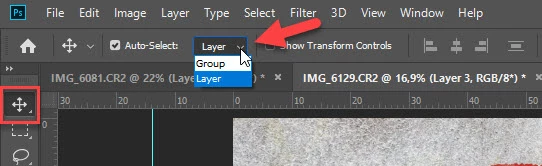
Select the move tool. Auto select is a check box on the options bar at the top of the screen.

Dave


2 replies

davescm
Community Expert
Community Expert
April 17, 2019

Hi

I suspect you mean this, from Image Analysis place scale marker:

If so, it is a group with a layer for the marker and one for the text. If you select the group both move with the move tool - but make sure you do not have "Auto Select -Layer" enabled in the move tool options bar or only one will move.

Dave

Bojan Živković11378569
Community Expert
Community Expert
April 17, 2019

Can you post some screenshot or to record short video which is visualizing your problem. I believe that most of us on the forum do not understand your terminology and what is scale bar nor what exactly your problem is.

huil86486747
Participant
April 18, 2019

To try and make a clearer description, I am starting by making scale bars with the "Place Scale Marker" command:

Once I have a scale bar, I select it and move and rotate it to get into a final location:

Previously I would select the Measurement Scale Marker, drag it into place, and the text would go along with it. Now I am having to either separately move the bar and the number or link the two layers. For one or two this isn't a big deal, but for hundreds I would definitely prefer to not be adding another step.

I need to dig a little bit for the "Auto Select" check box. I couldn't find it but it does sound like the right setting.

davescm
Community Expert
Community Expert
April 18, 2019

Select the move tool. Auto select is a check box on the options bar at the top of the screen.

Dave