

Any way to automatically link scale bar and measurement?
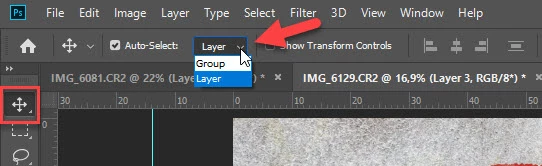
In the previous version of Photoshop I had whenever I made a scale bar I could select the scale bar and it would drag the bar and the text next to the name. When I selected the text, the text would move but not the scale bar. This worked well, I could quickly move the scale bar where it needed to be. Then I could select the number and move it separately if it was poorly positioned relative to the scale bar.
I accidentally deleted and reinstalled Photoshop, now the latest version appears to have broken this feature. If I drag the scale bar only the scale bar moves, the measurement stays behind. If I drag the text, only the text moves the scale bar stays behind. This is horrible, it doubles the amount of time I need to position measurements. As I am making hundreds of measurements they were already extremely tedious without adding another step. Are there any settings which can revert this to its former state?
 AdChoices