
Participating Frequently
July 18, 2021
Question

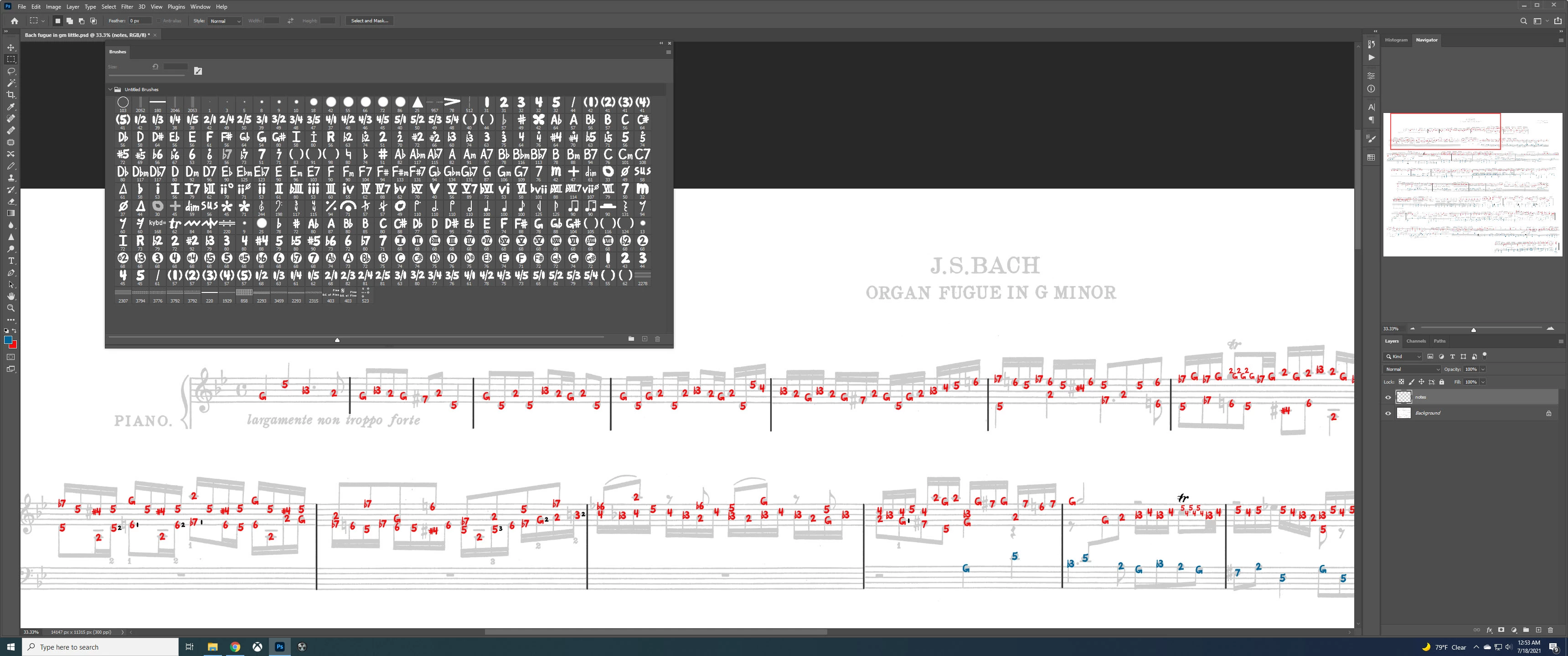
any way to program hotkeys for custom brushes?

  • July 18, 2021
  • 2 replies
  • 440 views

Does anyone know if there is a way to make hotkeys for custom brush templates?  They used to be called stamps I think.  I saw something online that said you could use arrow keys to go to a different brush, but it just seems to rotate them.


I study music and am trying to label the note(s)
 

This topic has been closed for replies.

2 replies

Semaphoric
Community Expert
Community Expert
July 20, 2021

Are you trying to construct the whole score, or just label an existing image? Another way would be to use a musical notation font, such as Adobe Sonata.


If you're just adding to an existing score, like the red and blue in your example, you could use the Type tool with a font that has musical flats and sharps, such as Lucida Pro Unicode.

mike7531Author
Participating Frequently
July 24, 2021

Hi, I have mostly been studying church hymns and easy classical/baroque things.  I like to expirement with different ways of writing them out.  I mostly have recreated those with keyboard diagrams I made in photoshop, I like to arrange them in columns and play going downward like an old piano roll.  I color the keys the left and right hands play in gray and blue, and label the fingers to use and which note of the scale the keys are.  I also just experimented coloring the Bass, Tenor, Alto and Soprano parts different colors so they are able to be seen easier, but it's hard to find that many colors that look good next to each other.


I just study public domain stuff, and do it for a hobby.  I don't sell it or anything.


mike7531Author
Participating Frequently
July 24, 2021

Holding the Ctrl and Alt keys down and dragging could be helpful for some things, I didn't know about that thanks.

Trevor.Dennis
Community Expert
Community Expert
July 18, 2021

I notice you don't have Recent Brushes enabled.  That is available as an option in both the Brushes panel, and right click brush panel.


I can't think of a way to asign specific presets to shortcuts with brushes, but if it is possible I suspect it would use Creative Cloud Libraries.  I have to go out now, but will try it later.

mike7531Author
Participating Frequently
July 18, 2021

Hi, thanks.  Having the recent brushes on top does help does make it easier.


I know how to sight read but I like to label what intervals the notes being played are from the harmonies.  It makes it a lot easier to visualize the patterns on keyboard (for me at least).


If there is any way to program the brushes into hotkeys I would buy another program to do it.  Would be so much faster!  I will look up creative cloud libraries, I'm mostly self taught in photoshop and I haven't heard of that.


Thanks again


Trevor.Dennis
Community Expert
Community Expert
July 19, 2021

OK I have tried it and it didn't work.

I created a new library and placed a music symble in that library (you simply drag from the brush panel to the library.

I then recorded an Action that selected the brush tool and selected the brush preset from the library.

Playing the action selected the brush tool OK, but did not select the preset from the library.

I tried various ways of coming at it but none worked.

Would there be any benefit from creating a library for your music notation presets, and selecting from that library panel which you would have open and convenient?  A problem with that is that the brush panel and Library both display a stroke of the preset rather than a single stamp of the brush, so you don't have a visual reference of what the preset looks like.


Another approach would be to create a shape layer of each symbol, and place them in a CC Library.  You can drag symbols from the library to the document.  

If you check Skip Transform when Placing you won't have a bounding box when you place the symbol.

The down side to this is that every symbol will create its own layer.


I don't know if I have given you anything to think about, but please ask if you have other ideas etc. if you need help with them.