
Loren Rye
Inspiring
June 12, 2023
Answered

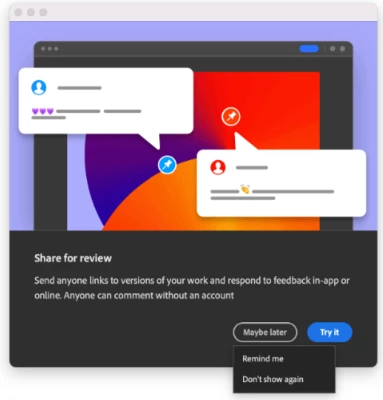
Any way to turn off Share for Review popup after saving?

  • June 12, 2023
  • 6 replies
  • 4479 views

I've been seeing this popup after every image save after the most recent update--I appreciate Adobe's attempts to enhance connectivity and to provide coherent workflows, but my job doesn't require any sort of review process and this is costing me time and adding a particular kind of frustration to my workflow because it forces me to stop what I'm doing and to interact with the software outside of that workflow. I don't need this feature. 


How can I disable it?


I see that in the Illustrator community a "Dont' show this again" checkbox was added to the popup to permanently disable it, but that's not available in Photoshop. 


Kinda losing my marbles with all this connectivity stuff which strangles my already sub-par network connection in favor of a cloud ecosystem which is severely impractical in my line of work. 


Thanks! 🙂 
Correct answer Audrey Sousa

Hi Loren,

Appreciate your feedback -- this option is available under the "Maybe later" button.  The next time you get this dialog, click on "Maybe later" and then choose "Don't show again" to ensure we don't show this to you again.


Note that we are aware of feedback that this option is a bit hidden in Photoshop and are actively working on making the option more obvious, coming soon to a future release.


Thanks, Audrey

6 replies

Audrey Sousa
Adobe Employee
Adobe Employee
December 14, 2023

Hi everyone -- thank you for the feedback.  Please note that this popup is TURNED OFF in Photoshop version 25.1 onwards.  You can upgrade to that version or higher to ensure you no longer see this.


Rosebudster
Known Participant
December 3, 2023

@Audrey Sousa ... THERE IS NO option in Photoshop Elements 2023 to turn off these ads. I will never ever purchase anything from you again. You shoujld be ashamed of yourselves with these intrusive popups. It is one thing to have them on free software but I paid for PSE and you have no right to intrude on my use of this product. I have found a great substitute and am transitioning over. SHAME ON YOU.

c.pfaffenbichler
Community Expert
Community Expert
December 3, 2023
quote

@Audrey Sousa ... THERE IS NO option in Photoshop Elements 2023 to turn off these ads. I will never ever purchase anything from you again. You shoujld be ashamed of yourselves with these intrusive popups. It is one thing to have them on free software but I paid for PSE and you have no right to intrude on my use of this product. I have found a great substitute and am transitioning over. SHAME ON YOU.


By @Rosebudster

First off: Feature Requests (Idea) or Bug Reports are registered at Adobe, otherwise this is essentially a user Forum, though thankfully some Adobe employees do occasionally chime in. So you are not talking to Adobe. 


Secondly: This is the Photoshop Forum, not the Photoshop Elements Forum. 

Try: https://community.adobe.com/t5/photoshop-elements/ct-p/ct-photoshop-elements?page=1&sort=latest_replies&lang=en&tabid=all


Thirdly: Is there a »Maybe Later«-button on the dialog and if you click it what happens (as per post 1)? 

AdDesigner11595779
Known Participant
November 21, 2023

ALSO: related: How to turn off the dang annoying intrusive stupid 'share for review' thing for INDESIGN??? Can't find that anywhere. it is intrusive, useless, time-wasting, space-wasting the most annoying thing i have ever encountered. not needed, not wanted!!!

c.pfaffenbichler
Community Expert
Community Expert
November 21, 2023

You may want to post Indesign-related posts on the Indesign Forum. 

While I use Indesign I am not sure what your problem is. 

bellevue scott
Inspiring
June 22, 2023

I'm having this issue too. I didn't click on maybe later, because I don't ever want to see this again. I didn't know that clicking on maybe later might give a dropdown box. 


To be clear, I have three subsciptions to Adobe Cloud for six computers. I pay Adobe a lot of money every month, and as a paying customer, I don't EVER EVER EVER want to see popup ads for Adobe products and services in my work routine. Ever, for any reason. 


I am getting these while running droplets. So for me, I dragged a bunch of images onto a droplet and went to lunch, and came back to find my routine had stopped for a popup ad. 


The ONLY other company that does this is Intuit/Quickbooks, the worst company in the world in my opinion, and because of it I'm changing accounting SW. Adobe, don't be like that. Don't do this. It's extremely obnoxious. We pay for this software. Just don't do this. Thanks

gener7
Community Expert
Community Expert
June 22, 2023

To be fair, it's a free feature they thought you might want to know about. Of course not everyone does, so click the "x" in the upper-right corner and that should take care of it.

bellevue scott
Inspiring
June 22, 2023
It keeps appearing and it’s not fair. I don’t pay for expensive sw to get
inline popup ads that stop my droplets and actions. That’s
absolutely ridiculous. It’s a hard no for me. --
Sent from my iThingy
bellevue scott
Inspiring
June 19, 2023

Windows 10
PS 24.5

On two occasions now in the last few days I have run files on a droplet, and have come back to my computer and it has stopped running the droplet and is waiting for me to respond to this Adobe popup ad.


How do I stop this? It's interfering with my work flow, to mention nothing of being absolutely obnoxiously intrusive. 


thanks

Jeff Arola
Community Expert
Community Expert
June 19, 2023

If in Photoshop you go to Edit>Preferences>Tools and uncheck Show Rich Tooltips, does that stop those ads?

bellevue scott
Inspiring
June 19, 2023

Rich tool tips is turned off and has been. Thanks

Audrey Sousa
Adobe Employee
Audrey SousaCorrect answer
Adobe Employee
June 14, 2023

Hi Loren,

Appreciate your feedback -- this option is available under the "Maybe later" button.  The next time you get this dialog, click on "Maybe later" and then choose "Don't show again" to ensure we don't show this to you again.


Note that we are aware of feedback that this option is a bit hidden in Photoshop and are actively working on making the option more obvious, coming soon to a future release.


Thanks, Audrey

Morris A
Participating Frequently
November 30, 2023

How about a fix that works and an apoligy from a VP?


c.pfaffenbichler
Community Expert
Community Expert
November 30, 2023
quote

How about a fix that works and an apoligy from a VP?

How about some manners and providing meaningful information about your actual issue?