
adaml36863613
Participant
April 4, 2019
Question

Applescript and Photoshop Artboards

  • April 4, 2019
  • 1 reply
  • 554 views

I'm just beginning to learn how to script for Photoshop, and I'm running into an issue I can't find an answer to anywhere. I'm using Applescript, since I'm a scripting novice. The problem is that I can't get scripts to work if the target layer is contained within an artboard. For example, take the following simple test script that hides any layer named "Test":

tell application "Adobe Photoshop CC 2019"

  set myDoc to current document

  tell myDoc

  set the properties of (every art layer whose name is "Test") to {visible:false}

  end tell

end tell

My test file has one "Test" layer inside an artboard, and two outside. As you can see below, only the two outside the artboard were modified.
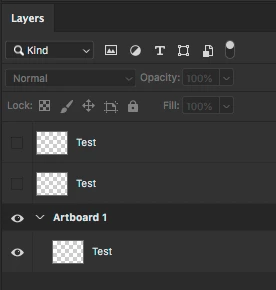
Is it possible to tell Photoshop to look inside artboards with Applescript?

Moved to Scripting forum. [Moderator]

This topic has been closed for replies.

1 reply

Chuck Uebele
Community Expert
Community Expert
April 5, 2019

If you're just starting scripting, I would suggest to use javascript, as more people know that and can help you, and it's cross platform.

Participant
February 1, 2023

not exactly the answer he was looking for yes java scripting is very helpful but... Can this be done useing Applescript. I have a simmlar question that involves how to manuver through artboards and layer groups. 

Stephen Marsh
Community Expert
Community Expert
February 1, 2023

I believe that the original 2019 post went unanswered due to the very reasons mentioned by Chuck.


Perhaps check on the MacScripter site:

https://www.macscripter.net/tag/adobe


Without reading the AS ref guide, I would guess that layers within groups are navigated in a similar way to JS.