donski101
Participant
December 13, 2019
Question

Apply 2 hues to tone an image

  • December 13, 2019
  • 3 replies
  • 514 views

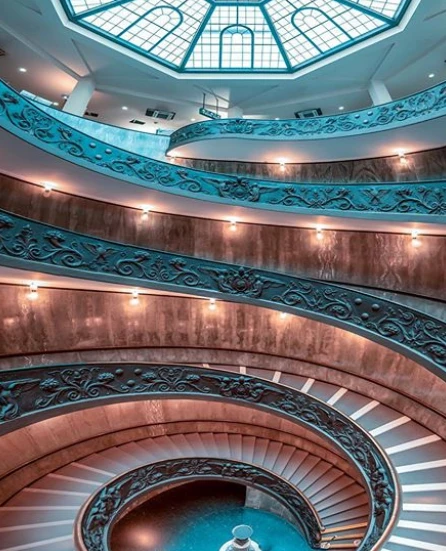
How do I take an image and achieve the effect as per the pictiure attcahed please?


Many Thanks
 

This topic has been closed for replies.

3 replies

Chuck Uebele
Community Expert
Community Expert
December 13, 2019

Convert the image to LAB color: Image>Mode>LAB. copy either the A or B channel (most likely the B, which is yellow/blue). Use levels to increase the contrast to create a mask. Ctrl/Cmd click on the channel icon to create a selection of the channel. Go back to the layers panel and create a solid file adjustment layer of one of the two colors you want (black/white icon in the layers panel). A mask will be created for you when your create the adjustment layer, if you have a selection. Change the blend mode to color. Below that layer, make another solid fill adjustment layer and change the blend mode again to color.

donski101
donski101Author
Participant
December 13, 2019

Thanks Chuck...I'll have a play around.


Chuck Uebele
Community Expert
Community Expert
December 13, 2019

Another way this could have been done is to use LAB color to create a mask for the different light color temperatures. In LAB it's easier to separate the colors without regard to density. Once the masks are made, solid fill layers set to color blend mode can be used with the masks.

donski101
donski101Author
Participant
December 13, 2019

Thanks Chuck....I'm a bit of a noob.....Are there any good tutorials out there for creating the masks based on color temp?....

PECourtejoie
Community Expert
Community Expert
December 13, 2019

Hello, this has likely been done in Camera Raw or lightroom, directly on a camera file.

The natural light and artificial lights give different colors, that have been adjusted either simply by changing the color temperature, or the HSL adjustments to push the colors one way or the other.

Maybe is it also an orange and teal LUT (in the presets)

PECourtejoie
Community Expert
Community Expert
December 13, 2019

Remember that Camera Raw can be used as a filter. 

check this long video, but go straight to the camera raw is your best friend section, it's enlightening!


https://www.youtube.com/watch?v=-Sgs3QahTnc

donski101
donski101Author
Participant
December 13, 2019

Thanks.....I'll check it out.
