
Participant
June 20, 2017
Answered

Arabic language not working even after fixing to middle eastern

  • June 20, 2017
  • 3 replies
  • 2860 views

Hi All,

This may look like a regular question but i have an issue Arabic letters and typing in photoshop cc 2017 , the letter and typing is working just fine with any new document and i have the text engine and the preferences to middle eastern, but when i try to edit one of already created files , lets an english newsletter and i want to translate into Arabic the letters wont connect and will stay separated even though everything is set to the right preferences.

Can you please help me with this

Much Appreciated

Regards
This topic has been closed for replies.
Correct answer Zaid Al Hilali

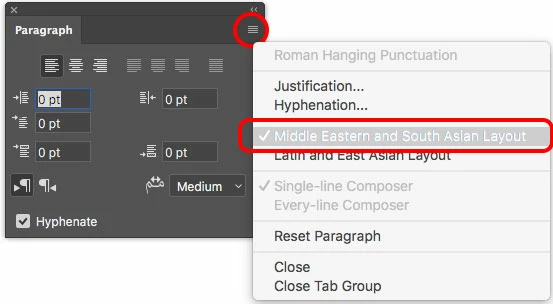
Display Paragraph Panel, from the fly-out menu choose "Middle Eastern and South Asian Layout" when you type Arabic or English in your Photoshop.

3 replies

Participant
July 30, 2018

you have to close and reopen photoshop after you allow the middle eastern character from preferences >> type

Mike_Gondek10189183
Community Expert
Community Expert
June 20, 2017

Make sure tracking is set to 0, on the text block you are editing.

Participant
June 20, 2017

ill try this and let you know

Legend
June 20, 2017

You say "everything is set to the right preferences" but maybe it is not. Please describe ALL the preferences and document settings that you change, after installing the Arabic software, so we can see if you missed out anything.

Anyway a newsletter should not be made or edited in Photoshop, that is making such hard work!

Participant
June 20, 2017

Hi ,

as i followed instruction i set the text engine to middle eastern in both preferences and from type select, as i informed before it working for any new project i create the language shows fine but when i try to edit an already created "image" for a newsletter it wont work , my bad it is an image for newsletter not the newsletter itself.