Daniel Marple
Known Participant
February 3, 2022
Answered

ArchViz Post Production Layer Mask Script

  • February 3, 2022
  • 3 replies
  • 2524 views

Long time photoshop user, first time poster.


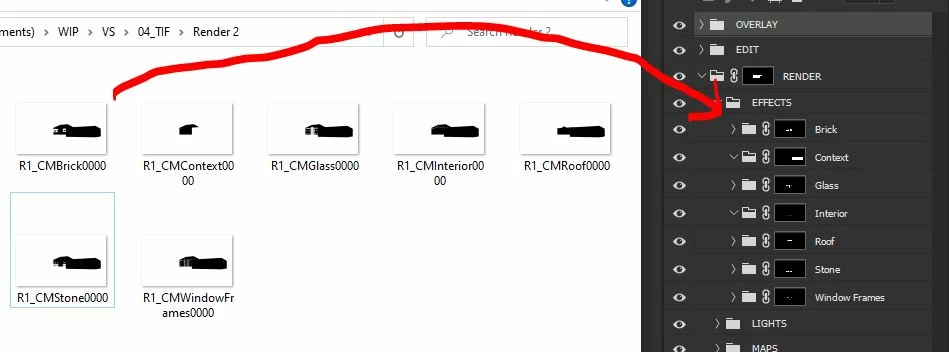
I'm an architectural visualiser and part of my job involves using jpeg geometry black and white masks generated in my renders as group layer masks. 


Currently this involves:


1. Creating a group the main photoshop file.

2. Naming the group to match the corresponding .jpeg generated by the render eg. 'Brickwork'

3. Open the separate Brickwork.jpeg mask

4. Copy all

5. Paste into main photoshop file as the mask of my 'Brickwork' group from (2)


This leaves me with a group correctly named, and with the right mask which allows me to adjust levels, saturation, colour etc of all the brickwork in my render. I would love to be able to automate this process to avoid having to manually do the same 5 step process to the 20+ layer masks in each of my renders. I hope that the below image helps which shows an example with only 7 groups:


Any help would be much appreciated. Please let me know if you have any questions.


Dan

This topic has been closed for replies.
Correct answer c.pfaffenbichler

Thank you, I did come to that conclusion, however I couldn't get the recursive code to correctly add the layer sets into the effects set. Perhaps the temp layer was active when it shouldn't be, I ran out of steam...


Does this work? 

(function () {

    try {
        var inputFolder = Folder.selectDialog("Select the input folder:");
        if (inputFolder === null) {
            // alert('Script cancelled!');
            return;
        }

        var fileList = inputFolder.getFiles(/\.(tif|tiff)$/i);
        fileList.sort().reverse();
        
        var validateEmptyList = (fileList.length > 0);
        if (validateEmptyList === false) {
            alert("Script cancelled as the input folder is empty!");
            return;
        }
        
        var baseDoc = app.activeDocument.name;
        var savedDisplayDialogs = app.displayDialogs;
        app.displayDialogs = DialogModes.NO;
        app.activeDocument.activeLayer = app.activeDocument.layers[0];

        var effectsGroup = app.activeDocument.layerSets.add();
        effectsGroup.name = "EFFECTS";


        for (var i = 0; i < fileList.length; i++) {
            open(fileList[i]);
            dupeLayer("_temp", 5);
            var maskName = app.activeDocument.name.replace(/\.[^\.]+$/, '').replace(/^.{5}/, '').replace(/\d{4}$/, '');
            app.activeDocument.close(SaveOptions.DONOTSAVECHANGES);

            var tempGroup = effectsGroup.layerSets.add();
            tempGroup.name = maskName;

            blankMask();
            applyMask(true);
            removeTempLayer();
        }

        app.activeDocument.activeLayer = app.activeDocument.layers[0];

        app.displayDialogs = savedDisplayDialogs;
        app.beep();

    } catch (err) {
        alert("An unexpected error has occurred!");
    }

    ////// FUNCTIONS /////

    function removeTempLayer() {
        var s2t = function (s) {
            return app.stringIDToTypeID(s);
        };
        var descriptor = new ActionDescriptor();
        var list = new ActionList();
        var reference = new ActionReference();
        reference.putName(s2t("layer"), "_temp");
        descriptor.putReference(s2t("null"), reference);
        list.putInteger(373);
        descriptor.putList(s2t("layerID"), list);
        executeAction(s2t("delete"), descriptor, DialogModes.NO);
    }

    function applyMask(preserveTransparency) {
        var s2t = function (s) {
            return app.stringIDToTypeID(s);
        };
        var descriptor = new ActionDescriptor();
        var descriptor2 = new ActionDescriptor();
        var reference = new ActionReference();
        reference.putEnumerated(s2t("channel"), s2t("channel"), s2t("RGB"));
        reference.putName(s2t("layer"), "_temp");
        descriptor2.putReference(s2t("to"), reference);
        descriptor2.putBoolean(s2t("preserveTransparency"), preserveTransparency);
        descriptor.putObject(s2t("with"), s2t("calculation"), descriptor2);
        executeAction(s2t("applyImageEvent"), descriptor, DialogModes.NO);
    }

    function blankMask() {
        var s2t = function (s) {
            return app.stringIDToTypeID(s);
        };
        var descriptor = new ActionDescriptor();
        var reference = new ActionReference();
        descriptor.putClass(s2t("new"), s2t("channel"));
        reference.putEnumerated(s2t("channel"), s2t("channel"), s2t("mask"));
        descriptor.putReference(s2t("at"), reference);
        descriptor.putEnumerated(s2t("using"), s2t("userMaskEnabled"), s2t("revealAll"));
        executeAction(s2t("make"), descriptor, DialogModes.NO);
    }

    function dupeLayer(name2, version) {
        var s2t = function (s) {
            return app.stringIDToTypeID(s);
        };
        var descriptor = new ActionDescriptor();
        var reference = new ActionReference();
        var reference2 = new ActionReference();
        reference.putEnumerated(s2t("layer"), s2t("ordinal"), s2t("targetEnum"));
        descriptor.putReference(s2t("null"), reference);
        reference2.putName(s2t("document"), baseDoc);
        descriptor.putReference(s2t("to"), reference2);
        descriptor.putString(s2t("name"), name2);
        descriptor.putInteger(s2t("version"), version);
        executeAction(s2t("duplicate"), descriptor, DialogModes.NO);
    }

}());


3 replies

Stephen Marsh
Community Expert
Community Expert
February 5, 2022

Here is my version, I had fun putting it together, hit many brick walls and had find workarounds etc.


I really wanted to create the layer set masks inside the EFFECTS group, however I just couldn't get there and spent way too much time going down false trails. In the end I just moved the layers, however, as I had to hard code their names, if you used this on different renders with different names the mask sets would not be moved unless they were added to the list. I'd like to do more, but for now I'm mentally exhausted!


/*
Create mask groups from renders.jsx
https://community.adobe.com/t5/photoshop-ecosystem-discussions/archviz-post-production-layer-mask-script/m-p/12726579#M620671
Stephen Marsh, v1.0 - 5th February 2022
*/

//#target photoshop

(function () {

    try {
        var inputFolder = Folder.selectDialog("Select the input folder:");
        if (inputFolder === null) {
            // alert('Script cancelled!');
            return;
        }

        var fileList = inputFolder.getFiles(/\.(tif|tiff)$/i);
        fileList.sort().reverse();
        
        var validateEmptyList = (fileList.length > 0);
        if (validateEmptyList === false) {
            alert("Script cancelled as the input folder is empty!");
            return;
        }
        
        var baseDoc = app.activeDocument.name;
        var savedDisplayDialogs = app.displayDialogs;
        app.displayDialogs = DialogModes.NO;
        app.activeDocument.activeLayer = app.activeDocument.layers[0];

        for (var i = 0; i < fileList.length; i++) {
            open(fileList[i]);
            dupeLayer("_temp", 5);
            var maskName = app.activeDocument.name.replace(/\.[^\.]+$/, '').replace(/^.{5}/, '').replace(/\d{4}$/, '');
            app.activeDocument.close(SaveOptions.DONOTSAVECHANGES);

            tempGroup();
            blankMask();
            applyMask(true);
            removeTempLayer();
            app.runMenuItem(stringIDToTypeID('selectNoLayers'));
            app.activeDocument.activeLayer.name = maskName;
        }

        try {
            app.activeDocument.activeLayer = app.activeDocument.layers["WindowFrames"];
            app.activeDocument.activeLayer.name = "Window Frames";
        } catch (error) {}
        
        app.activeDocument.activeLayer = app.activeDocument.layers[0];
        var effectsGroup = app.activeDocument.layerSets.add();
        effectsGroup.name = "EFFECTS";
        try {
            move("Window Frames");
            move("Stone");
            move("Roof");
            move("Interior");
            move("Glass");
            move("Context");
            move("Brick");
        } catch (error) { }
        app.activeDocument.activeLayer = app.activeDocument.layers[0];

        app.displayDialogs = savedDisplayDialogs;
        app.beep();

    } catch (err) {
        alert("An unexpected error has occurred!");
    }

    ////// FUNCTIONS /////

    function move(layerName) {
	var s2t = function (s) {
		return app.stringIDToTypeID(s);
	};
	var descriptor = new ActionDescriptor();
	var list = new ActionList();
	var reference = new ActionReference();
	var reference2 = new ActionReference();
	reference.putName( s2t( "layer" ), layerName );
	descriptor.putReference( s2t( "null" ), reference );
	reference2.putIndex( s2t( "layer" ), 20 );
	descriptor.putReference( s2t( "to" ), reference2 );
	descriptor.putBoolean( s2t( "adjustment" ), false );
	descriptor.putInteger( s2t( "version" ), 5 );
	list.putInteger( 509 );
	descriptor.putList( s2t( "layerID" ), list );
	executeAction(s2t( "move" ), descriptor, DialogModes.NO);
}

    function removeTempLayer() {
        var s2t = function (s) {
            return app.stringIDToTypeID(s);
        };
        var descriptor = new ActionDescriptor();
        var list = new ActionList();
        var reference = new ActionReference();
        reference.putName(s2t("layer"), "_temp");
        descriptor.putReference(s2t("null"), reference);
        list.putInteger(373);
        descriptor.putList(s2t("layerID"), list);
        executeAction(s2t("delete"), descriptor, DialogModes.NO);
    }

    function applyMask(preserveTransparency) {
        var s2t = function (s) {
            return app.stringIDToTypeID(s);
        };
        var descriptor = new ActionDescriptor();
        var descriptor2 = new ActionDescriptor();
        var reference = new ActionReference();
        reference.putEnumerated(s2t("channel"), s2t("channel"), s2t("RGB"));
        reference.putName(s2t("layer"), "_temp");
        descriptor2.putReference(s2t("to"), reference);
        descriptor2.putBoolean(s2t("preserveTransparency"), preserveTransparency);
        descriptor.putObject(s2t("with"), s2t("calculation"), descriptor2);
        executeAction(s2t("applyImageEvent"), descriptor, DialogModes.NO);
    }

    function blankMask() {
        var s2t = function (s) {
            return app.stringIDToTypeID(s);
        };
        var descriptor = new ActionDescriptor();
        var reference = new ActionReference();
        descriptor.putClass(s2t("new"), s2t("channel"));
        reference.putEnumerated(s2t("channel"), s2t("channel"), s2t("mask"));
        descriptor.putReference(s2t("at"), reference);
        descriptor.putEnumerated(s2t("using"), s2t("userMaskEnabled"), s2t("revealAll"));
        executeAction(s2t("make"), descriptor, DialogModes.NO);
    }

    function tempGroup() {
        var tempGroup = app.activeDocument.layerSets.add();
        tempGroup.name = "_tempGroup";
    }

    function dupeLayer(name2, version) {
        var s2t = function (s) {
            return app.stringIDToTypeID(s);
        };
        var descriptor = new ActionDescriptor();
        var reference = new ActionReference();
        var reference2 = new ActionReference();
        reference.putEnumerated(s2t("layer"), s2t("ordinal"), s2t("targetEnum"));
        descriptor.putReference(s2t("null"), reference);
        reference2.putName(s2t("document"), baseDoc);
        descriptor.putReference(s2t("to"), reference2);
        descriptor.putString(s2t("name"), name2);
        descriptor.putInteger(s2t("version"), version);
        executeAction(s2t("duplicate"), descriptor, DialogModes.NO);
    }

}());
 

c.pfaffenbichler
Community Expert
Community Expert
February 5, 2022

I really wanted to create the layer set masks inside the EFFECTS group,

I think the »simplest« work-around might be creating an empty Layer in the Group before adding the other Groups and then removing the Layer. 

Stephen Marsh
Community Expert
Community Expert
February 5, 2022

Thank you, I did come to that conclusion, however I couldn't get the recursive code to correctly add the layer sets into the effects set. Perhaps the temp layer was active when it shouldn't be, I ran out of steam...

Stephen Marsh
Community Expert
Community Expert
February 3, 2022

The filename pattern appears to be consistent, but just to double check...


R1_CMBrick0000


Ignore the first 5 characters, ignore the last four characters, which may always be digits and not just any character?


Is that a reasonable assumption?


Daniel Marple
Known Participant
February 3, 2022

Hi Stephen,


Thanks for your help.


The first 5 characters are always the same, annoyingly sometimes the render comes back with the extra four 0's at the end, sometimes it doesn't.


But the folders being 'Brick0000' or 'Brick' would be fantastic, although don't worry if this is too complex an ask.


To be honest I'd be happy with the folder name being 'R1_CMBrick0000' as that would be a small price to pay at this point!

Stephen Marsh
Community Expert
Community Expert
February 3, 2022

It's actually one of the easiest parts! 

c.pfaffenbichler
Community Expert
Community Expert
February 3, 2022

Can you provide a complete example? (The renderings and the resulting file minus sensitive data, naturally.)

Are the renderings always located relative to the psd or do you want to have Folder-selection? 

Are the mask-renderings grayscale or RGB? 

Why jpg and not a file format without lossy compression? 

Daniel Marple
Known Participant
February 3, 2022

Thanks for your swift reply! To answer your questions:


Can you provide a complete example? (The renderings and the resulting file minus sensitive data, naturally.)
Yes please see attached project file stripped of sensitive data as well as the corresponding project renders.

Are the renderings always located relative to the psd or do you want to have Foder-selection? 

The renders are always in a separate folder called 'TIF' in the same master project folder as the photoshop file which is in 'PSD'. Having folder selection would be useful.

Are the mask-renderings grayscale or RGB? 

They are RGB with an alpha channel.

Why jpg and not a file format without lossy compression?

Apologies, the renderings are actually .tif files not .jpeg.

Please let me know if I can be of any more help.