jeffery wright
Inspiring
November 21, 2018
Answered

Arrange, re-order Library swatches?

  • November 21, 2018
  • 2 replies
  • 3823 views

Why would this be a difficult thing to do?

Shouldn't it be as easy as drag and drop?
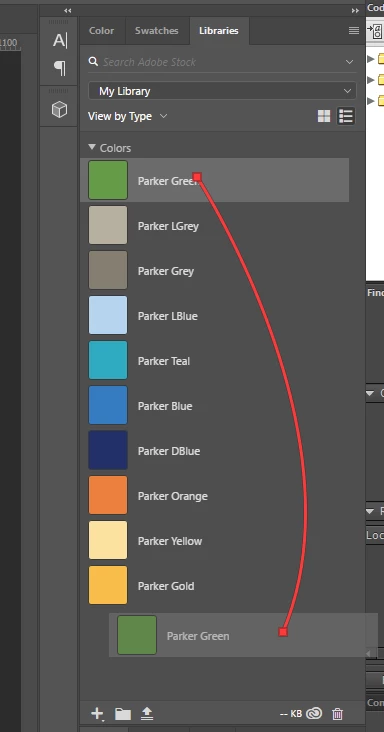
Why isn't it?

Does anyone know how this is achieved?

Thanks.

    This topic has been closed for replies.
    Correct answer Myra Ferguson

    That wasn't available in earlier versions. The new version also supports making your own groups in your Libraries.

    2 replies

    Cris Wiegandt
    Community Expert
    Community Expert
    October 18, 2019

    For me it's not working.

    I'm using Photoshop CC 20.0.6

    on mac OS 10.13.6

    Participant
    December 5, 2019

    Not working for me either. Photoshop 21.0.1 on Mac OS 10.15.1. 

    Cris Wiegandt
    Community Expert
    Community Expert
    December 6, 2019

    since the update, it's working for me. 

    so weird! 

    Myra Ferguson
    Community Expert
    Community Expert
    November 21, 2018

    I'm able to reorder swatches in my Libraries by dragging and dropping in Photoshop version 20.0.0 on Windows 10. Which version are you using?

    jeffery wright
    Inspiring
    November 21, 2018

    19.1.6 on Win10 Enterprise.

    Were you able to do that with previous versions?

    Thanks.

    Myra Ferguson
    Community Expert
    Myra FergusonCommunity ExpertCorrect answer
    Community Expert
    November 21, 2018

    That wasn't available in earlier versions. The new version also supports making your own groups in your Libraries.