
Answered
Arranging shapes in a circle
I can't figure out how to arrange shapes in a circle in Photoshop CC. If I try to do it manually they don't fit in perfectly. Is there an easier way to do it?

I can't figure out how to arrange shapes in a circle in Photoshop CC. If I try to do it manually they don't fit in perfectly. Is there an easier way to do it?
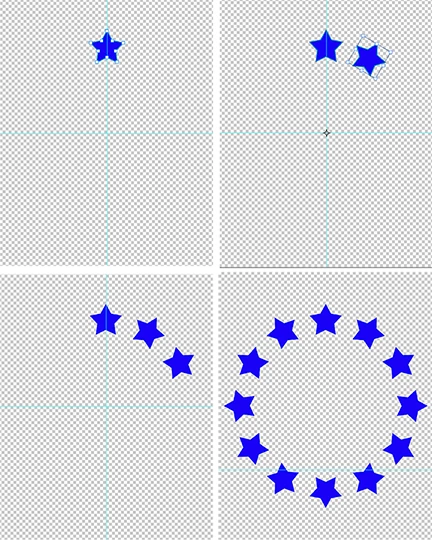
1. New file transparent Background Contents
2. Draw shape near the top centered left to right
3. Choose Direct Selection tool to create Fig 1
4. Choose Edit. Hold down Cmd+Opt+Shift and choose Free Transform Path
5. Hold down Shift key and drag the Center Marker down to what will be the center of the circle.
6. In the Options bar set the Angle to 30 degrees (30 into 360 will provide 12 images)
7. Commit for result shown in Fig 2
8. Each Cmd +Opt+Shift +T will repeat the shape (Fig 3)
9. Completed circle (Fig 4)
Already have an account? Login
Enter your E-mail address. We'll send you an e-mail with instructions to reset your password.
 AdChoices