
Participant
January 26, 2022
Answered

Asus ProArt StudioBook - Integrated Dial Plugin Error

  • January 26, 2022
  • 4 replies
  • 3191 views

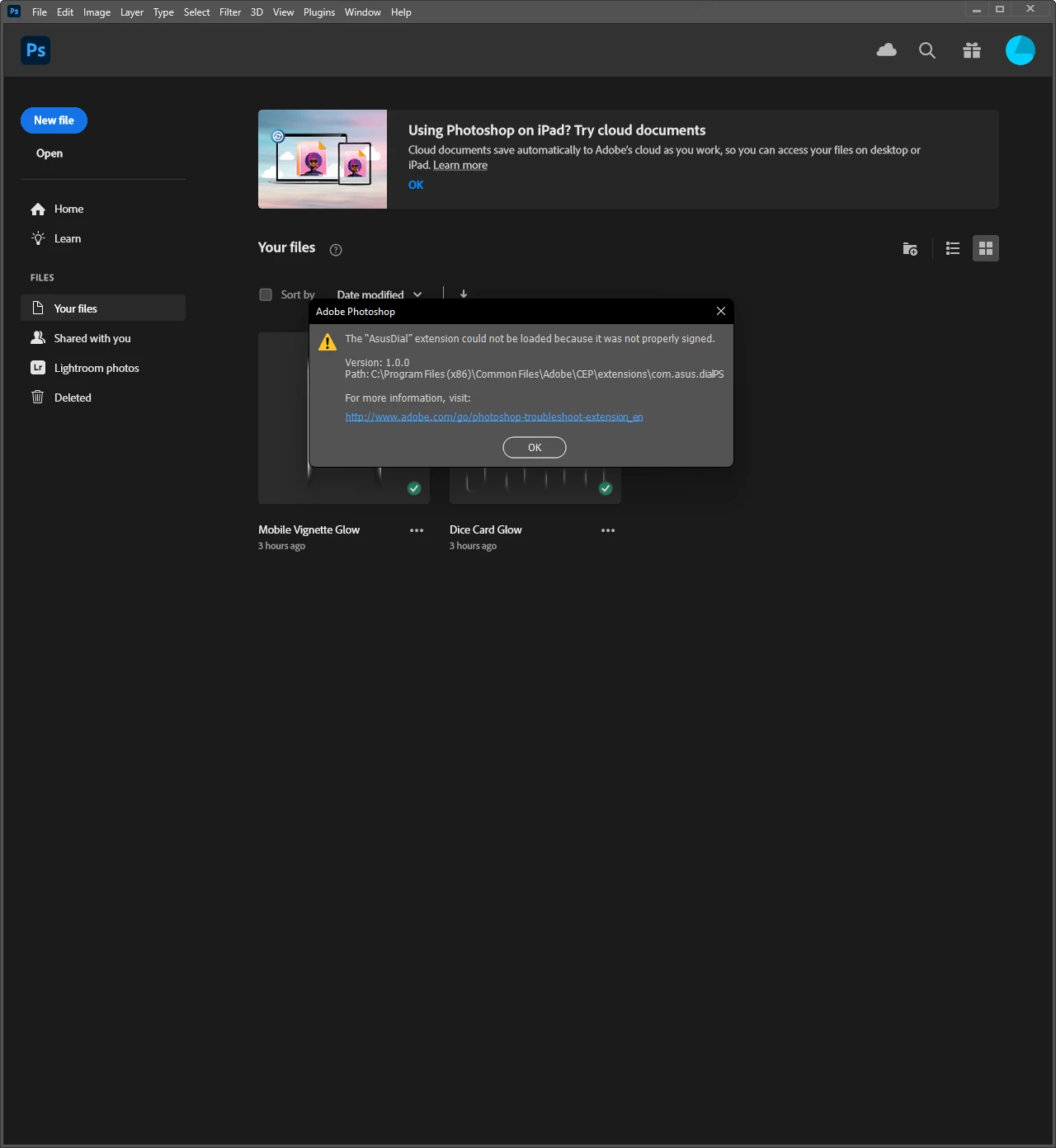
I've started using an Asus StudioBook. The laptops comes with an integrated dial similar to Surface Dial. Asus promotes compability with Adobe products such as Photoshop and Premiere Pro. The plugin generates an error while launching. I've attached a screenshot below depicting the error.


How may I solve this issue.


Photoshop CC 2022

OS: Windows 11

How to reproduce: Install Photoshop on an Asus ProAart StudioBook W7600H, Install ProArtCreatorHub, Launch Photoshop.


Screenshot:
 

This topic has been closed for replies.
Correct answer Ashley24703682unxl

Hey simply just go to the Microsoft Store and install the asus dial & control panel and follow the instructions there then it should no longer say that in photoshop 🙂 

4 replies

Ashley24703682unxlCorrect answer
Participant
May 13, 2024

Hey simply just go to the Microsoft Store and install the asus dial & control panel and follow the instructions there then it should no longer say that in photoshop 🙂 

Participant
March 23, 2023

I have same,  whether someone managed to slove this issue ?

Jaid25835298b728
Participant
March 24, 2023

No. I just have to clear the error message, every time I fire up Photoshop. It's kind of annoying but it doesn't seem to cause any problems to Photoshop otherwise... (that I've noticed). But I don't use Photoshop as much as I used to.

Participant
March 24, 2023

Hi,

I unistalled Asus Dial control panel toolkit and ProArt creator hub, next I instaled this again and error is gone.

Jaid25835298b728
Participant
August 27, 2022

This has also happened to me. Following the links to solutions take me around in circles or dead ends (404 screens). This is a very specific problem to do with the ASUS dial extension. Should I be looking on the ASUS website or the Adobe website for the solution?

Legend
January 26, 2022

Plug-ins can become un-signed depending on how they are moved around on the system. You'll have to get a new, signed version of the plug-in from Asus. Usually, this just requires to reinstall using a fresh installer from the plug-in vendor. 


https://helpx.adobe.com/photoshop/kb/plug-ins-photoshop-troubleshooting.html

Participant
February 25, 2023

How should we download if form the vendor if Asus relinks this to download from Microsoft Store?