pjglad
Inspiring
March 18, 2020
Answered

Auto-Blend Layers not working

  • March 18, 2020
  • 2 replies
  • 19172 views

Photoshop 21.1.1

MacOS 10.15.3


I select two .jpg layers which are stacked then select Auto-blend layers but it does not create a third merged layer. Is this a known issue?
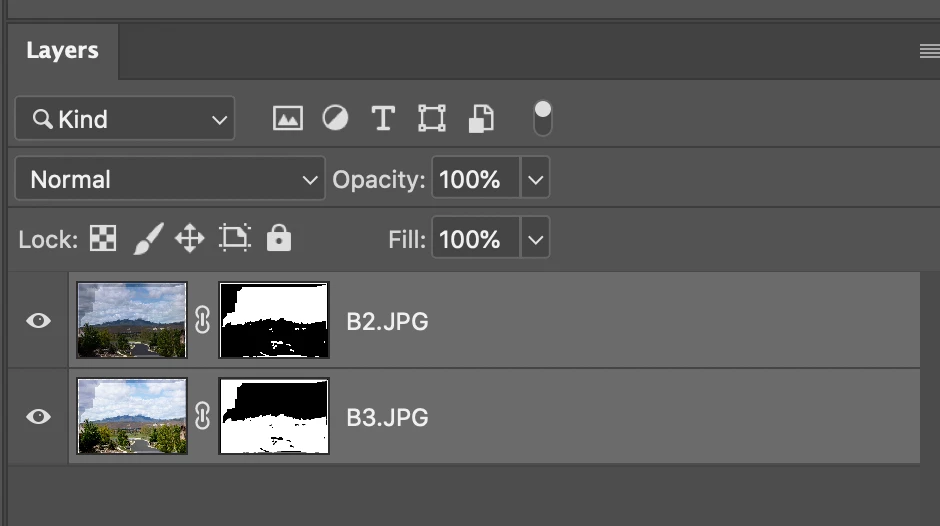

This topic has been closed for replies.
Correct answer c.pfaffenbichler

Did you use »Content-Aware Fill Transparent Areas« previously but have it unchecked this time? 

2 replies

Participant
October 10, 2020

Hey photoshop person who works at there so when I try to auto blend layers when I do everything it doesn't do it but when I select the background while trying to auto blend it does it but I don't want to blend the background with my photos can anyone help me please I have wanted to auto blend face's for so long but I can't rn so photoshop please help send m an email or something

c.pfaffenbichler
Community Expert
Community Expert
October 11, 2020

This is a user Forum, so you are not really addressing Adobe here, even though some Adobe employees thankfully have been dropping by.


Please read this (in particular the section titled "Supply pertinent information for quicker answers")

https://community.adobe.com/t5/Community-Help/Guidelines-Tips-for-the-Adobe-Forums/td-p/4788157

and post meaningful screenshots including the Layers Panel. 


»I have wanted to auto blend face's for so long«

Are you sure you know what auto blending does in Photshop? 

c.pfaffenbichler
Community Expert
Community Expert
March 18, 2020

Why do you expect otherwise?  


Quote from »photoshop_reference.pdf«: 

»Use the Auto-Blend Layers command to stitch or combine images with smooth transitions in the final composite image. Auto-Blend Layers applies layer masks as needed to each layer to mask out over or underexposed areas or content differences. Auto-Blend layers is available only for RGB or Grayscale images. It does not work with Smart Objects, video layers, 3D layers, or background layers.«

c.pfaffenbichler
Community Expert
c.pfaffenbichlerCommunity ExpertCorrect answer
Community Expert
March 18, 2020

Did you use »Content-Aware Fill Transparent Areas« previously but have it unchecked this time? 

pjglad
pjgladAuthor
Inspiring
March 18, 2020

thanks