Participant
April 4, 2019
Question

Auto blend problem

  • April 4, 2019
  • 3 replies
  • 977 views

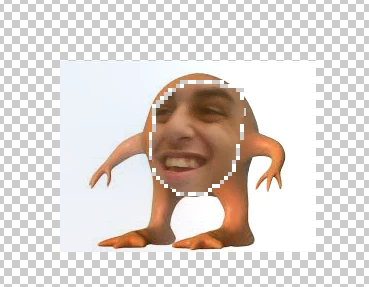
So I'm trying to auto blend two faces but when I do it there's a space between the two pictures as seen below (or above not sure where it is).

Any help is appreciated, thanks!

This topic has been closed for replies.

3 replies

Chuck Uebele
Community Expert
Community Expert
April 5, 2019

I would agree with Norman. You need a good amount of overlap for the blend to work. It doesn't fill in areas, just blends them.

Norman Sanders
Legend
April 5, 2019

It would seem, from looking at your image, in the step calling for a removal of the bottom face image area, once you make the Selection, you are increasing the selected area for removal, rather than reducing the area for removal in the bottom layer. In other words, the removed area should be smaller that the top layer face.

April 4, 2019

Hi

It would help if you showed a proper screenshot with all the pertinent panels opened, take a look at this tutorial

https://photoshoptrainingchannel.com/swap-faces-in-photoshop/

Participant
April 4, 2019

changed the project a bit but yeah

Benjamin Root
Legend
April 4, 2019

If you Flatten Image, does the border remain?