
Known Participant
May 3, 2019
Question

Auto create Artboard

  • May 3, 2019
  • 1 reply
  • 2182 views

Hello everybody,

I have an issue

How to create auto Artboard with available layers?

Example:

With 25 layers from 1 to 25 opening in one tab

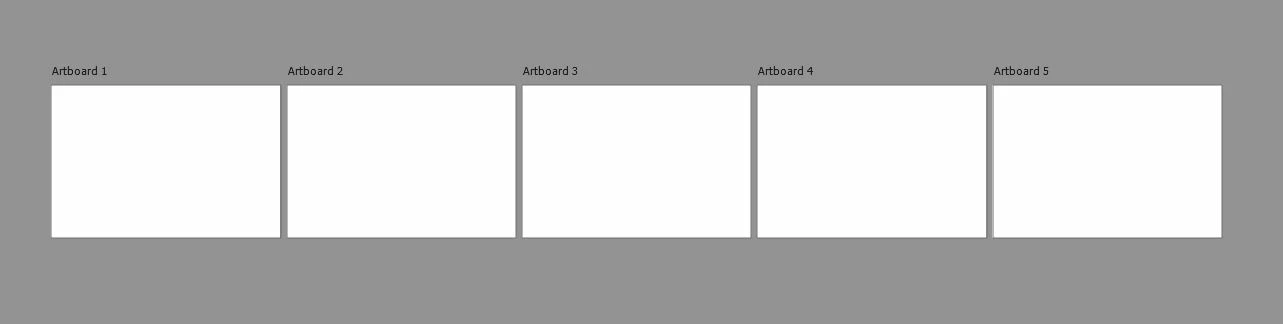
- 1 to 5 create Artboard 1

- 6 to 10 create Artboard 2

- 11 to 15 create Artboard 3

- 16 to 20 create Artboard 4

- 21 to 25 create Artboard 5

These Artboards are placed side by side on the tab current.

I appreciate any help!!!

Thank very much!
This topic has been closed for replies.

1 reply

Stephen Marsh
Community Expert
Community Expert
May 3, 2019

Will there always be 25 layers that need to be grouped into lots of 5 layers on each of the 5 artboards?

Do the final artboards need to be the original canvas size, an out of the box preset size or a custom size?

Stephen Marsh
Community Expert
Community Expert
May 3, 2019

OK, it appears that there is no DOM code for artboards and that it is all AM based, is that right?

So I had a bit of a play for giggles. Assuming that the goal is to create a new artboard at the existing document canvas size, rather than an iPhone size or some other preset or custom value...

// Create New Artboard at Canvas Dimensions

#target photoshop

var savedRuler = app.preferences.rulerUnits;

app.preferences.rulerUnits = Units.PIXELS;

var aD = app.activeDocument;

var dW = aD.width

var dH = aD.height

// New artboard width converted to a float

var abWidth = dW.toString().replace( ' px', '.000000' );

// New artboard height converted to a float

var abHeight = dH.toString().replace( ' px', '.000000' );

// More info below:

// https://forums.adobe.com/thread/1867670

// https://forums.adobe.com/message/7646958#7646958

// ScriptingListener/AM code tidied up via the Clean SL script

make();

function make() {

  var c2t = function (s) {

  return app.charIDToTypeID(s);

  };

  var s2t = function (s) {

  return app.stringIDToTypeID(s);

  };

  var descriptor = new ActionDescriptor();

  var descriptor2 = new ActionDescriptor();

  var reference = new ActionReference();

  reference.putClass( s2t( "artboardSection" ));

  descriptor.putReference( c2t( "null" ), reference );

  // descriptor.putInteger( s2t( "layerSectionStart" ), 5 );

  // descriptor.putInteger( s2t( "layerSectionEnd" ), 6 );

  // Artboard name

  descriptor.putString( s2t( "name" ), "Artboard 1" );

  descriptor2.putDouble( s2t( "top" ), 0.000000 );

  descriptor2.putDouble( s2t( "left" ), 0.000000 );

  // Replace recorded artboard height for canvas height

  descriptor2.putDouble( s2t( "bottom" ), abHeight );

  // Replace recorded artboard width with canvas width

  descriptor2.putDouble( s2t( "right" ), abWidth );

  descriptor.putObject( s2t( "artboardRect" ), s2t( "classFloatRect" ), descriptor2 );

  executeAction( s2t( "make" ), descriptor, DialogModes.NO );

  app.preferences.rulerUnits = savedRuler;

}

ANCHINGOAuthor
Known Participant
May 6, 2019

Thanks for your help.

I tried it but it was not what I needed.

I will describe more carefully.

The above is just an example of a case. Exactly, I need in the script that sets a value as the number of layers to be combined into an artboard.

If I have 25 layers then give me 5 artboard.

If I have 50 layers then give me 10 artboard.