Answered
Auto delete the empty layers in the channels? ( Photoshop )
Can you help me with the scripts that auto delete the empty layers in the channels?
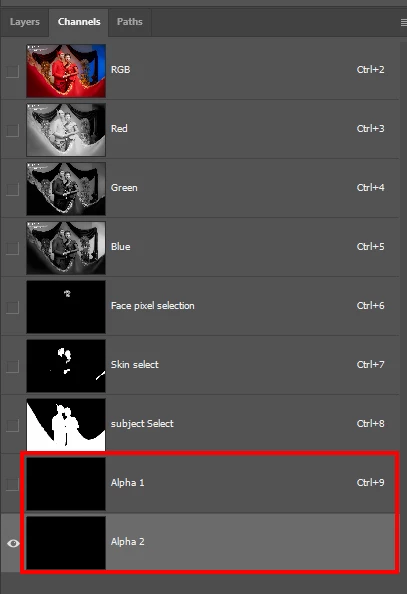

Can you help me with the scripts that auto delete the empty layers in the channels?
Full credit to @c.pfaffenbichler for the base code, all I did was wrap around extra code to create a single history step and the option to remove all white alpha channels (rather than black) by holding down ALT/OPT when executing the script.
/*
Remove All Black Alphas or ALT-OPT for All White Alphas.jsx
https://community.adobe.com/t5/photoshop-ecosystem-discussions/auto-delete-the-empty-layers-in-the-channels-photoshop/td-p/14221173
Based on
https://community.adobe.com/t5/photoshop-ecosystem-discussions/check-if-channel-have-pixels-or-not-script-code/td-p/13061347
by c.pfaffenbichler
*/

#target photoshop

function main() {

    /* Hold down the ALT/OPT key to remove white alpha channels */
    if (ScriptUI.environment.keyboardState.altKey) {
        if (app.documents.length > 0) {
            var myDocument = app.activeDocument;
            var theChannels = myDocument.channels;
            var originalRulerUnits = app.preferences.rulerUnits;
            app.preferences.rulerUnits = Units.PIXELS;
            var theTotal = Number(myDocument.width) * Number(myDocument.height);
            for (var m = theChannels.length - 1; m >= 0; m--) {
                var thisChannel = theChannels[m];
                if (thisChannel.kind == "ChannelType.MASKEDAREA") {
                    thisChannel.visible = true;
                    var theHisto = thisChannel.histogram;
                    // black or white
                    if (theHisto[255] == theTotal) {
                        thisChannel.visible = false;
                        thisChannel.remove()
                    } else {
                        thisChannel.visible = true
                    }
                }
            }
            app.preferences.rulerUnits = originalRulerUnits;
        }

    /* Remove black alpha channels */
    } else {
        if (app.documents.length > 0) {
            var myDocument = app.activeDocument;
            var theChannels = myDocument.channels;
            var originalRulerUnits = app.preferences.rulerUnits;
            app.preferences.rulerUnits = Units.PIXELS;
            var theTotal = Number(myDocument.width) * Number(myDocument.height);
            for (var m = theChannels.length - 1; m >= 0; m--) {
                var thisChannel = theChannels[m];
                if (thisChannel.kind == "ChannelType.MASKEDAREA") {
                    thisChannel.visible = true;
                    var theHisto = thisChannel.histogram;
                    // black or white
                    if (theHisto[0] == theTotal) {
                        thisChannel.visible = false;
                        thisChannel.remove()
                    } else {
                        thisChannel.visible = true
                    }
                }
            }
            app.preferences.rulerUnits = originalRulerUnits;
        }
    }

}

app.activeDocument.suspendHistory("Delete All Empty Alpha Channels...", "main()");
https://prepression.blogspot.com/2017/11/downloading-and-installing-adobe-scripts.html
Already have an account? Login
Enter your E-mail address. We'll send you an e-mail with instructions to reset your password.
 AdChoices