
Participant
August 12, 2024
Answered

Auto-Select no longer navigating to selected layer in 'Layers' window

  • August 12, 2024
  • 2 replies
  • 558 views

In previous versions of PS, when selecting a layer using Auto-Select, you would see in the 'Layers' window that PS moved the selected layer to the bottom of the window so that it was in view, and if it had been in a previously closed folder it would open the folder. Basically it made the location of the layer visible in the layers window. It no longer does this. So if your selected layer is in a closed folder you have to go rooting around to find exactly where it is.


Would really appreciate if anyone knows how to restore this function! 


Many thanks!
Correct answer Jeff Arola

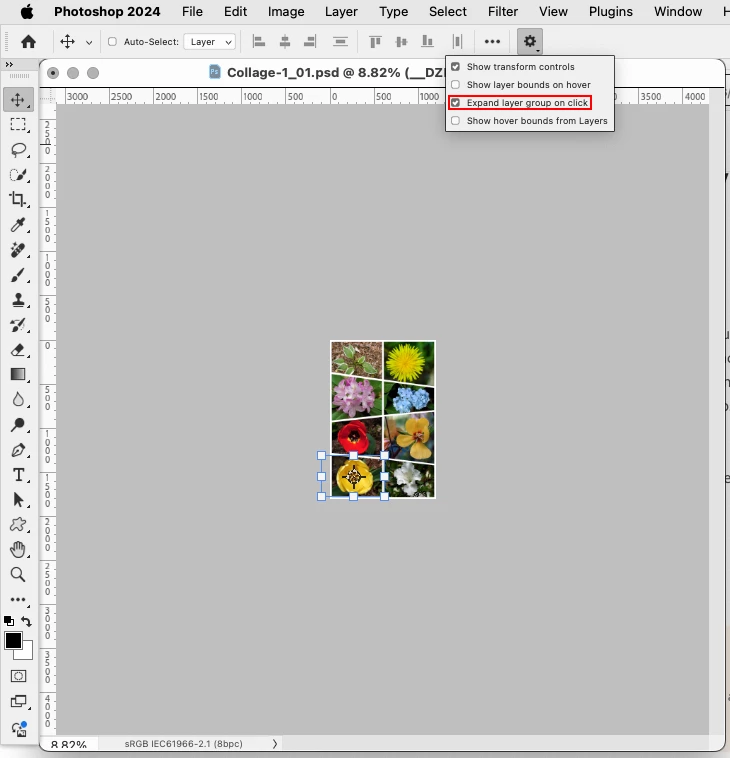
With the Move Tool selected, in the tool options bar, click on the gear icon then click Expand Layer Group on Click


2 replies

Jeff Arola
Community Expert
Jeff ArolaCommunity ExpertCorrect answer
Community Expert
August 15, 2024

With the Move Tool selected, in the tool options bar, click on the gear icon then click Expand Layer Group on Click


Participant
August 15, 2024

Amazing, thanks so much!

Stephen Marsh
Community Expert
Community Expert
August 12, 2024

Check your toolbar options with the move tool active.


Also with the move tool, you can contextual click to select overlapping layers by name.

Participant
August 14, 2024

Yeah I've checked all the settings I can. It's not a problem with it selecting the layer, it does that. The problem is it's not brining the layer within visibility in the 'Layers' window, like this..

Had that Matte layer been out of view it no longer brings it up into view. Does that make sense?