
Participant
December 20, 2023
Question

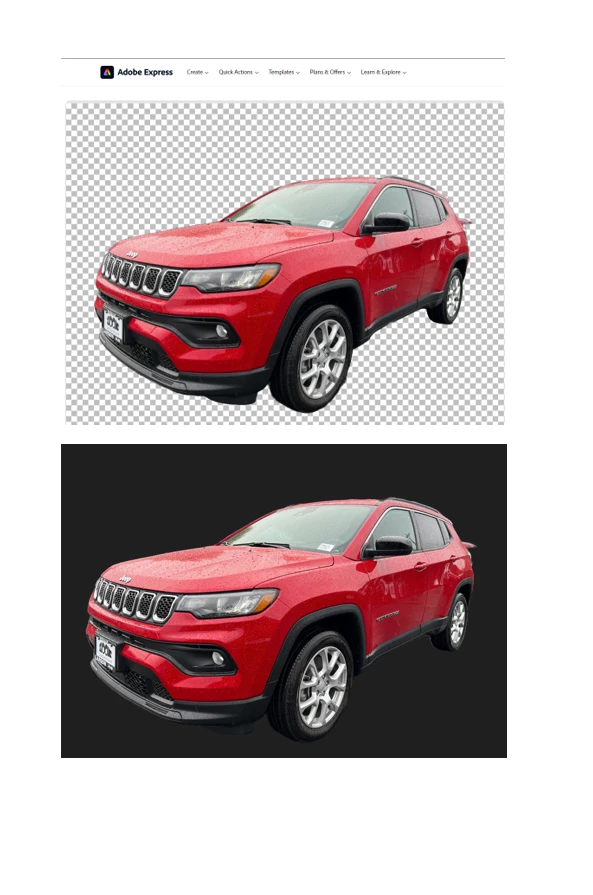
Background Remover showing black background when copied

  • December 20, 2023
  • 3 replies
  • 3181 views

Sorry for the elementary question but I don't know how to fix lol.  When I upload the photo it and remove the background and download it used to just allow me to copy and paste the image.  Now when downloaded its a square black background of the image and NOT just the image anymore.  In the pic you can see the black background, I used to be able to just transfer the image of the vehicle itself.  Anyone know how to revert back to how it was?  Please and thank you. 
3 replies

didiermazier
Community Expert
Community Expert
December 21, 2023

What's the site Url you upload to?

Bojan Živković11378569
Community Expert
Community Expert
December 21, 2023

If you are working with an image with transparent background, always download it and then open or place it in Photoshop to avoid such "problems" as black background.

Kevin Stohlmeyer
Community Expert
Community Expert
December 20, 2023

@Tony34379762ef6v outside of Photoshop - different applications/websites will show transparency differently. If this was saved properly as a transparent png it should retain transparency but only if the site you are uploading to supports it.

Participant
December 20, 2023

Thank you for that info, its the same website I was downloading from before.   Maybe they changed something on their end.  Are you saying the website I'm downloading the picture from should be saved as a transparent png, or when i'm downloading it from adobe?  I just copy and paste once its downloaded from adobe, just would always transfer just the vehicle image never had the black square box before. 

Kevin Stohlmeyer
Community Expert
Community Expert
December 20, 2023

@Tony34379762ef6v I would save it as a transparent png from Photoshop then upload to your site.