
JoeJoseph
Participating Frequently
February 15, 2019
Answered

Batch Action Crashes After 7,077 files?

  • February 15, 2019
  • 2 replies
  • 2803 views

Hi there, I have a problem with a batch process I'm trying to use to add watermarks. The "watermark" is very simple - plain grey text. However, I have 1.2 million files to process and Photoshop crashes, usually after processing 7,077 files. On average that's only about 450MB, all 1280x720 png files. These are in separate folder of about 55k each. I've tried this on two different computers. Both have drivers and Photoshop up-to-date. I have tried turning off the option to use the video card, as suggested by the troubleshooting guide. I've turned off autosave and tried adjusting the memory limit up and down. No change.


The computer does not freeze. It's just Photoshop that stops. There are no errors in the log file, and it doesn't give me a specific error. It just gives me the option to send or not send a crash report.


Please help. I don't want to have to restart this process every hour or so 170 times. If it's important my primary system is Windows 10, 32 GB memory with an Intel i7-8700k and a GTX 1080ti. I don't think the video card has anything to do with it since I turned off the option to use it to process. I'll try anything, thank you.
Correct answer Stephen Marsh

I have not tested on your volume of images. The other suggested apps can do what you want and have far less overhead than Photoshop, but they too could fall over, I don’t know. The reason that I suggested them was that they do what you require without all of the baggage that comes with Photoshop.

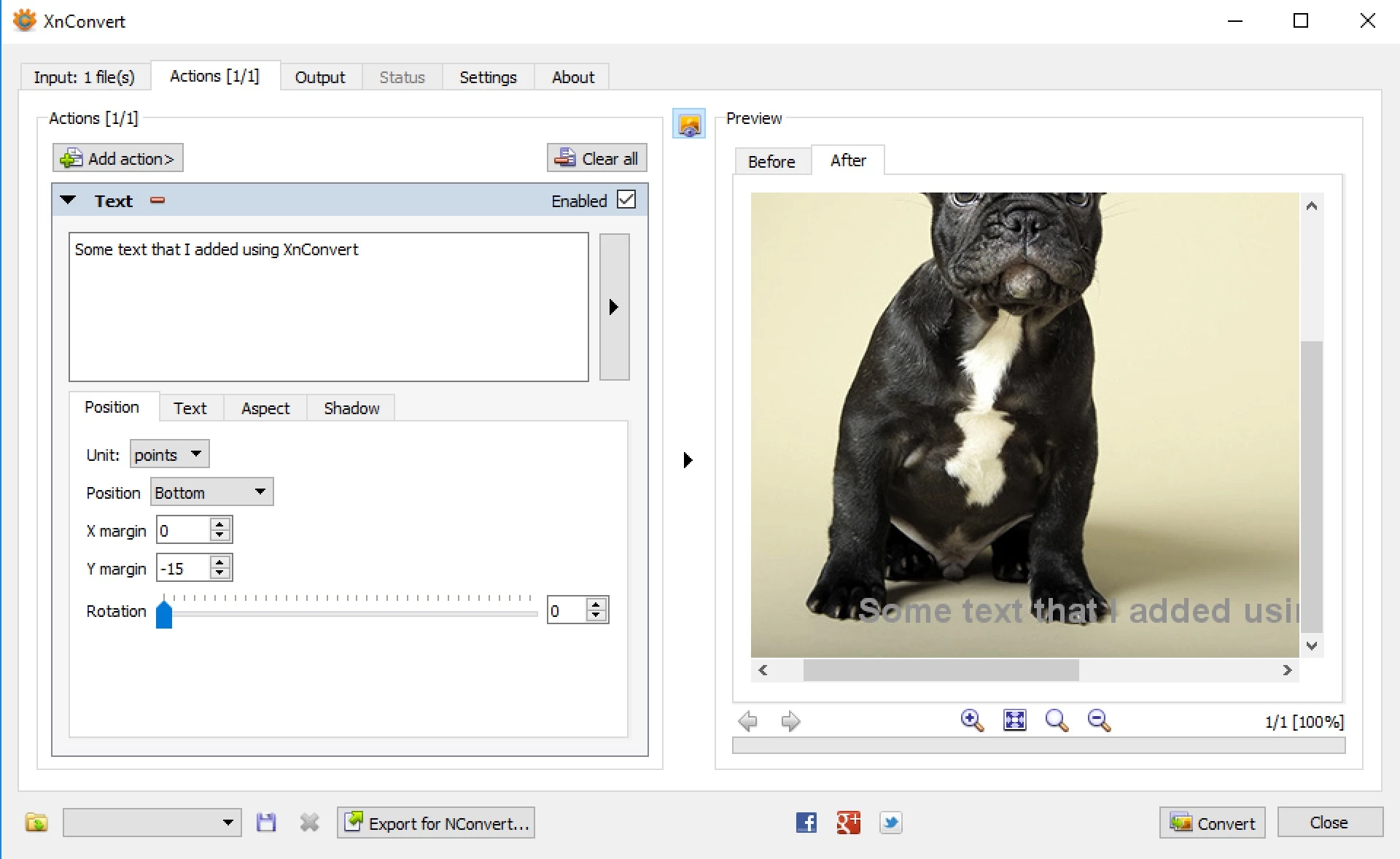
Here is an example from XnConvert, which is a GUI so it will have some overhead over and above a CLI tool (XnConvert can output code for use in the CLI based nConvert, which may have better performance):


OK, I performed a very simple test. I did not close open apps or reboot the computer before the test – nor did I attempt to fine tune Photoshop for better batch performance, so perhaps the results could have potentially been better.

I created 500 png files at 1280 x 720 px in size, approx. 2mb each.

I setup an action in Photoshop to add a text layer, flatten and save as PNG. I then setup the batch and timed it. The run took around 28 minutes 40 seconds to complete the batch of 500 images. This was on a Mac with an SSD.

I then went into my Windows 10 virtual machine that is running on the same Mac, so there is the overhead of running two OS at the same time. I then used XnConvert to perform the same action of watermarking the same 500 source images with text. The run was approximately 3 minutes. I could have downloaded and installed XnConvert on the Mac, however it was already installed in Windows so ran the test there. I doubt that the deciding factor is the OS, it is the program. The right tool for the job, horses for courses and all that.

Photoshop: 28:40

XnConvert: 03:02

There is no guarantee that XnConvert will crash or stop processing after processing thousands of images, however on this simple test I am backing XnConvert over Photoshop for performance and reliability of batching many images with a simple addition of a text watermark. It would also be informative to run the command line nConvert, ImageMagick or GraphicsMagick tools as well as they don’t have the processing overhead of a GUI, however they usually have a longer/steeper learning curve for installation and use.

2 replies

Stephen Marsh
Community Expert
Community Expert
February 15, 2019

I would look into using a different tool for this “industrial volume” of images, such as ImageMagick or GraphicsMagick or XnConvert or nConvert etc.

JJMack
Community Expert
Community Expert
February 15, 2019

Can you post the details in the crash report.  Also when you were running that batch job you monitoring  Photoshop resource consumption using Windows task manager windows explore properties for your scratch dusks? Was Photoshop using all available RAM and a lot of scratch disk space?  Processing 1.2 million file may be more then your machine resources can handle if Photoshop resource management has problems.  When Photoshop crashed did your machine still have some free resources available. If Photoshop can process a file a second how long will it take Photoshop to process 1,200,000 files  two weeks.

JJMack
JoeJoseph
JoeJosephAuthor
Participating Frequently
February 15, 2019
Can you post the details in the crash report.

I cannot, unfortunately, because it doesn't give me any. It just tells me I can send the crash report or not, but there's no way to view details or anything. It appears to be a very generic message. It looks just like this. Except it's PS and not LR, obviously.

Also when you were running that batch job you monitoring  Photoshop resource consumption using Windows task manager windows explore properties for your scratch dusks? Was Photoshop using all available RAM and a lot of scratch disk space?

Looks like with the graphics card processing off Photoshop is running under capacity. The machine is at about 56% CPU and 36% RAM. I did notice while doing this that Windows Explorer was taking a significant CPU load because it's constantly refreshing the folder to sort by date, so I've backed out of the folder and it's now down to 31% and 37%. Almost all of that is now Photoshop.

When Photoshop crashed did your machine still have some free resources available. If Photoshop can process a file a second how long will it take Photoshop to process 1,200,000 files  two weeks.

To be clear, I'm doing batches of about 55k. I have a hard time believing it's system resources. It also doesn't explain exactly 7,077 images, when the images vary from 5 KB to 350 KB you'd expect it to at least be 7,075 sometimes. The exact file count every time is uncanny.

I'm wondering if there's some limit in Photoshop's internal storage of which images have already been processed? It's odd, because even if I only have 8k images left in the folder (I move them to a completed folder once they've been processed) it won't make it past 7,077.

I think I will be looking at alternatives, but I'd love to not have to learn a new tool if possible.. Two weeks would be fine if I didn't have to constantly restart the process. I'm already to 165k, having restarted the batch process over 20 times.

JJMack
Community Expert
Community Expert
February 15, 2019

There are two type of crash reports system crash reports the Windows and Mac OS create for application failures and Adobe Crash Reports for Photoshop failures the you can send to Adobe  which you can also look at report before sending it to Adobe by clicking on more info.  That Info can be captures and posted. Photoshop editing image is a slow process It is hard to believe you would want to process so many image files and Photoshop place your logo on not many have such volumes of images. Batches of 55,000 image files WOW. I would think it would take Photoshop over a day to batch process 55,000 images.  Photoshop does a lot  of sequential processing many thing are not multi threaded so if your processor have many cores most will be idle during the batch process..

JJMack