
Participant
December 13, 2019
Question

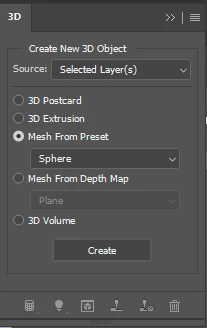
Batch action to generate normal maps being interrupted by 3D window

  • December 13, 2019
  • 2 replies
  • 734 views

Hi, I'm wondering if anyone has an answer to this. I'm trying to automate generating normal maps for a series of photos, so I've set up an action that simply calls Generate Normal (Filter > 3D > Generate Normal Map). It works how I expect it to when I run it within Photoshop on a single image, but when trying on a batch, it gets interrupted by the 3D window and stalls... Not sure what's going on or if anyone else has experienced this?
This topic has been closed for replies.

2 replies

Bojan Živković11378569
Community Expert
Community Expert
December 13, 2019

Everything works fine from my testing. Either upload action as suggested or expand action and make screenshot so we can identify potential problem.

By the way, which batch command/script you are using? I am testing using File > Automate > Batch.

Participant
December 13, 2019

Thanks for the quick responses! The action is actually getting called from a python script, so the problem must be from within the script, because you're right, using the same action from File > Automate > Batch doesn't present the same issue. I'll have to do more investigating. Thank you!

JJMack
Community Expert
Community Expert
December 13, 2019

Can you save your  Actions set that has the action then upload the *.atn file to a file sharing site and post a link to it so we can test your action.


Supply pertinent information for more timely and effective answers. The more information you supply about your issue, the better equipped other community members will be to answer. Consider including the following in your question:

  • Adobe product and version number
  • Operating system and version number
  • The full text of any error message(s)
  • What you were doing when the problem occurred
  • Screenshots of the problem
  • Computer hardware, such as CPU; GPU; the amount of RAM; etc.
JJMack