
m90583877
Known Participant
November 8, 2018
Answered

Batch converting 1000 pdf to jpg

  • November 8, 2018
  • 4 replies
  • 58859 views

Hi,

I have a question I haven't really found a solution for. I need to process 1000+ pdf files into jpg or png files.

Usually I would just write a short action with save is but the problem is every time I open the pdf file this window pops up:
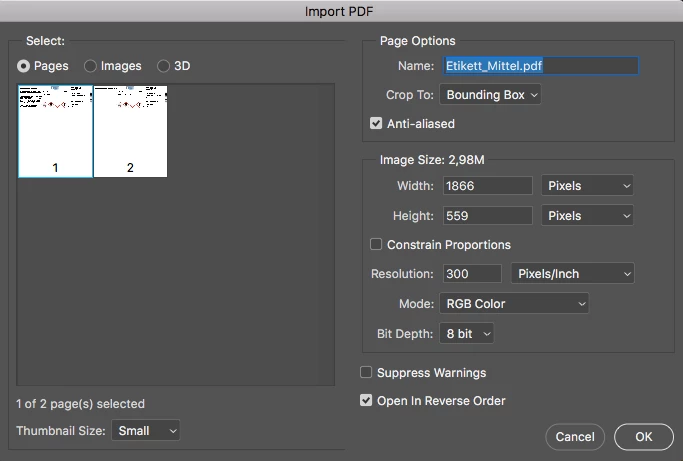
So when I write the action with saving the files as a jpg and attach the folder with the pdf files for Batch process, this window pops up for each pdf which kind of kills the automation.

What would be the way to do it? Is there a way to write this setting (I need then as Pages) into an action as well? Or what can I do?

Thank you!

Correct answer

Hi,

Sorry if you've already solved this issue.  I may be understanding your requirements incorrectly but I have a Macbook Pro with Adobe Acrobat installed.  I recently had a 68 page PDF that I needed converted into JPGs.  


So I:

1. opened the file

2. --> went to Tools --> Organize Pages

3. then I click Edit from top menu --> Select All

4. File--> Save As...

5. change Format from Adobe PDF Files to JPEG (or PNG or any other format you want listed)

6, Save.


It worked wonderfully for me but, like I mentioned, perhaps I didn't understand properly.  I just wanted to share my experience.


Thanks.


4 replies

Correct answer
February 11, 2020

Hi,

Sorry if you've already solved this issue.  I may be understanding your requirements incorrectly but I have a Macbook Pro with Adobe Acrobat installed.  I recently had a 68 page PDF that I needed converted into JPGs.  


So I:

1. opened the file

2. --> went to Tools --> Organize Pages

3. then I click Edit from top menu --> Select All

4. File--> Save As...

5. change Format from Adobe PDF Files to JPEG (or PNG or any other format you want listed)

6, Save.


It worked wonderfully for me but, like I mentioned, perhaps I didn't understand properly.  I just wanted to share my experience.


Thanks.


Participant
May 13, 2020

IDK if it helped anyone else but this is exactly what I was looking for and it worked perfecty even with the free trial version of Adobe Acrobat! Thank you!

Mike_Gondek10189183
Community Expert
Community Expert
November 8, 2018

File >> Scripts >> Image processor

This will create a folder named JPEG that will store all the copies of your files in .jpg format.

For mine ai also run an action to convert the color profiel to Gracol, you can choose any action that you have created if needed or to  further automate

If you have trouble with resolution let us know in detail about the pdfs you used and  results you are getting and one of us can assist you further.

m90583877
m90583877Author
Known Participant
November 14, 2018

Thank you, I will try this asap and write if it worked!

rob day
Community Expert
Community Expert
November 8, 2018

every time I open the pdf file this window pops up:

Try checking the Suppress Warnings box when you record the action, so in this case the action is always going to open the selected page 1 along with the other options you have chosen. Then when you batch the action also check the Suppress boxes there:

m90583877
m90583877Author
Known Participant
November 14, 2018

I have just tried to surpress warnings as you suggested, but in this case it just opens all the original pdfs in the distorted form and then gives me the following warning:

and the action does not save anything.

This is how it looks when I open the files one by one:

and this what happens when I run an action which says open, save as a jpg (which does not happen) and close.

JJMack
Community Expert
Community Expert
November 8, 2018

All pdf file are not the same. Some are a single image and will open like normal image files in Photoshop as a single layer. Other are not a single image map have pages image and other objects and some PDF files are PDF slide presentations.  Photoshop can not import these as a single raster layer.  There may be some scripts the can process these types of PDF with Photoshop however I would think PDF processing script would also has a dialog for you to use to set processing options,  Perhaps one is a Plug-in that can be batched in an action.  Search the Web for Photoshop PDF processing scripts.  I see that Xtools has a PDFtoJpeg script. And Paul has a PDF Processor script on the web.  I have never user these.  I do not normally process or save PDF files with Photoshop.

JJMack
m90583877
m90583877Author
Known Participant
November 8, 2018

Thank you for the detailed answer.

Yes the problem is that these pdf files are machine generated in order to print labels. So Photoshop opens it in this way.

If I may ask how do you usually process the pdf files then?

Stephen Marsh
Community Expert
Community Expert
November 8, 2018

You may have more luck with a script that was designed to gracefully deal with PDF files, rather than image files:

https://raw.githubusercontent.com/Paul-Riggott/PS-Scripts/master/PDF%20ProcessorII.jsx

Prepression: Downloading and Installing Adobe Scripts