
Copy link to clipboard
Copied
Hi,
I have many psd files with me and all the psd files contains a layer named say "Lora" inside them.
This layer can be in bottom or maybe in nested groups too.
I want to know how can we batch delete just this "Lora" layer from all of them and save the psd automatically.
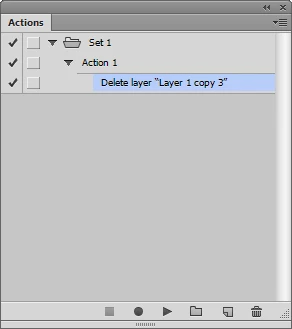
If no other Layer is named »Lora« then selecting that Layer and deleting it should record fine in an Action.
Edit:
A few additions to the post from @c.pfaffenbichler –
* If no layers are selected in the document, you will get an error. The easiest way around this is to add a new layer and then delete it, which will then select the next layer at the top of the stack, allowing for the selection of the "Lora" layer without error.
* Actions selecting layers by name are case-sensitive, so "Lora" will work, but "lora" or "LORA" etc will not.
After creating the action, you would need to run the action thro
...
Copy link to clipboard
Copied
If no other Layer is named »Lora« then selecting that Layer and deleting it should record fine in an Action.
Edit:
Copy link to clipboard
Copied
A few additions to the post from @c.pfaffenbichler –
* If no layers are selected in the document, you will get an error. The easiest way around this is to add a new layer and then delete it, which will then select the next layer at the top of the stack, allowing for the selection of the "Lora" layer without error.
* Actions selecting layers by name are case-sensitive, so "Lora" will work, but "lora" or "LORA" etc will not.
After creating the action, you would need to run the action through Automate > Batch or Scripts > Image Processor etc.
Copy link to clipboard
Copied
Copy link to clipboard
Copied
@r-bin – That would save a layer selection step, however, I have forgotten how to record the explicit layer name into a single delete step!
Doh! Just drag it to the trash! :]
Copy link to clipboard
Copied
Worked well. Thanks a lot.
Get ready! An upgraded Adobe Community experience is coming in January.
Learn more