DavidBoileau
Participant
December 7, 2023
Answered

Batch enlarge images based on longest side using Preserve Detail 2.0

  • December 7, 2023
  • 2 replies
  • 885 views

Hello Everyone,


I'm trying to batch upscale images to a "longest side" using "Preserve Details 2.0." These a shots of products for an online retailer.


I have tried many ways to do this and it's proving impossible. Am I missing something? Image processor does not use "Preserve Details 2.0", Ligthroom (v7) does not preserve the transparency of the tiffs, I can't tell photoshop to scale longest side in actions, and I lost a full day trying to figure out scripting with the script listener and ChatGPT helping me.


All I want to do is to batch upscale a series of images (tiffs,pngs) using Preserve Details 2.0 to a "Longest Side".


What am I missing? It surely can't be that hard. I must be missing something.


Thanks in advance.

This topic has been closed for replies.
Correct answer Stephen Marsh

I'd expect Automate > Fit Image to use the interpolation method set in Preferences > General (but I don't know if it does).


EDIT: Fit Image doesn't use the interpolation from preferences, the code is old and the DOM only supports basic Preserve Details, so AM code would be needed:


    // resize the image using a good conversion method while keeping the pixel resolution
    // and the aspect ratio the same
    app.activeDocument.resizeImage(newWidth, newHeight, resolution, ResampleMethod.BICUBIC);


You can use a conditional action:
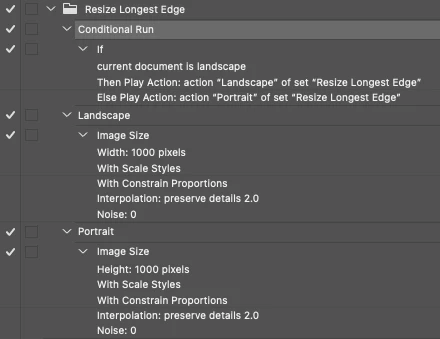


A very quick, rough'n'ready script version of the action:


/*
// Enable Preserve Details 2 in Preferences/Technology Previews
var idset = stringIDToTypeID( "set" );
    var desc2444 = new ActionDescriptor();
    var idnull = stringIDToTypeID( "null" );
        var ref135 = new ActionReference();
        var idproperty = stringIDToTypeID( "property" );
        var idexperimentalFeatures = stringIDToTypeID( "experimentalFeatures" );
        ref135.putProperty( idproperty, idexperimentalFeatures );
        var idapplication = stringIDToTypeID( "application" );
        var idordinal = stringIDToTypeID( "ordinal" );
        var idtargetEnum = stringIDToTypeID( "targetEnum" );
        ref135.putEnumerated( idapplication, idordinal, idtargetEnum );
    desc2444.putReference( idnull, ref135 );
    var idto = stringIDToTypeID( "to" );
        var desc2445 = new ActionDescriptor();
        var idexpFeatureDeepUpscale = stringIDToTypeID( "expFeatureDeepUpscale" );
        desc2445.putBoolean( idexpFeatureDeepUpscale, true );
    var idexperimentalFeatures = stringIDToTypeID( "experimentalFeatures" );
    desc2444.putObject( idto, idexperimentalFeatures, desc2445 );
executeAction( idset, desc2444, DialogModes.NO );
*/

// Pixel Width and Height Value
conditionalResize(1000, 1000);

function conditionalResize(W, H) {
    if (activeDocument.width > activeDocument.height) {
        var idimageSize = stringIDToTypeID("imageSize");
        var desc2420 = new ActionDescriptor();
        var idwidth = stringIDToTypeID("width");
        var idpixelsUnit = stringIDToTypeID("pixelsUnit");
        desc2420.putUnitDouble(idwidth, idpixelsUnit, W); // Width in px
        var idscaleStyles = stringIDToTypeID("scaleStyles");
        desc2420.putBoolean(idscaleStyles, true);
        var idconstrainProportions = stringIDToTypeID("constrainProportions");
        desc2420.putBoolean(idconstrainProportions, true);
        var idinterfaceIconFrameDimmed = stringIDToTypeID("interfaceIconFrameDimmed");
        var idinterpolationType = stringIDToTypeID("interpolationType");
        var iddeepUpscale = stringIDToTypeID("deepUpscale");
        desc2420.putEnumerated(idinterfaceIconFrameDimmed, idinterpolationType, iddeepUpscale);
        var idnoise = stringIDToTypeID("noise");
        desc2420.putInteger(idnoise, 0); // Noise value
        executeAction(idimageSize, desc2420, DialogModes.NO);
    } else {
        var idimageSize = stringIDToTypeID("imageSize");
        var desc2413 = new ActionDescriptor();
        var idheight = stringIDToTypeID("height");
        var idpixelsUnit = stringIDToTypeID("pixelsUnit");
        desc2413.putUnitDouble(idheight, idpixelsUnit, H); // Height in px
        var idconstrainProportions = stringIDToTypeID("constrainProportions");
        desc2413.putBoolean(idconstrainProportions, true);
        var idinterfaceIconFrameDimmed = stringIDToTypeID("interfaceIconFrameDimmed");
        var idinterpolationType = stringIDToTypeID("interpolationType");
        var iddeepUpscale = stringIDToTypeID("deepUpscale");
        desc2413.putEnumerated(idinterfaceIconFrameDimmed, idinterpolationType, iddeepUpscale);
        var idnoise = stringIDToTypeID("noise");
        desc2413.putInteger(idnoise, 0); // Noise value
        executeAction(idimageSize, desc2413, DialogModes.NO);
    }
}


https://prepression.blogspot.com/2017/11/downloading-and-installing-adobe-scripts.html

 

2 replies

Bojan Živković11378569
Community Expert
Community Expert
December 8, 2023

"I can't tell photoshop to scale longest side in actions"


Actually you can using conditional action. There are available conditions based on image orientation.

Stephen Marsh
Community Expert
Stephen MarshCommunity ExpertCorrect answer
Community Expert
December 7, 2023

I'd expect Automate > Fit Image to use the interpolation method set in Preferences > General (but I don't know if it does).


EDIT: Fit Image doesn't use the interpolation from preferences, the code is old and the DOM only supports basic Preserve Details, so AM code would be needed:


    // resize the image using a good conversion method while keeping the pixel resolution
    // and the aspect ratio the same
    app.activeDocument.resizeImage(newWidth, newHeight, resolution, ResampleMethod.BICUBIC);


You can use a conditional action:


A very quick, rough'n'ready script version of the action:


/*
// Enable Preserve Details 2 in Preferences/Technology Previews
var idset = stringIDToTypeID( "set" );
    var desc2444 = new ActionDescriptor();
    var idnull = stringIDToTypeID( "null" );
        var ref135 = new ActionReference();
        var idproperty = stringIDToTypeID( "property" );
        var idexperimentalFeatures = stringIDToTypeID( "experimentalFeatures" );
        ref135.putProperty( idproperty, idexperimentalFeatures );
        var idapplication = stringIDToTypeID( "application" );
        var idordinal = stringIDToTypeID( "ordinal" );
        var idtargetEnum = stringIDToTypeID( "targetEnum" );
        ref135.putEnumerated( idapplication, idordinal, idtargetEnum );
    desc2444.putReference( idnull, ref135 );
    var idto = stringIDToTypeID( "to" );
        var desc2445 = new ActionDescriptor();
        var idexpFeatureDeepUpscale = stringIDToTypeID( "expFeatureDeepUpscale" );
        desc2445.putBoolean( idexpFeatureDeepUpscale, true );
    var idexperimentalFeatures = stringIDToTypeID( "experimentalFeatures" );
    desc2444.putObject( idto, idexperimentalFeatures, desc2445 );
executeAction( idset, desc2444, DialogModes.NO );
*/

// Pixel Width and Height Value
conditionalResize(1000, 1000);

function conditionalResize(W, H) {
    if (activeDocument.width > activeDocument.height) {
        var idimageSize = stringIDToTypeID("imageSize");
        var desc2420 = new ActionDescriptor();
        var idwidth = stringIDToTypeID("width");
        var idpixelsUnit = stringIDToTypeID("pixelsUnit");
        desc2420.putUnitDouble(idwidth, idpixelsUnit, W); // Width in px
        var idscaleStyles = stringIDToTypeID("scaleStyles");
        desc2420.putBoolean(idscaleStyles, true);
        var idconstrainProportions = stringIDToTypeID("constrainProportions");
        desc2420.putBoolean(idconstrainProportions, true);
        var idinterfaceIconFrameDimmed = stringIDToTypeID("interfaceIconFrameDimmed");
        var idinterpolationType = stringIDToTypeID("interpolationType");
        var iddeepUpscale = stringIDToTypeID("deepUpscale");
        desc2420.putEnumerated(idinterfaceIconFrameDimmed, idinterpolationType, iddeepUpscale);
        var idnoise = stringIDToTypeID("noise");
        desc2420.putInteger(idnoise, 0); // Noise value
        executeAction(idimageSize, desc2420, DialogModes.NO);
    } else {
        var idimageSize = stringIDToTypeID("imageSize");
        var desc2413 = new ActionDescriptor();
        var idheight = stringIDToTypeID("height");
        var idpixelsUnit = stringIDToTypeID("pixelsUnit");
        desc2413.putUnitDouble(idheight, idpixelsUnit, H); // Height in px
        var idconstrainProportions = stringIDToTypeID("constrainProportions");
        desc2413.putBoolean(idconstrainProportions, true);
        var idinterfaceIconFrameDimmed = stringIDToTypeID("interfaceIconFrameDimmed");
        var idinterpolationType = stringIDToTypeID("interpolationType");
        var iddeepUpscale = stringIDToTypeID("deepUpscale");
        desc2413.putEnumerated(idinterfaceIconFrameDimmed, idinterpolationType, iddeepUpscale);
        var idnoise = stringIDToTypeID("noise");
        desc2413.putInteger(idnoise, 0); // Noise value
        executeAction(idimageSize, desc2413, DialogModes.NO);
    }
}


https://prepression.blogspot.com/2017/11/downloading-and-installing-adobe-scripts.html


DavidBoileau
Participant
December 8, 2023

Thanks Stephen, I'm going to explore this and get back to you. At first glance it seems to execute what I need.