I'd expect Automate > Fit Image to use the interpolation method set in Preferences > General (but I don't know if it does).
EDIT: Fit Image doesn't use the interpolation from preferences, the code is old and the DOM only supports basic Preserve Details, so AM code would be needed:
    // resize the image using a good conversion method while keeping the pixel resolution
    // and the aspect ratio the same
    app.activeDocument.resizeImage(newWidth, newHeight, resolution, ResampleMethod.BICUBIC);
You can use a conditional action:
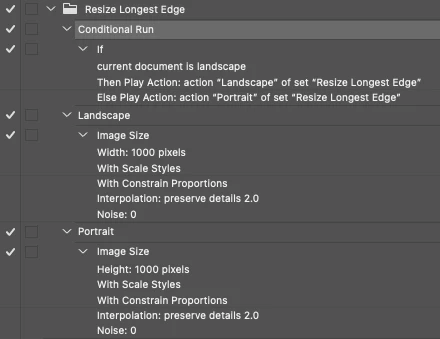
A very quick, rough'n'ready script version of the action:
/*
// Enable Preserve Details 2 in Preferences/Technology Previews
var idset = stringIDToTypeID( "set" );
    var desc2444 = new ActionDescriptor();
    var idnull = stringIDToTypeID( "null" );
        var ref135 = new ActionReference();
        var idproperty = stringIDToTypeID( "property" );
        var idexperimentalFeatures = stringIDToTypeID( "experimentalFeatures" );
        ref135.putProperty( idproperty, idexperimentalFeatures );
        var idapplication = stringIDToTypeID( "application" );
        var idordinal = stringIDToTypeID( "ordinal" );
        var idtargetEnum = stringIDToTypeID( "targetEnum" );
        ref135.putEnumerated( idapplication, idordinal, idtargetEnum );
    desc2444.putReference( idnull, ref135 );
    var idto = stringIDToTypeID( "to" );
        var desc2445 = new ActionDescriptor();
        var idexpFeatureDeepUpscale = stringIDToTypeID( "expFeatureDeepUpscale" );
        desc2445.putBoolean( idexpFeatureDeepUpscale, true );
    var idexperimentalFeatures = stringIDToTypeID( "experimentalFeatures" );
    desc2444.putObject( idto, idexperimentalFeatures, desc2445 );
executeAction( idset, desc2444, DialogModes.NO );
*/

// Pixel Width and Height Value
conditionalResize(1000, 1000);

function conditionalResize(W, H) {
    if (activeDocument.width > activeDocument.height) {
        var idimageSize = stringIDToTypeID("imageSize");
        var desc2420 = new ActionDescriptor();
        var idwidth = stringIDToTypeID("width");
        var idpixelsUnit = stringIDToTypeID("pixelsUnit");
        desc2420.putUnitDouble(idwidth, idpixelsUnit, W); // Width in px
        var idscaleStyles = stringIDToTypeID("scaleStyles");
        desc2420.putBoolean(idscaleStyles, true);
        var idconstrainProportions = stringIDToTypeID("constrainProportions");
        desc2420.putBoolean(idconstrainProportions, true);
        var idinterfaceIconFrameDimmed = stringIDToTypeID("interfaceIconFrameDimmed");
        var idinterpolationType = stringIDToTypeID("interpolationType");
        var iddeepUpscale = stringIDToTypeID("deepUpscale");
        desc2420.putEnumerated(idinterfaceIconFrameDimmed, idinterpolationType, iddeepUpscale);
        var idnoise = stringIDToTypeID("noise");
        desc2420.putInteger(idnoise, 0); // Noise value
        executeAction(idimageSize, desc2420, DialogModes.NO);
    } else {
        var idimageSize = stringIDToTypeID("imageSize");
        var desc2413 = new ActionDescriptor();
        var idheight = stringIDToTypeID("height");
        var idpixelsUnit = stringIDToTypeID("pixelsUnit");
        desc2413.putUnitDouble(idheight, idpixelsUnit, H); // Height in px
        var idconstrainProportions = stringIDToTypeID("constrainProportions");
        desc2413.putBoolean(idconstrainProportions, true);
        var idinterfaceIconFrameDimmed = stringIDToTypeID("interfaceIconFrameDimmed");
        var idinterpolationType = stringIDToTypeID("interpolationType");
        var iddeepUpscale = stringIDToTypeID("deepUpscale");
        desc2413.putEnumerated(idinterfaceIconFrameDimmed, idinterpolationType, iddeepUpscale);
        var idnoise = stringIDToTypeID("noise");
        desc2413.putInteger(idnoise, 0); // Noise value
        executeAction(idimageSize, desc2413, DialogModes.NO);
    }
}
https://prepression.blogspot.com/2017/11/downloading-and-installing-adobe-scripts.html


 AdChoices