
Exit
  • Global community
    • Language:
      • Deutsch
      • English
      • Español
      • Français
      • Português
  • 日本語コミュニティ
  • 한국 커뮤니티
0

Batch export to jsxbin using VS code

Engaged ,
Aug 12, 2019 Aug 12, 2019

I am trying to use exportToJSX.js to batch export to jsxbin.

It is explained here: https://marketplace.visualstudio.com/items?itemName=Adobe.extendscript-debug

I have both node and nmp installed and always get these errors:
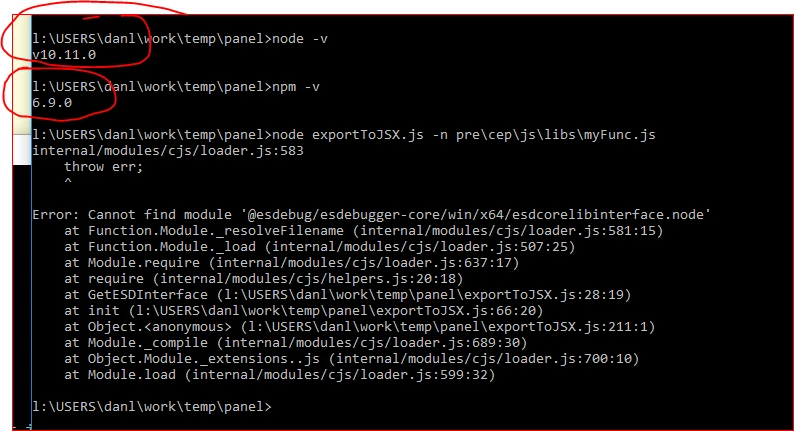
any idea what can be done about it?

Any other way to batch convert to jsxbin?

TOPICS
Actions and scripting
2.8K
Translate
Report
Community guidelines
Be kind and respectful, give credit to the original source of content, and search for duplicates before posting. Learn more
community guidelines

correct answers 1 Correct answer

Community Expert , Aug 12, 2019 Aug 12, 2019

should you be using: or does the environment variable %PATH% resolve    exportToJSX.js

node "C:\Users\(your user id)\.vscode\extensions\<adobe.extendscript-debug extension directory>\public-scripts\exportToJSX.js" -n pre\cep\js\libs\myFunc.js

Translate
Adobe
Community Expert ,
Aug 12, 2019 Aug 12, 2019

Make sure you have access to

The message states its not found

JJMack
Translate
Report
Community guidelines
Be kind and respectful, give credit to the original source of content, and search for duplicates before posting. Learn more
community guidelines
Engaged ,
Aug 12, 2019 Aug 12, 2019

This is the first time I'm using node to do this so perhaps i am missing something

As i wrote before i have the correct version installed and what i do is:

  1. open a terminal (win10)
  2. run:
    node exportToJSX.js -n <path>

I get this error ans i have no idea where to find that missing module.

Does it work for you?

Dan

Translate
Report
Community guidelines
Be kind and respectful, give credit to the original source of content, and search for duplicates before posting. Learn more
community guidelines
Community Expert ,
Aug 12, 2019 Aug 12, 2019

Did you try searching you drives for what can not be found?  Do you have it or is it missing not on your machine. What is esdcorelibinterface or where is it.  where is "@esdebug"  ???   When you did the install in the link you posted did it state the that install was successful?

Did you try the Trouble Installing link?

    1. Ensure that you have node 10.11.0 installed. You may use the following command from terminal to get node. npm install -g node@10.11.0
    2. Locate the script at the following location:>
      Mac: $HOME/.vscode/extensions/<adobe.extendscript-debug extension directory>/public-scripts/exportToJSX.js>
      Windows: %USERPROFILE%\.vscode\extensions\<adobe.extendscript-debug extension directory>\public-scripts\exportToJSX.js
    3. Run the following command from terminal. node <Path to exportToJSX.js> [options] [filename/directory]
JJMack
Translate
Report
Community guidelines
Be kind and respectful, give credit to the original source of content, and search for duplicates before posting. Learn more
community guidelines
Engaged ,
Aug 12, 2019 Aug 12, 2019

that exactly the problem - i'm on win 10, i don't have "@esdebug"

i have C:\ & D:\...

I guess this is some node path which i cannot access.

I would like to know if that script works or perhaps it doesn't any more.

I couldn't find any reference to anyone using it apart from this:

ExtendScript Debugger - Visual Studio Marketplace

Translate
Report
Community guidelines
Be kind and respectful, give credit to the original source of content, and search for duplicates before posting. Learn more
community guidelines
Community Expert ,
Aug 12, 2019 Aug 12, 2019

should you be using: or does the environment variable %PATH% resolve    exportToJSX.js

node "C:\Users\(your user id)\.vscode\extensions\<adobe.extendscript-debug extension directory>\public-scripts\exportToJSX.js" -n pre\cep\js\libs\myFunc.js

JJMack
Translate
Report
Community guidelines
Be kind and respectful, give credit to the original source of content, and search for duplicates before posting. Learn more
community guidelines
Engaged ,
Aug 13, 2019 Aug 13, 2019
LATEST

Yes not it working.

The problem was that i located the script as explained but i copied it locally and run it from the local folder.

Should only run it from the installation directory.

Dan

Translate
Report
Community guidelines
Be kind and respectful, give credit to the original source of content, and search for duplicates before posting. Learn more
community guidelines