Exit
  • Global community
    • Language:
      • Deutsch
      • English
      • Español
      • Français
      • Português
  • 日本語コミュニティ
  • 한국 커뮤니티
0

Batch function gone

New Here ,
Apr 10, 2017 Apr 10, 2017

Updated to the newest version of Photoshop there the other day and ever since it won't let me run a batch or even open multiple photos:

FatalError: General Photoshop error occurred. This functionality may not be available in this version of Photoshop.

Infuriating, a large portion of my workday is batching images.

Anyone else have this problem?

185
Translate
Report
Community guidelines
Be kind and respectful, give credit to the original source of content, and search for duplicates before posting. Learn more
community guidelines
Adobe
Community Expert ,
Apr 10, 2017 Apr 10, 2017

Please post better details of your problem.

Supply pertinent information for quicker answers

  • The more information you supply about your situation, the better equipped other community members will be to answer. Consider including the following in your question:
  • Adobe product and version number
  • Operating system and version number
  • The full text of any error message(s)
  • What you were doing when the problem occurred
  • Screenshots of the problem
  • Computer hardware, such as CPU; GPU; amount of RAM; etc.

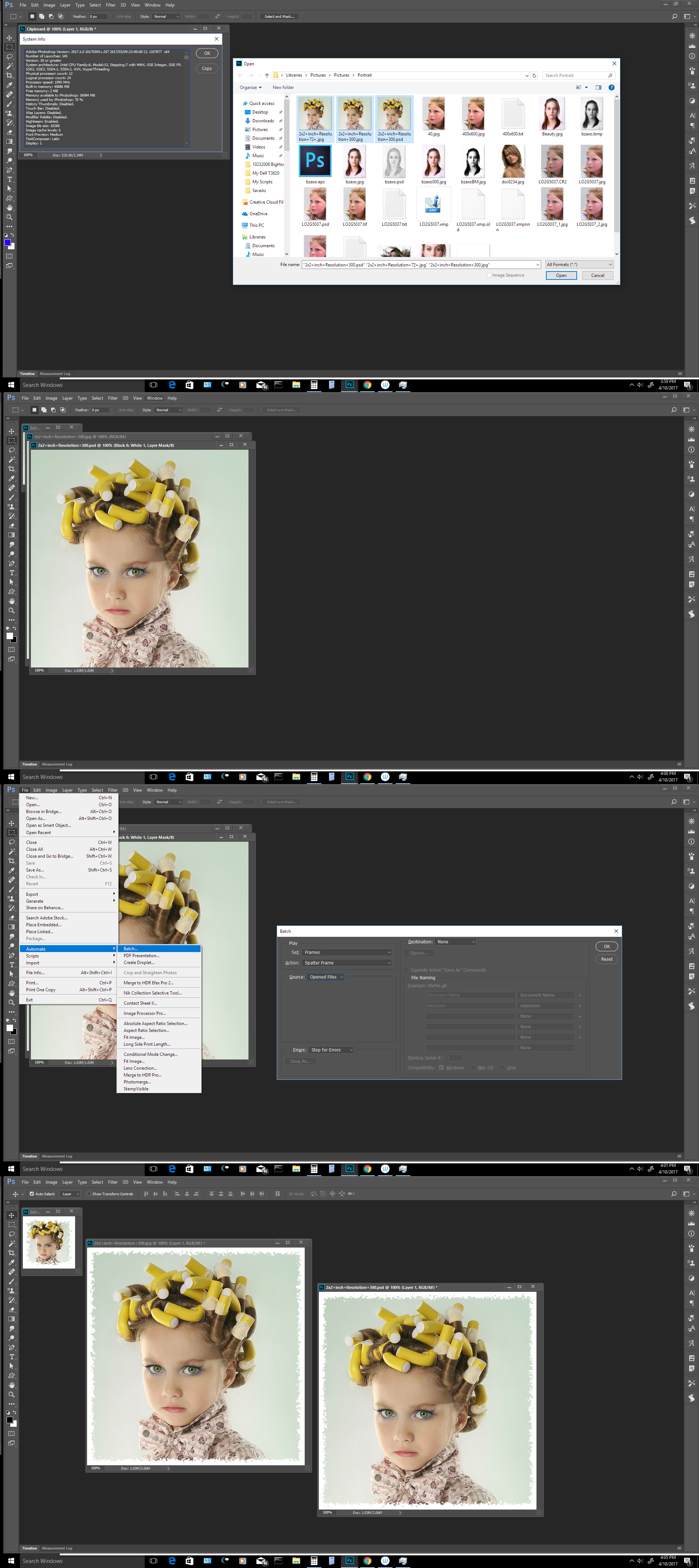
Here is what I see on my Windows 10 machine.

Capture.jpg

JJMack
Translate
Report
Community guidelines
Be kind and respectful, give credit to the original source of content, and search for duplicates before posting. Learn more
community guidelines
New Here ,
Apr 11, 2017 Apr 11, 2017
  • Adobe product and version number
    • "Updated to the newest version of Photoshop"
  • Operating system and version number
  • The full text of any error message(s)
    • "FatalError: General Photoshop error occurred. This functionality may not be available in this version of Photoshop."
  • What you were doing when the problem occurred
    • "it won't let me run a batch or even open multiple photos"
  • Screenshots of the problem
  • Computer hardware, such as CPU; GPU; amount of RAM; etc.

Already did a few of those you asked for.

Mac Pro, OS X Yosemite, 10.10.5, 64gb of RAM

Translate
Report
Community guidelines
Be kind and respectful, give credit to the original source of content, and search for duplicates before posting. Learn more
community guidelines
Community Expert ,
Apr 11, 2017 Apr 11, 2017
LATEST

That is a normal error message one  get when an action is played and some document condition that the action depends on is not meet.  Could you post the batched action. As you see from my screen capture batch and multiple documents worked for me with one of Adobe's actions.

JJMack
Translate
Report
Community guidelines
Be kind and respectful, give credit to the original source of content, and search for duplicates before posting. Learn more
community guidelines