ashfaaqm76713227
Participant
March 10, 2016
Answered

Batch image resizing and adding watermark.

  • March 10, 2016
  • 2 replies
  • 5161 views

HI, I'm transitioning from Photoshop Elements 12 to CC. In Elements 12 there is a "process multiple files..." Option where I can batch resize images by px, percent, inches etc and it lets me add a watermark in any color and place it in the center or bottom. In CC I see an image processor but I can't resize by percent and I can't add a watermark. I can do it with Actions but is there a predone script that I can use. Since it exists in Elements, is there a way to get the same dialog options into CC via a plugin?
This topic has been closed for replies.
Correct answer Benjamin Root

‌This may be just what you're looking for: https://creative.adobe.com/addons/products/13157#.VuDLN_BOKrU

Personally, I use an Action combined with the Batch script. The steps in my Action are like this:

  1. Resize
  2. Place Embedded
  3. Transform (size)
  4. Move to correct position with Move tool
  5. Flatten Image
  6. Convert to sRGB
  7. Save As (JPEG; quality 10, etc)
  8. Close (Save: no)

I actually created one Action for horizontally oriented photos and one for vertically oriented. The resize and transform steps are different on each. Most notably, the resize step; I enter the desired short side's dimension for both (height for horizontal and width for vertical), and the long size is automatically filled in.

Last, create a third Action (the one you will choose in the Batch script) containing only an if/else step. Go to the Action panel's menu and choose "Insert Conditional." Set it like this: If image is horizontal: play [horizontal Action]. Else, play: [vertical Action]

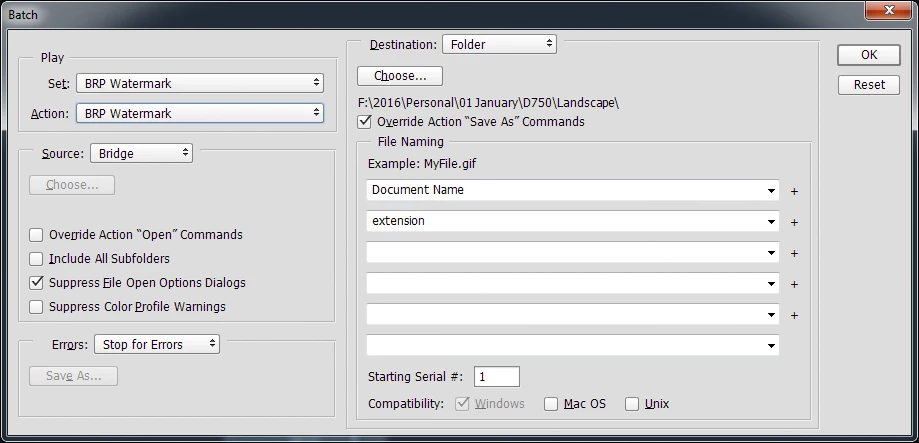
Then I have Batch set up like this:

I've been planning to put together a video tutorial of this, but haven't had the chance yet. Anyway, hope this helps!

2 replies

Benjamin Root
Benjamin RootCorrect answer
Legend
March 10, 2016

‌This may be just what you're looking for: https://creative.adobe.com/addons/products/13157#.VuDLN_BOKrU

Personally, I use an Action combined with the Batch script. The steps in my Action are like this:

  1. Resize
  2. Place Embedded
  3. Transform (size)
  4. Move to correct position with Move tool
  5. Flatten Image
  6. Convert to sRGB
  7. Save As (JPEG; quality 10, etc)
  8. Close (Save: no)

I actually created one Action for horizontally oriented photos and one for vertically oriented. The resize and transform steps are different on each. Most notably, the resize step; I enter the desired short side's dimension for both (height for horizontal and width for vertical), and the long size is automatically filled in.

Last, create a third Action (the one you will choose in the Batch script) containing only an if/else step. Go to the Action panel's menu and choose "Insert Conditional." Set it like this: If image is horizontal: play [horizontal Action]. Else, play: [vertical Action]

Then I have Batch set up like this:

I've been planning to put together a video tutorial of this, but haven't had the chance yet. Anyway, hope this helps!

ashfaaqm76713227
Participant
March 10, 2016

Yeah I figured there was some action oriented thing to do here but I was hoping for something out of the box. Is there a way to export the elements script and import into CC. It already exists and worked really well for me. I don't want to recreate it. Is that script stored as a file in the elements directory? can I copy that into the CC files and make it available to use?

JJMack
Community Expert
Community Expert
March 10, 2016

If you have an action that can watermark your image. It would be easy to do using the plug  script image processor pro that can be downloaded and installed for the web.

My crafting actions package has a sample action. That can watermark any size image.

JJMack
Mohit Goyal
Community Manager
Community Manager
March 10, 2016

Moved to Photoshop Scripting

Thanks,

Mohit