
Batch processing problems in Photoshop CS3 I never had before...
I am a long time user of Photoshop CS3 and am having problems with batch processing in Photoshop CS3 for the first time in about decade of using it.
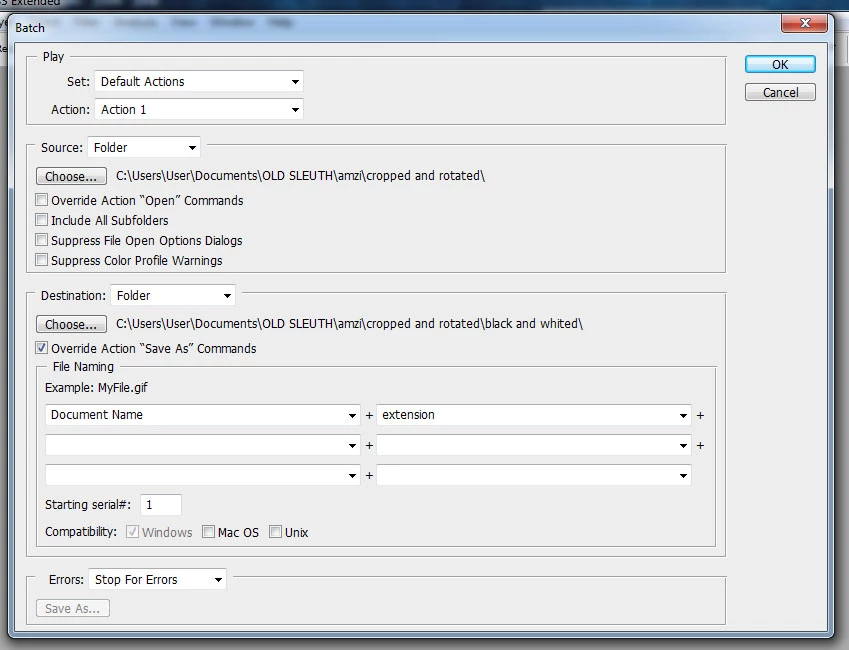
As seen in the image below, I need to batch process files that are in the "cropped rotated" folder and have the new files saved into the "black and whited" sub folder.
These folders are already chosen in the attached Batch processing window. However, when started it will ONLY batch process and save into the source folder. Nothing is saved in the destination folder. Sometimes the files are batch processed into both the source and destination folders.
What am I doing wrong here? I've had this program for about a decade (over several past computers) and this has been happening only in the past month. Was something unchecked on the Batch processing window that I am missing??
Before performing Batch I am backing up the files to a USB drive then drag and drop them back into the original folder after moving the processed files into the folder I needed them to be saved in.
Hundred files each time and am totally lost on how to fix this. Please help.
 AdChoices