


- Home
- Photoshop ecosystem
- Discussions
- Re: My Free Photoshop Photo Collage and Mockup Too...
- Re: My Free Photoshop Photo Collage and Mockup Too...
Batch replacement of smart object in laptop mockup.

Copy link to clipboard
Copied
Hey
I have laptop mockup and almost 10,000 images and i want to put every single pic in mockup and save it as png. or jpg but i cant to do it one by one as it take a ages to do.So if anyone know any script which can work like that please answer me,it will be a great help..
Thank you



Explore related tutorials & articles
 21
Replies
21
21
Replies
21


Copy link to clipboard
Copied
My Free Photoshop Photo Collage and Mockup Toolkit Saves jpeg files for populated mockups and can optionally save a PSD layered version. There is no png option. The scripts are text .JSX files you could easily add png saving. To populate 10,000 images the script run time will be long. Have a good bottle of wine to enjoy as you watch the script perform it deed. Your laptop need freespace for Photoshop's scratch and 10,000 new jpeg files.
Copy link to clipboard
Copied
Hey
Thanks for your help,but i already know about your toolkit but i dont know how to use it.It will be a great help if you provide me some tutorial.you can mail me"shivamnegi896@gmail.com"
Copy link to clipboard
Copied
There is a help button and documentation. exanple videos a feedback addrss for bugs reports and enhancenent request. Have you look at any of that material? Did you use the link I posted?
Copy link to clipboard
Copied
ya i used batch mockup template.but it give me error of something like "images folder not found" but i have select the correct folder
Copy link to clipboard
Copied
The messager most like stated you did not create the sub folders in your Image collection folder. They are require to be named "obj0, obj1, .... objN" the replacement Images for the diffent Smar object layer layer ate the top of template layer stack. You know the content of you replacements and where you want the content replaced. This is spelled out in the documentation. Mockup rule 4. There are only rules.
Simple Mockup Templates
Four Rules
- Simple Mockup Templates Only the Smart Object Layer on the top of the Template layers stack will be updated then a Jpeg file saved.
- Only Photoshop Objects are support in the top smart objects layers. That is they can not be Object File that are not supported by Photoshop like Camera RAW Files or Illustrator file like .ai, .svg.
I suggest these objects should be PSD or PSB the Photoshop creates. Avoid using PNG objects in Mockup template use replace content to replace .png objects with a .psd which has your png's content. - The first None Smart Object Layer near the top of the layer stack Marks the end of Smart Object Layers the will be updated. Lower Smart Object Layers only update if they share top layers objects.
- The Replacement Image Collection need to be in sub folders named obj0, obj1, obj2, .... objN. Each folder must contains the same number of replacement Image files.
Copy link to clipboard
Copied
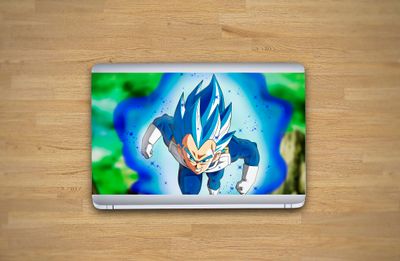
thank you sir its working....sir can you suggest me some laptop mockup i have but they are not good..
Copy link to clipboard
Copied
sir it no resizeing my images..
Copy link to clipboard
Copied
thank you for your help,but images are not resizeing according to mockup....if you know any mock which will work fine with your script please send me...it will help me alot..

Copy link to clipboard
Copied
What is actual problem? Perhaps your images are different dimensions and orientation/aspect ratio? Try to fix that first. Find image which works well with mockup then adjust all other images according to that image befors running batch to replace.
In essence, you must find which dimensions and aspect ratio works for your template if script does not do job perfectly, what is most likely if your images are not same dimensions and orientation because script is not created for your project specifically.
There is also another option using data sets to replace image in template and along way to scale image to fit or fill available space. This is option which will work regardless of different dimensions and aspect ratios but it requires additional setup from your side and one additional step because it can save PSD files only which needs to be converted in batch process to desired PNG or JPEG image.
Copy link to clipboard
Copied
You wrote " it no resizeing my images.."
The thing is smart object need to be replaced with the same size object as in the template. If you want to be able to use any size image file for replacing for replacing smart object you can try using the scripts edit option. That should do an acceptable job as long as the difference between Object Aspect Ratio and replacement images Aspect Ratio is not too great. The Object in the Template must then also be a Photoshop Object the The Scripts can not edit Raw File object or vector file objects for Photoshop does not support those files. The script will bypass editing those smart object and let you know that the are being skipped. The Scripts edit and resize your images to fill the smart Object canvas. If the Aspect ratios are not an exact match there will be some images content loss. Read the documentation its all in there. Smart Object Layers are neither Smart or Magic. You do not seem to know anything about smart object layers. Your the problem the Templates and Script most likely are good. Your using images that are not sutable for the templates you are trying to use.
Copy link to clipboard
Copied
Thanks its working fine...Will 2 mockups work at a same time???
Copy link to clipboard
Copied
The same replacement image will be populated into all the templates. The templates can have different amounts of smart object layers a Que of replacement for all possible smart object layers is required. If some templates have one smart object layer others two smart object layers and one has five there need to be five feeds obj0, obj1, obj2, obj3 and obj4 so the template with 5 smart object can be populated. One user populated 41 labels into 84 templates over 3,000 jpegs were saved it took quite some time to process the batch. Its in the documentation.
Copy link to clipboard
Copied
The mockup you have most likely can be easily modified to comply to my four rules. The mockup templates you have most likely have smart objects layers scattered throughout the layers stack and my scripts will not repopulate them. That is easy to remedy. There are just 4 rules
1) Smart object that need replacement have to be one the top of the layer stack.
A none visibility layer with a share object on top is fine.
2) If you want to be able to use the edit option so you can use any size replacement file. Object in the template that need to be replaced need to be Photoshop Objects. Not RAW file object or vector .svg .ai file objects. They would open in ACR or AI the script would lose control and not be able to edit the object.
3) There need to be none Smart object layer or group below the smart object layers so the script will know when to save the
populated mockup.
4) There needs to be a que of replacement objects for each smart object layer in folders the have the required folder name obj?


Copy link to clipboard
Copied
Hi JJMack,
your script "BatchMockupTemplates.jsx" works really well when everything is set according to the 4 rules, thanks!!! ... but that first layer on top rule creates me problem because in the mockup there are often shadow layers and or other ones that really need to stay on top! of the smart object to be replaced!
Do you have any solution for this?
It could be for example just the 5th layer (smart object) / the "N" one to be replaced!
Eventually also by name! The script replace the layer (smartobject) named "picturetobereplaced"... or even simply the 1st smart object the script finds...
There must be a way! 😉
Thanks so much if you can help!!!
Copy link to clipboard
Copied
A very simple one. Its the a simple to populate design for my scripts to populate.
Let say your mockup is very complex and you have many Smart object layer scattered throughout your layers stack with adjustment layers, overlay layers, smart filters etc. Wow complex.
Easy fix target all the layers and layer groups and use the menu Layer>New>Group from Layers... name that group Mockup. Now with the layer stack fully expanded scan the layers and find the smart object layers you want repopulated. Each time you find one target it and do a Crtl+J copy and drag the copy out the mockup group to the top of the layer stack.
When you have all the copies on top of the stack. Set their opacity and fill to 0 and turn their visibility off. You may want to color the layer green. Make sure the stack matches your replacement queues obj0, obj1, ...., objN. These none visible layers will have their objects replace. The layers in the Mockup group that share the layers object contents will be visible.
I create my Mockup templates starting with the smart object layer on top, I immediately duplicate it and drag the dupe into the group where I then transform, warp, mask filter and adjust the object for its use in the mockup group.
Its the simple to populated Mockup design. Its rule number 1..... and it is simply easy to comply with......
Copy link to clipboard
Copied
Oh that's great! Thank you so much JJMack! Easy and flawless solution! :))
Copy link to clipboard
Copied
As I'm here... will ask just one more thing! Thanks if you can!
I have mainly 2:3 and 3:4 ratio images, the mockups I'm making they're exactly for the 3:4 ratio but would be great if the script can stretch the 2:3 images to fit the 3:4 (fit the height and stretch the width).
The picture are almost all abstract designs that will not suffer that much of that minimum distortion...
I've tried read some other post but don't manage to get it if it can be done!
Thanks a lot in advance! (and... if you have a Paypal or smthg else, I can also contribute with something for the script and for help).
Copy link to clipboard
Copied
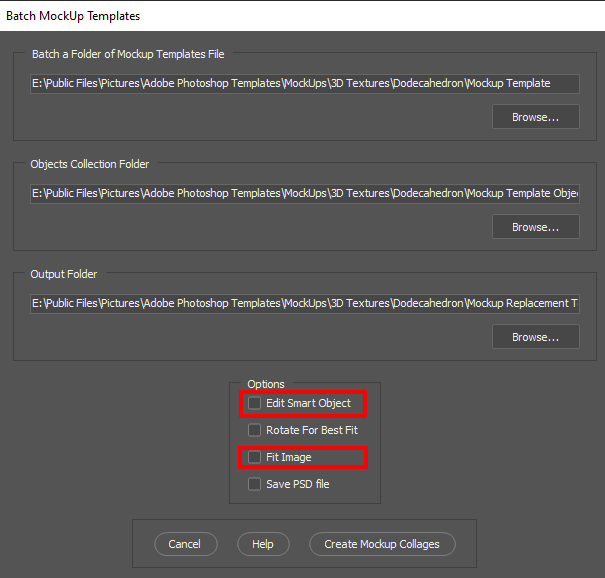
If the replacements are not the correct size and the object in the template are Photoshop objects you can use the Scripts edit option. Replacement will be edited into the existing object and resized to fill the Object canvas. Excess image areas will be clipping by the objects canvas. The replaced image will look a centered 3:4 crop expand the fill the 3:4 canvas. So you will loose some image content if the image aspect ratio are different the the original objects. I do not distort images into the wrong aspect ratio area. My process is more a centered crop resize. If you do not want to loose content in addition to Edit you can check the Fit Image option, The images will be fitted to the object canvas, Wrong aspect ratio image will have two borders. Top bottom or left and right.
Copy link to clipboard
Copied
OK! Thanks again JJMack!
Yep, I agree on the general approach to don't strewtch pictures!
The Scripts option are great and I'm already using them.
Anyway... I will probably just create dedicated mockups for each ratio.
Thank you!

Copy link to clipboard
Copied
Hi,
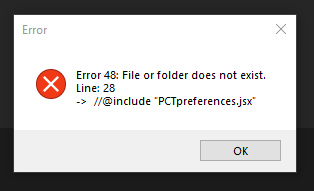
I need the PNG output version. Also I get an error after putting BatchMockupTemplates.jsx in the Presets / Script folder.
I will be very happy if you can help. Thank you.
Copy link to clipboard
Copied
My Scripts do not save PNG file only Jpeg and PSD files are saved. You can Save a PGN file from a saved PSD file. And you have my Scripts so you can Add code to save PNG files. You also did not install all my scripts. PCTpreferences.jsx in a preferences script used by my Scripts. You can Modify this script to add your own preferencs. Add Layer Styles for image and text layers. Your paths where you keep you image file and templates. Defaults for text font, color, scaling etc.
//* ==========================================================
// 2013  John J. McAssey (JJMack)
// ======================================================= */

// This script is supplied as is. It is provided as freeware.
// The author accepts no liability for any problems arising from its use.

// Image files and Template Alpha Channel "Image 1" should have the same orientation matching Aspect
// ratio is even better.  This script will try to transform the placed Images to match the Image 1 Alpha channel as
// best as it can and even try to handle orientation miss matches.

/* Help Category note tag menu can be used to place script in automate menu
<javascriptresource>
<about>$$$/JavaScripts/PCTpreferences/About=JJMack's Photo Collage Toolkit.^r^rCopyright 2013 Mouseprints.^r^rPreferences</about>
<category>JJMack's Collage Script</category>
</javascriptresource>
*/

// enable double-clicking from Mac Finder or Windows Explorer
#target photoshop // this command only works in Photoshop CS2 and higher

// bring application forward for double-click events
app.bringToFront();

///////////////////////////
//       SET-UP
///////////////////////////

/////////////////////////////////////////////////////////////////////////////////
///////////////////////CUSTOMIZE Here////////////////////////////////////////////
/////////////////////////////////////////////////////////////////////////////////
// Some Hard Coded variables that some day I may put into the dialog options area

var imageStyleList = ['Default Style (None)','Photo Collage Style 1','Photo Collage Style 2','Photo Collage Style 3','Photo Collage Style 4','Photo Collage Style 5','Photo Collage Style 6','Photo Collage Style 7','Photo Collage Style 8','Photo Collage Style 9','Photo Collage Style 10','Photo Collage Style 11'];
var imageStyleDefault = 0;			// imageStyleList index number

var textSizeFactor = 4;				// > 1 scales down text size
var textFont = "ArialMT";			// Photoshop internal font name
var textAngle = -10;				// center text angle
var textColor = new SolidColor;			// text color
    textColor.rgb.red = 255;
    textColor.rgb.green = 255;
    textColor.rgb.blue = 255;
var textStyleList = ['Default Style (None)','Shiny Metal','Shiney Metal No Stroke','Strong Metal','Strong Metal No Stroke','Clear Emboss - Inner Bevel','Clear Emboss - Outer Bevel','JJMack Overlay'];
var textStyleDefault = 0;                       // textStyleList index number
var textLocationDefault = 7;                    // text Location Default Bottom Center

//var templateFolder = "C:/Program Files/Adobe/Adobe Photoshop Templates/";
var templateFolder = "E:/Public Files/Pictures/Adobe Photoshop Templates/";
//var imagePath = "~/My Documents/My Pictures/";	// Windows XP
//var imagePath = "~/Pictures/";			// Windows 7
var imagePath = "E:/My Files/Pictures/";

// End hard coded variables
/////////////////////////////////////////////////////////////////////////////////
/////////////////////////////////////////////////////////////////////////////////
/////////////////////////////////////////////////////////////////////////////////

]


Find more inspiration, events, and resources on the new Adobe Community
Explore Now
 AdChoices