Known Participant
July 26, 2024
Answered

Batch turning rasterize layers into work paths/vectors?

  • July 26, 2024
  • 1 reply
  • 416 views

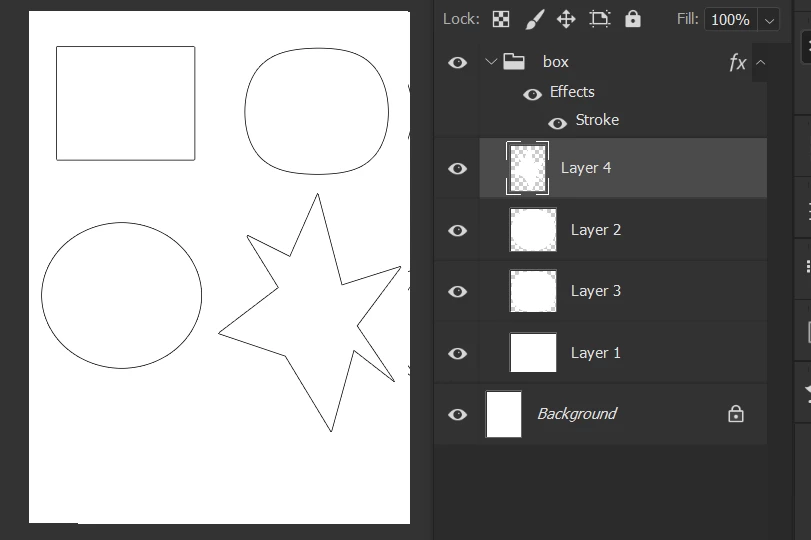
I have tons of layers which each of them are the random shapes. They're rasterized and in a group like this:

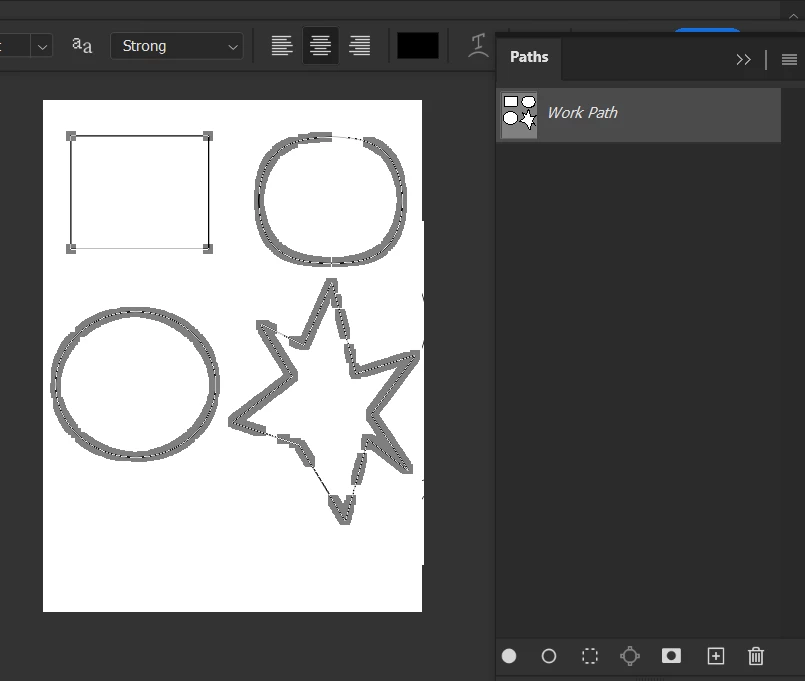
I used to make their work paths by merging them and took selection of the whole layer:

However, this way is not suitable anymore for my work, so I have to create separated paths. I was looking for some faster ways to convert those rasterize shapes into vector layers, but it seems hopeless. Could anyone help me this?


This topic has been closed for replies.
Correct answer Stephen Marsh

@Zipser31550168t845 


Give this script a go:


/*
All Layer Selections in the Selected Group to Separate Paths.jsx
v1.0 - 26th July 2024, Stephen Marsh
https://community.adobe.com/t5/photoshop-ecosystem-discussions/batch-turning-rasterize-layers-into-work-paths-vectors/m-p/14761068
*/

#target photoshop

if (app.documents.length > 0) {
    var doc = app.activeDocument;
    // Get the current layer group
    var layerGroup = doc.activeLayer;
    if (layerGroup.typename == "LayerSet") {
        var layers = layerGroup.artLayers;
        // Loop over all art layers in the current layer group
        for (var i = 0; i < layers.length; i++) {
            var layer = layers[i];
            var layerName = layer.name + " Path";
            loadTransparency(layer);
            selectionToPath(2);
            savePath();
        }
        deselectPaths();
        app.beep();
        alert("Selections from all layers in the selected group have been converted to separate paths!");
    } else {
        alert("Select a layer group!");
    }
} else {
    alert("A document must be open to run this script!");
}


///// Functions /////

// Load the layer's transparency channel as a selection
function loadTransparency(layer) {
    var c2t = function (s) {
        return app.charIDToTypeID(s);
    };
    var s2t = function (s) {
        return app.stringIDToTypeID(s);
    };
    var descriptor = new ActionDescriptor();
    var reference = new ActionReference();
    var reference2 = new ActionReference();
    doc.selection.deselect();
    doc.activeLayer = layer;
    reference.putProperty(s2t("channel"), s2t("selection"));
    descriptor.putReference(c2t("null"), reference);
    reference2.putEnumerated(s2t("channel"), s2t("channel"), s2t("transparencyEnum"));
    descriptor.putReference(s2t("to"), reference2);
    executeAction(s2t("set"), descriptor, DialogModes.NO);
}

// Convert the selection to a temporary work path
function selectionToPath(tolValue) {
    var s2t = function (s) {
        return app.stringIDToTypeID(s);
    };
    var descriptor = new ActionDescriptor();
    var reference = new ActionReference();
    var reference2 = new ActionReference();
    reference.putClass(s2t("path"));
    descriptor.putReference(s2t("null"), reference);
    reference2.putProperty(s2t("selectionClass"), s2t("selection"));
    descriptor.putReference(s2t("from"), reference2);
    descriptor.putUnitDouble(s2t("tolerance"), s2t("pixelsUnit"), tolValue);
    executeAction(s2t("make"), descriptor, DialogModes.NO);
}

// Save the path from a temporary work path
function savePath() {
    var s2t = function (s) {
        return app.stringIDToTypeID(s);
    };
    var descriptor = new ActionDescriptor();
    var reference = new ActionReference();
    var reference2 = new ActionReference();
    reference.putClass(s2t("path"));
    descriptor.putReference(s2t("null"), reference);
    reference2.putProperty(s2t("path"), s2t("workPath"));
    descriptor.putReference(s2t("from"), reference2);
    descriptor.putString(s2t("name"), layerName);
    executeAction(s2t("make"), descriptor, DialogModes.NO);
}

// Deselect active paths
function deselectPaths() {
    var s2t = function (s) {
        return app.stringIDToTypeID(s);
    };
    var descriptor = new ActionDescriptor();
    var reference = new ActionReference();
    reference.putEnumerated(s2t("path"), s2t("ordinal"), s2t("targetEnum"));
    descriptor.putReference(s2t("null"), reference);
    executeAction(s2t("deselect"), descriptor, DialogModes.NO);
}


https://prepression.blogspot.com/2017/11/downloading-and-installing-adobe-scripts.html

1 reply

Stephen Marsh
Community Expert
Stephen MarshCommunity ExpertCorrect answer
Community Expert
July 26, 2024

@Zipser31550168t845 


Give this script a go:


/*
All Layer Selections in the Selected Group to Separate Paths.jsx
v1.0 - 26th July 2024, Stephen Marsh
https://community.adobe.com/t5/photoshop-ecosystem-discussions/batch-turning-rasterize-layers-into-work-paths-vectors/m-p/14761068
*/

#target photoshop

if (app.documents.length > 0) {
    var doc = app.activeDocument;
    // Get the current layer group
    var layerGroup = doc.activeLayer;
    if (layerGroup.typename == "LayerSet") {
        var layers = layerGroup.artLayers;
        // Loop over all art layers in the current layer group
        for (var i = 0; i < layers.length; i++) {
            var layer = layers[i];
            var layerName = layer.name + " Path";
            loadTransparency(layer);
            selectionToPath(2);
            savePath();
        }
        deselectPaths();
        app.beep();
        alert("Selections from all layers in the selected group have been converted to separate paths!");
    } else {
        alert("Select a layer group!");
    }
} else {
    alert("A document must be open to run this script!");
}


///// Functions /////

// Load the layer's transparency channel as a selection
function loadTransparency(layer) {
    var c2t = function (s) {
        return app.charIDToTypeID(s);
    };
    var s2t = function (s) {
        return app.stringIDToTypeID(s);
    };
    var descriptor = new ActionDescriptor();
    var reference = new ActionReference();
    var reference2 = new ActionReference();
    doc.selection.deselect();
    doc.activeLayer = layer;
    reference.putProperty(s2t("channel"), s2t("selection"));
    descriptor.putReference(c2t("null"), reference);
    reference2.putEnumerated(s2t("channel"), s2t("channel"), s2t("transparencyEnum"));
    descriptor.putReference(s2t("to"), reference2);
    executeAction(s2t("set"), descriptor, DialogModes.NO);
}

// Convert the selection to a temporary work path
function selectionToPath(tolValue) {
    var s2t = function (s) {
        return app.stringIDToTypeID(s);
    };
    var descriptor = new ActionDescriptor();
    var reference = new ActionReference();
    var reference2 = new ActionReference();
    reference.putClass(s2t("path"));
    descriptor.putReference(s2t("null"), reference);
    reference2.putProperty(s2t("selectionClass"), s2t("selection"));
    descriptor.putReference(s2t("from"), reference2);
    descriptor.putUnitDouble(s2t("tolerance"), s2t("pixelsUnit"), tolValue);
    executeAction(s2t("make"), descriptor, DialogModes.NO);
}

// Save the path from a temporary work path
function savePath() {
    var s2t = function (s) {
        return app.stringIDToTypeID(s);
    };
    var descriptor = new ActionDescriptor();
    var reference = new ActionReference();
    var reference2 = new ActionReference();
    reference.putClass(s2t("path"));
    descriptor.putReference(s2t("null"), reference);
    reference2.putProperty(s2t("path"), s2t("workPath"));
    descriptor.putReference(s2t("from"), reference2);
    descriptor.putString(s2t("name"), layerName);
    executeAction(s2t("make"), descriptor, DialogModes.NO);
}

// Deselect active paths
function deselectPaths() {
    var s2t = function (s) {
        return app.stringIDToTypeID(s);
    };
    var descriptor = new ActionDescriptor();
    var reference = new ActionReference();
    reference.putEnumerated(s2t("path"), s2t("ordinal"), s2t("targetEnum"));
    descriptor.putReference(s2t("null"), reference);
    executeAction(s2t("deselect"), descriptor, DialogModes.NO);
}


https://prepression.blogspot.com/2017/11/downloading-and-installing-adobe-scripts.html
Known Participant
July 26, 2024

this work very nice Sir, thank you very much!

Stephen Marsh
Community Expert
Community Expert
July 26, 2024
quote

this work very nice Sir, thank you very much!


By @Zipser31550168t845


You're welcome, please mark my post with the script code as a correct answer, thanks.