
ullih36201345
Participant
April 3, 2023
Répondu

beim öffnen einer Datei kommt blinkendes weißes Fenster

Beim öffnen eienr Datei in Photoshop kommt ein blinkendes weißes Fenster. Diesen Fehler hatte ich noch nie und er kam von heute auf morgen! (Neuste Photoshopversion 24.3.0)

Wer könnte mir hier behilflich sein?

Gruß UH
Ce sujet a été fermé aux réponses.
Meilleure réponse par Ged_Traynor

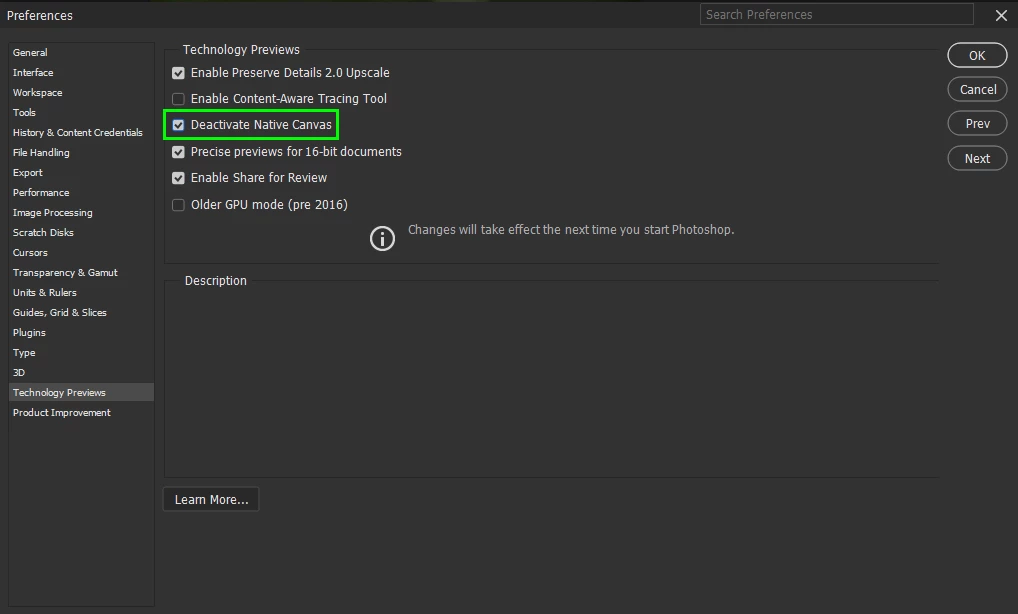
@ullih36201345 go to Edit > Preferences > Technology Previews and enable this option, then restart Photoshop

2 commentaires

Participant
April 8, 2023

Hallo UH,

hatte ich auch. Folgende Lösung hat bei mir funktioniert:

  • Wähle "Bearbeiten - Voreinstellungen - Technologievorschau..."
  • Wähle "Älterer GPU-Modus (vor 2016)"
  • Bestätige mit OK
  • Restart PS


Grüße ewald


Ged_Traynor
Community Expert
Ged_TraynorCommunity ExpertRéponse
Community Expert
April 3, 2023

@ullih36201345 go to Edit > Preferences > Technology Previews and enable this option, then restart Photoshop

ullih36201345
Participant
April 3, 2023

Super, funktioniert

Vielen vielen Dank

Ged_Traynor
Community Expert
Community Expert
April 3, 2023

@ullih36201345 you're welcome