
fizzyfizz
Known Participant
May 12, 2021
Question

Bending listed text

  • May 12, 2021
  • 3 replies
  • 3152 views

I cannot for the life of me work this out but I'm sure it must be possible with paths.

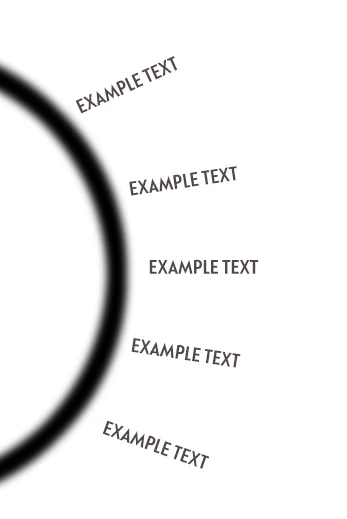
I want to bend equally spaced text onto a curve (as per pic below) 

How can I do this? 
This topic has been closed for replies.

3 replies

jane-e
Community Expert
Community Expert
May 12, 2021

Is this what you are looking for? The scripts came in while I was getting this ready, but I've done it and will post anyway.


Draw an ellipse and a path that starts from the center of the ellipse. Click the Type tool where you want the text to start.


Copy the Type layer. Rotate an appropriate amount for the number of items you have. Move the pivot point to the center of the ellipse. I used -15°.

(360°/x)


Repeat the rotation.


You can edit the text. The layer names will update when you do.


~ Jane


fizzyfizz
fizzyfizzAuthor
Known Participant
May 12, 2021

Yes, brilliant! Thanks Jane. That's a great workaround 🙂 

jane-e
Community Expert
Community Expert
May 12, 2021

You're welcome, @fizzyfizz. This is much faster in Illustrator because of several features that Illustrator has that PS does not, but it can be done without too much trouble in Photoshop. Let us know if you have questions.

~ Jane


Chuck Uebele
Community Expert
Community Expert
May 12, 2021

Frankly, the only way I can think to do this would be to write a script that calculates equal spaces on the path, then gets the perpendicular angle of those locations and apply them to the text angles. 

c.pfaffenbichler
Community Expert
Community Expert
May 12, 2021

Please elaborate. 


If there is the slightest chance that the curve may need to be edited later on I would recommend considering using Indesign for this task. 

fizzyfizz
fizzyfizzAuthor
Known Participant
May 12, 2021

Imagine having a bulleted list you need to curve round an arc. I could do it by hand but I'm sure there must be a way to do this in Photoshop. The text or curve won't need to be edited later. I don't have access to InDesign. Thanks 🙂

fizzyfizz
fizzyfizzAuthor
Known Participant
May 12, 2021

If all the text is the same, and you don't need to edit it later, you can create a pattern of the text and use the scripted fill with pattern along a path.


Wow, that's amazing! Thanks. It's an arc, not a circle. Can't believe it needs to be so complicated though 😞
