Known Participant
June 5, 2021
Answered

Best downsizing method

  • June 5, 2021
  • 4 replies
  • 3575 views

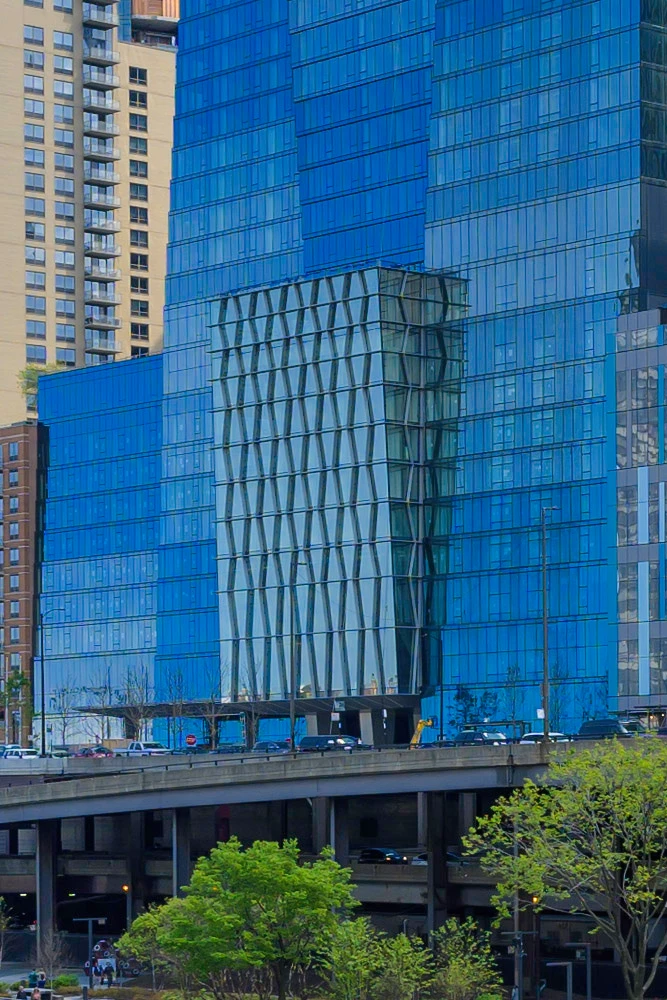
I have an 45 MP image I would like to downsize for the web, The image linear dimension would need to be downsized to 1/7 of original size. The image has plenty of small detail and an architectural pattern which does not hold up when downsized. This crop of the image would need to be downsized to 1/7 of linear size and keep the pattern intact. Is it possible?
This topic has been closed for replies.
Correct answer Nancy OShea

Thank you for your reply. Is there a way to convert the image froma  a raw file or tiff to a vector graphic in Photoshop?


quote

Thank you for your reply. Is there a way to convert the image from a raw file or tiff to a vector graphic in Photoshop?

=========

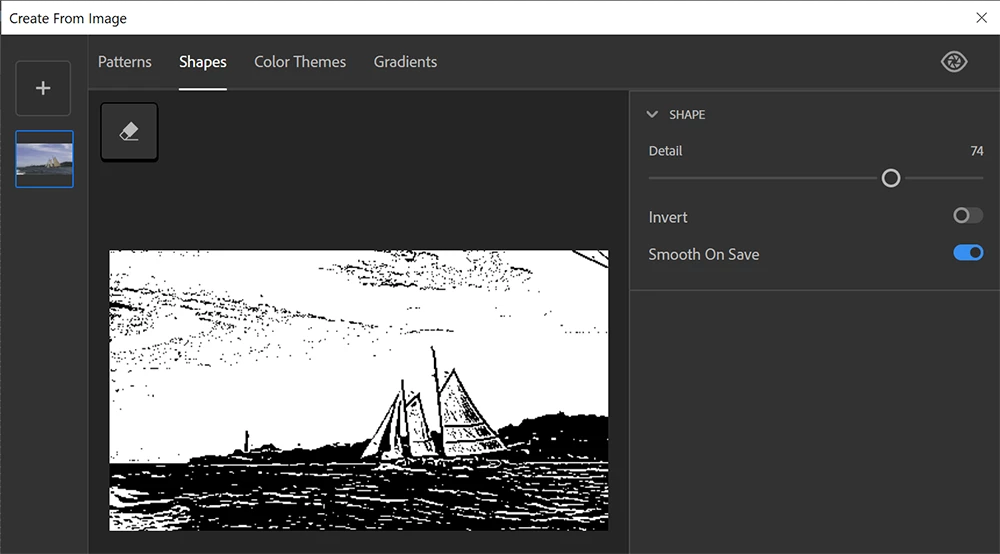
Sure.  But not to any degree of success.  Trust me, you wouldn't be happy with the results.  I tried it with a simple photograph below.  See screenshot.


For best results, re-trace your photo in Illustrator.  See link below.

https://www.stickermule.com/blog/how-to-use-image-trace-in-adobe-illustrator


4 replies

Participant
September 27, 2022

Wah kya Baat Hai

Zesty_wanderlust15A7
Known Participant
June 6, 2021

In PS, the "Nearest Neighbor" algorithm while downsizing could potentially come closest but it doesn't use interpolation, so anyone looking at it larger than 100% will see ugly aliasing...

Try this...

If you want a 150 px pic, downsample to 300 px with Bicubic Sharper. Then downsize to 150 px with Nearest Neighbor. You might get lucky it's not too bad when enlarging or keep some control with CSS maybe...

Just remembering this method is less ideal for architecture as it needs the interpolation more badly than a natural scene...

Nancy OShea
Community Expert
Community Expert
June 5, 2021

Go to File > Export > Export As > JPG (see screenshot). 


Keep in mind that reducing pixels removes information.  That's the problem with resolution dependant images.


Nancy O'Shea— Product User & Community Expert
Kaj_EAuthor
Known Participant
June 6, 2021

The image should first be downsized to 1/7 of linear dimension. The image I posted is a crop of the original image. Can you downsize it to 1/7 of original linear dimension and still retain the architectural pattern in the center of the image?

Kaj_EAuthor
Known Participant
June 6, 2021
quote

Thank you for your reply. Is there a way to convert the image from a raw file or tiff to a vector graphic in Photoshop?

=========

Sure.  But not to any degree of success.  Trust me, you wouldn't be happy with the results.  I tried it with a simple photograph below.  See screenshot.


For best results, re-trace your photo in Illustrator.  See link below.

https://www.stickermule.com/blog/how-to-use-image-trace-in-adobe-illustrator


Thank you Nancy.


Had hoped there would be a way of doing it in Photoshop, as I am on the photography plan and would not be excited to spend more, This is the first image where I have encountered this issue (sharp wide angle shot on a 45 MP snesor). I will probaly try the free trail of illustrator to se how it works for this single image.


I had tried bicubic, bilinear and preserve detail 2.0 wiht 50% downsizing steps in Photoshop 2021, but without success. The pattern detail is still there when I downsize the image to about 1/4 of original linear size, but it is gone when I go to 1/7. I should perhaps reshoot with the building filling more of the frame. I hought I had found a decent composition with the present image, but the downsizing seems to be a problem. 


This will probably become more of a problem when cameras with increasing pixel amount become increasingly common. Perhaps something for Adobe to consider in future versions of Photoshop?


Thank you for all the help sofar.


Kaj

Kaj_EAuthor
Known Participant
June 5, 2021

Sorry for the typos. Shuld read downsized"