Keep in mind that when using Free Transform, how it resamples depends on what is selected in the Interpolation menu in the options bar. These are the same as the interpolation options you see in the Resample menu in Image > Image Size, but Image Size offers eight options. Therefore, there is no Free Transform option that will be any better than in Image Size, because Image Size has all of the Free Transform options and a few more.
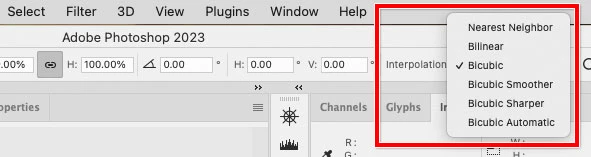
Also, in Photoshop today you have many more options for enlarging. The current list includes:
- Image > Image Size with Resampling enabled (includes the newer Preserve Details and Preserve Details 2.0 interpolation methods)
- Free Transform a layer with 5 interpolation options
- Super Zoom in Filter > Neural Filters (uses AI)
- Enhance upscaling command in Camera Raw (uses AI)
Which one is best often depends on what the source image content is. The more photographic the image, the more likely one of the newer AI options might be better.
…try doing small increments and building - that improves the result, somewhat.
By @S_Gans
The “enlarge in steps” method was popular with older versions, but I think more recently someone from Adobe said that method can no longer beat all of the newer resampling algorithms and AI options that Photoshop now has.


 AdChoices