Participant
February 18, 2017
Answered

Bevel and Emboss Gloss Contour Problem

  • February 18, 2017
  • 1 reply
  • 3340 views

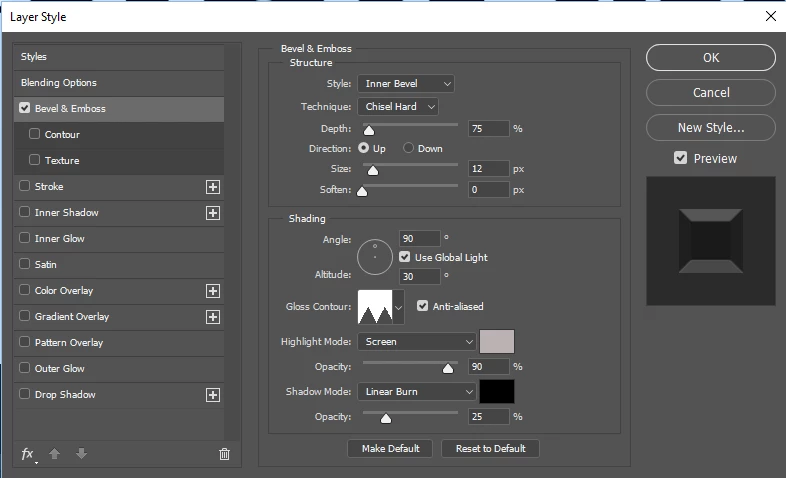
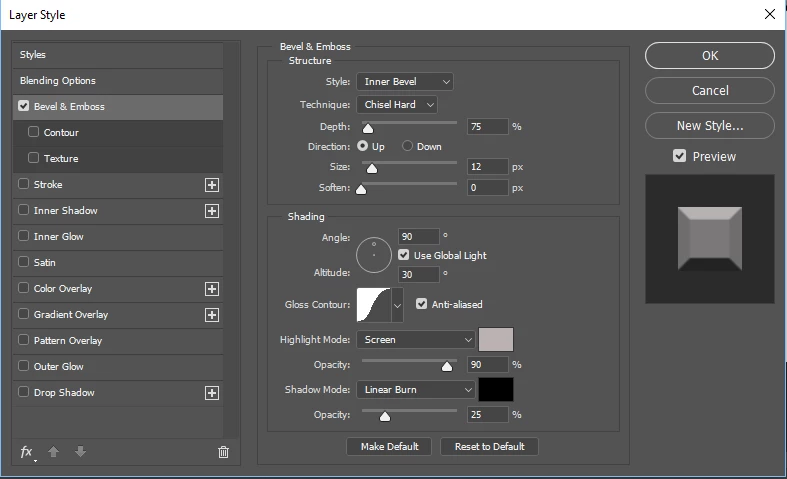
Everytime I change the gloss contour in the Emboss & Bevel feature (Blending Options), instead of changing the contour of the edge, it just changes the shade of grey that it's using, and the edge remains the standard linear bevel instead of the other contour shape.  Some of them just make it solid black.  I've been trying to follow some tutorials and their results are vastly different than mine, and I'm using the exact same settings as the presenter.  When select the shape, on their project, it does change the contour of the edge and not the overall color, but on mine, it just changes the color and not the edge at all.  I'm new at using Photoshop, so maybe there's something I'm doing wrong.  Thanks in advance for your help.

    This topic has been closed for replies.
    Correct answer goforce3

    After playing with the settings some more, I figured out my problem. There's another Contour option underneath Bevel & Emboss. That's the one that adjusts the Contour of the edges. The Gloss Contour apparently only sets how the reflections interact. 

    1 reply

    c.pfaffenbichler
    Community Expert
    Community Expert
    February 19, 2017

    Are you sure the presenter in the tutorial uses Technique »Chisel Hard«?

    goforce3AuthorCorrect answer
    Participant
    February 19, 2017

    After playing with the settings some more, I figured out my problem. There's another Contour option underneath Bevel & Emboss. That's the one that adjusts the Contour of the edges. The Gloss Contour apparently only sets how the reflections interact.