

BIG problems with PS 12.2
- July 9, 2020
- 1 commentaire
- 193 vue
Using the same techniques I've used for years with various PS versions, I getting different results. I've attached a screenshot below. GREEN: Using the move tool, I dragged document A onto document B. In the past, that would now give document B 2 layers. RED: Even though the layers panel shows only 2 layers, looking at document B you can clearly see there are 3 layers (B, A1, A2). Layer A1 can be moved, resized, deleted BUT layer A2 can not be altered in any way. I have to use the history panel to get rid of the entire MOVE process.
Screenshot 2: My intention was to add a text layer (Hello) to the background layer. BLUE: Using the text tool, I clicked ONCE on BG layer and typed Hello. Even though the layers panel shows 2 layers, there's actually 3 (BG, lorem ipsum, Hello). "Hello" layer can be moved, resized, deleted BUT "lorem ipsum" can not be altered in any way not even deleted.
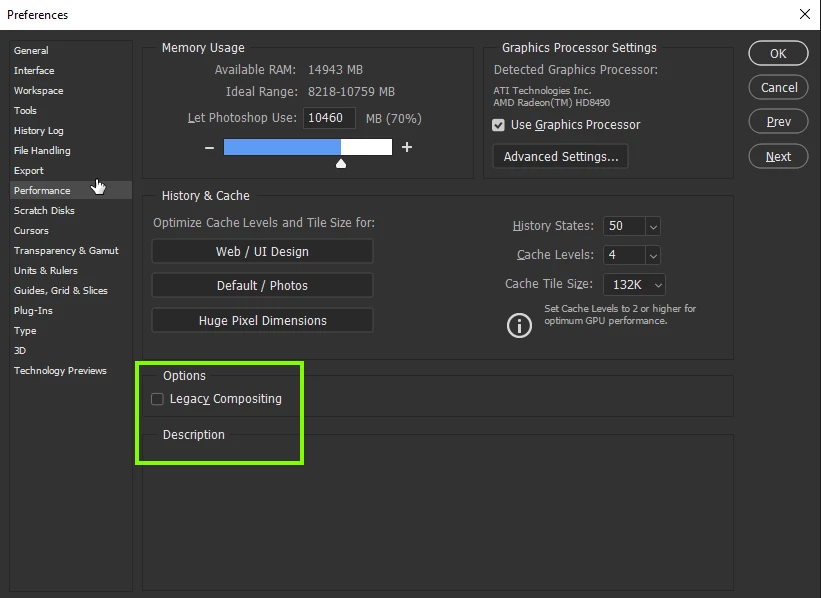
What in the world is going on? Is this something that can be fixed in PREFERENCES?
 AdChoices