

wobke362
Known Participant
April 8, 2023
Answered

Black & white flickering image window

  • April 8, 2023
  • 2 replies
  • 745 views

Hi peeps,

I downloaded some new Photoshop effects to try, but with opening an image in Photoshop I immediatly get a black&white flickering image window and it is not showing the image I opened. My image is however showing in my layers?

Photoshop is up-to-date: version 24.3

Windows 10 Home - x64


Someone has an idea?

Thanks!


Carine.
This topic has been closed for replies.
Correct answer Ged_Traynor

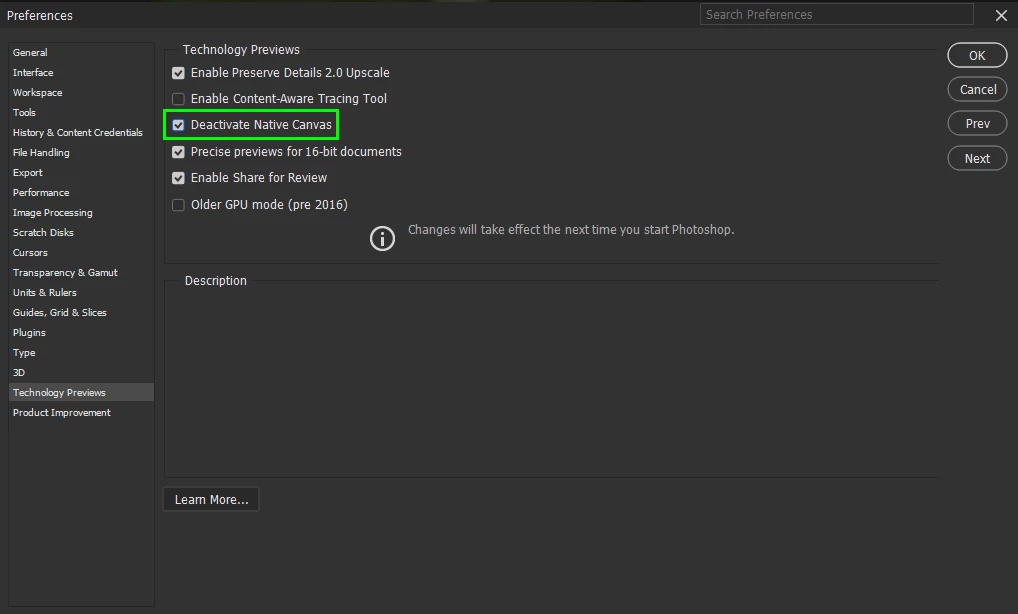
@wobke362 go to Edit > Preferences > Technology Previews and enable this option, then restart Photoshop

2 replies

Participant
April 8, 2023

Thank you so much. I had the same Problem.

Ged_Traynor
Community Expert
Ged_TraynorCommunity ExpertCorrect answer
Community Expert
April 8, 2023

@wobke362 go to Edit > Preferences > Technology Previews and enable this option, then restart Photoshop

wobke362
wobke362Author
Known Participant
April 8, 2023

Thank you so much - you're a life savier... 😉