
Participant
May 22, 2023
Question

Black to transparent gradient

  • May 22, 2023
  • 2 replies
  • 15299 views

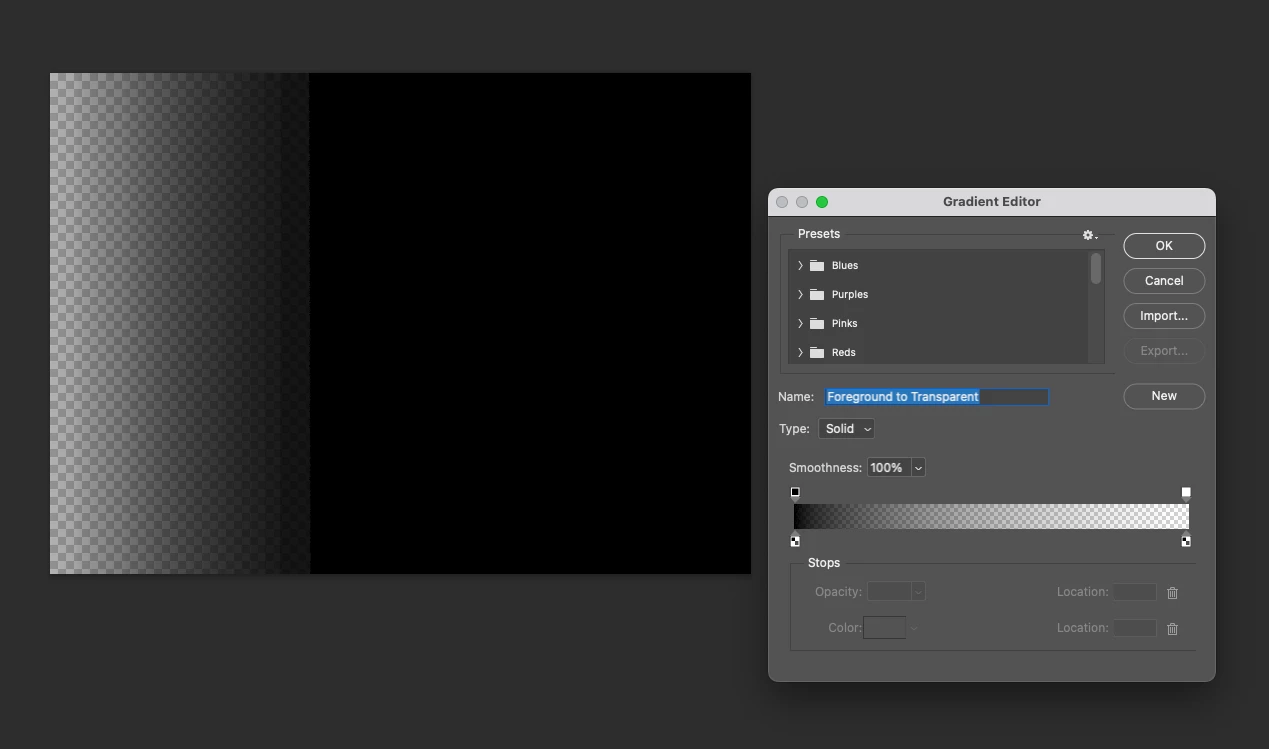
I have been using photoshop for 25 years and cannot figure out the new gradient tool. I am using the legacy preset, foreground to transparent. I want black to go about 3/4 across the canvas and then go to transparent (using it as a mask in Premiere). But when I try and create it, it is not a gradual transparency, it creates a very obvious black line and then kind of goes transparent. Totally unusable. I have tried to play around with the settings but it only makes it worse. What am I missing? Attaching a screenshot...
This topic has been closed for replies.

2 replies

Known Participant
November 3, 2024

Yeah that's why i don't like upgrading, they change it around so it takes so long to figure out how to do basic things


jane-e
Community Expert
Community Expert
November 4, 2024

@ricda 


If you don't like the new gradient tool, you can change the mode in the options bar from Gradient to Classic Gradient to work the old way.


Jane


Trevor.Dennis
Community Expert
Community Expert
May 22, 2023

Starting with the Black to Transparent as you have in the editor, click once above the gradient (my green highlight).

Then drag the Opacity Midpoint slider to the right to soften the transition and move it to your required location.

To save the new gradient give it a name (where it says Custom) and click on New.

Trevor.Dennis
Community Expert
Community Expert
May 22, 2023

I meant to say that I am not a big fan of the new(ish) gradient panel but you can load the Legacy Gradients from the panel menu.  Where these panel shine (Shapes, Patterns, Styles and Gradients) is the search function, so remember to give your custom gradients — or rename exisiting gradients etc. — with meaningful names.  All of these panels, plus the Brush presets panel, can only search the main panel area.  That is to say, they will not look in groups that have not been loaded from the fly-out menu.

Participant
May 22, 2023

Hi Trevor, thanks for the answer! Tried it again but it still makes a very prominent line. I thought maybe it was a graphics card issue or something but other gradients work just fine. Seems to only be with the black and transparency...