Participant
December 23, 2021
Answered

blak is green not black?

  • December 23, 2021
  • 1 reply
  • 1671 views

When ever Microsoft does an update someething changes. This morning I opened photoshop uploaded a picture of a cow and i see that all the black is green(ish) If I open it in another program the black is black.

I changed the ICC for the printer, but obviously that doesnt help.

What ever I do, the picture's black stays green. If I open a different picture, same issue.
If I add black, it's green(ish)


Any ideas? Please.
This topic has been closed for replies.
Correct answer D Fosse

That sounds very much like a broken monitor profile. This is quite common. Monitor/laptop manufacturers distribute profiles through Windows Update, and these profiles are very often bad in different ways.


The "other application" is probably not color managed and doesn't use the monitor profile.


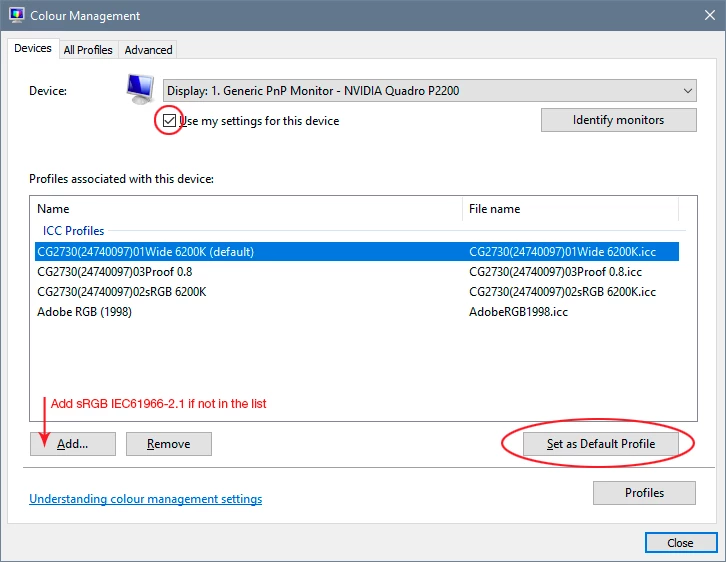
The proper way to deal with this is to use a calibrator to make a new profile, but if you don't have one, use sRGB IEC61966-2.1 for now. It won't be entirely accurate, but better than a broken profile.


Relaunch Photoshop when done, it needs to load the profile at application startup:

1 reply

D Fosse
Community Expert
D FosseCommunity ExpertCorrect answer
Community Expert
December 23, 2021

That sounds very much like a broken monitor profile. This is quite common. Monitor/laptop manufacturers distribute profiles through Windows Update, and these profiles are very often bad in different ways.


The "other application" is probably not color managed and doesn't use the monitor profile.


The proper way to deal with this is to use a calibrator to make a new profile, but if you don't have one, use sRGB IEC61966-2.1 for now. It won't be entirely accurate, but better than a broken profile.


Relaunch Photoshop when done, it needs to load the profile at application startup:

Participant
December 23, 2021

Thank you for such a quick respons. And wow!

That was it. So simple. Didnt think of that. I had to change the printer profile yesterday from sawgrass to Ricoh. I did not think about that changing the printer profile also changed the moniot profile.


Your a BOSS! 

davescm
Community Expert
Community Expert
December 23, 2021

For clarity, changing the printer profile does not change the monitor profile. They are unrelated. The monitor profile is set in the operating system and hence a broken profile can be delivered with an update.


Dave