
Participating Frequently
July 7, 2021
Question

Blend Photo onto canvas for web banner

  • July 7, 2021
  • 1 reply
  • 2125 views

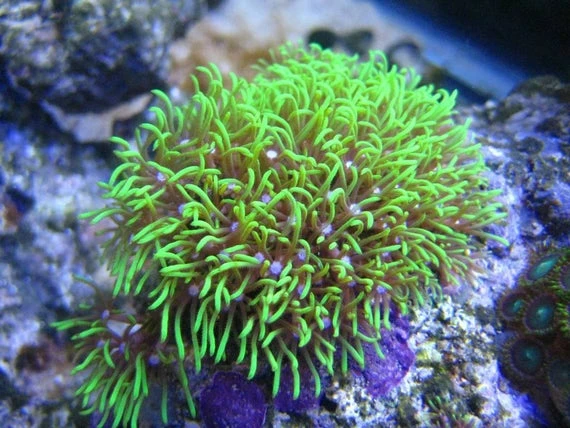
I have a photo taken from an iPhone. The focus object can't be cut out easily. Here's a googled example.

I need to place this onto a banner 1900x400px for example. I either end up with 

1) a photo on with the image center and middle on a gradient or painted background?

2) Photo way out of view/focus due to it's sizing?


What options / ideas are there to do somethin meaningful with this?? 
This topic has been closed for replies.

1 reply

c.pfaffenbichler
Community Expert
Community Expert
July 8, 2021

Content-Aware Fill is not likely to create a good background with so little background availabe, so I would recommend searching stock images sites to find »filler material« to extend the image. 

Also a strong »vignette«, effectively painting the sides black, could help. 

Participating Frequently
July 8, 2021

Could I grab the last cm of the image repeat it over and over then blur the image?


or could I blend it out from there to a single colour? But do it so it looked well done?


how would I do that?

Participating Frequently
July 8, 2021

With that image filling in the background is not that hard; it is probably too difficult for Content-Aware, though. 

So manual touch-up is likely necessary. 


Edit: 


That;s flippen amazing. When a look at most of my images, there is space on either side of the centrepeice .


I assume I can do the same with something like this? even though it's not the same simple pattern?


Are you willing to give a quick step by step guide to get me started on this?