

Block Eraser "stuttering" ...?
So, I've been having issues with my Eraser tool since I got Photoshop CC (Mac), and I can't seem to figure out what the problem is. Specifically, the issue is with using the Eraser in Block mode.
In theory, Block mode should just erase a big square chunk based on the size of the zoom. No problem, I used to use it all the time back before this whole 'subscription' model thing. But since getting CC, I seem to be having issues with it 'stuttering' when I drag the Block Eraser tool across the area I need erased.
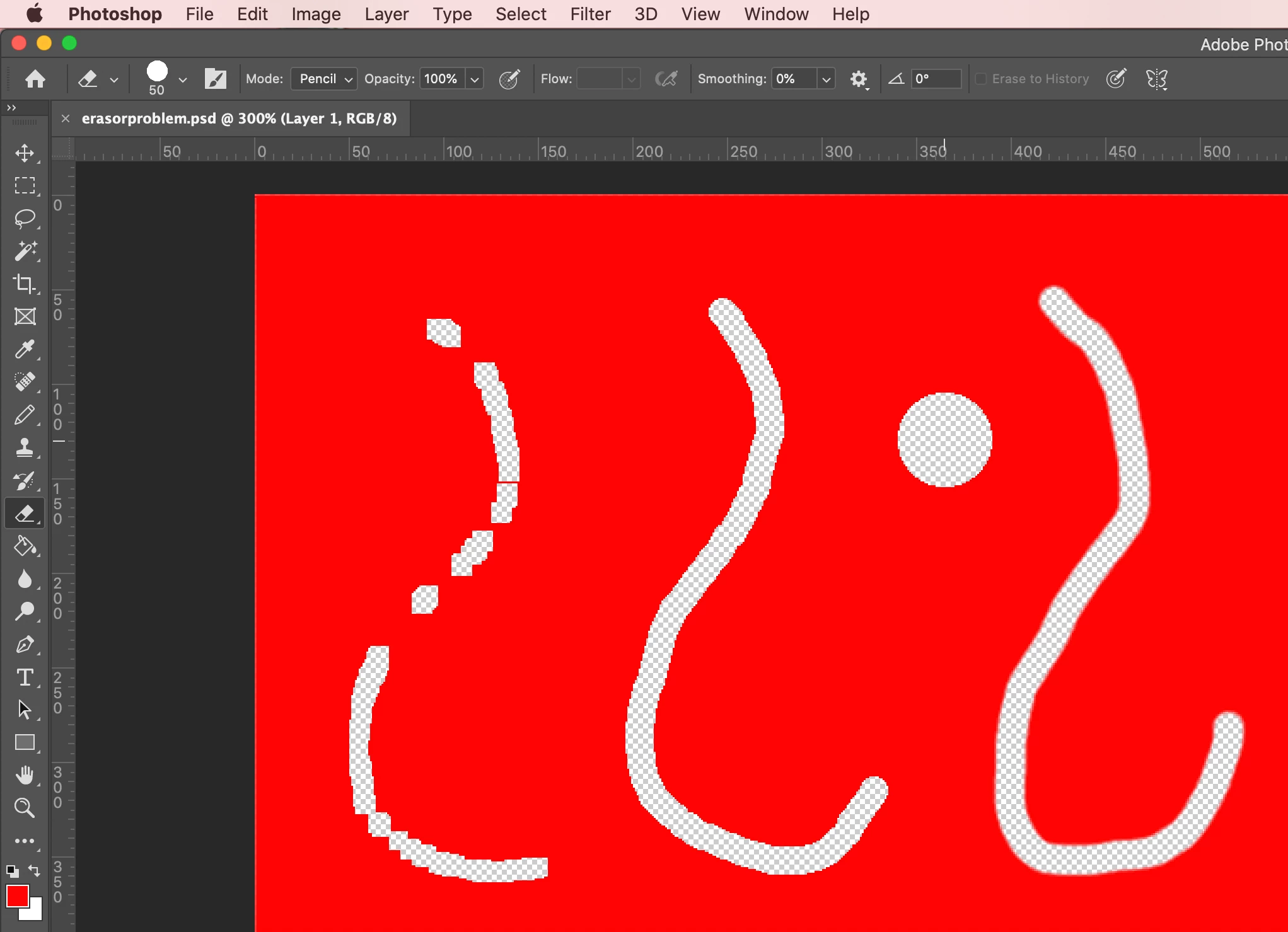
See the attached image: the sweep on the left is what i get from Block Eraser mode, while the other two are in pencil and brush eraser modes (all lines being dragged with the same speed and direction). Despite that, only the Block Eraser tool is acting up and "stuttering" as it moves. I don't use a tablet or anything (plain old unfancy mouse), I have already tried resetting the Eraser tool, etc., and every setting I can find for Block Eraser is set to just provide a simple sweep of erased material. No blurring, no pressure, nothing. The stuttering is semi-random, in that it seems to change a little as I move (some spots are good, other times it's almost none chosen -- even the initial mouse presss to start sometimes doesn't eras anything until i've moved quite a bit and it kicks in it fits and stutters), so it's not snapping to anything (I have all those turned off, etc.).
Any ideas? I don't use PS for anything super fancy, so Block Eraser was one of my most commonly-used tools, but it's largely uselesss now.
In what may be a possible related issue (or not, I dunno), I noticed that the Pencil Eraser doesn't seem to actually erase out to the full size, either (as seen in the screenshot image which I took with the pencil eraser outline for reference around the circle it actually deleted).
Thanks in advance! Any help would be appreciated.
 AdChoices