nphillips82
Inspiring
August 6, 2018
Answered

Blur Gallery Tool Window/Palette Missing

  • August 6, 2018
  • 5 replies
  • 11315 views

Hello,

I was in the Field Blur tool and was messing around but wanted to cancel and instead of the cancel button at the contextual menu at the top I accidentally closed the tool window/palette whatever. So now when I go into any of the blur gallery options I no longer get the extra tool settings. I tried searching first but all the questions I saw were related to the actual cursor and showing extras or graphics cards not allowing this as an option. My card is more than capable I was using the tool I just stupidly closed it and can't get the tool settings back.

I've tried alt + h I saw that in a thread but that didn't seem to work. Any suggestions? Thanks in advance!
    This topic has been closed for replies.
    Correct answer nphillips82

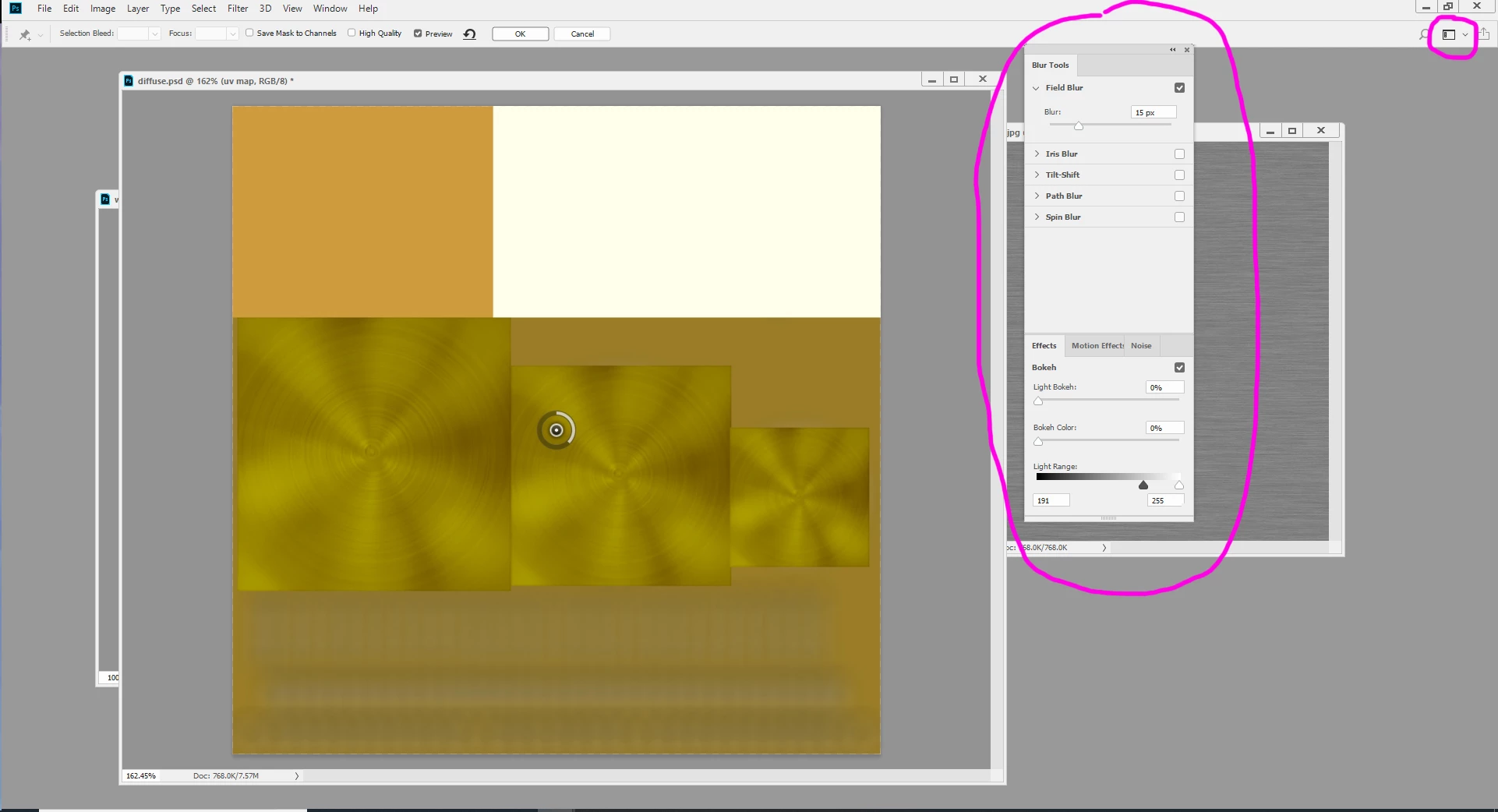
    Ah!! I just now figured it out. I'll upload a picture and answer just in case anyone else comes across this. Basically while in the tool there's a button on the very top right under the minimize/maximize/close buttons. There's another three buttons under those starting with a magnifying glass. The middle one that looks kind of like a screen layout, is- the one you want. Normally it changes your workspace but in the Blur Gallery tool you can use it to Reset Blur Gallery and then the specific tools for whatever blur gallery effect you've selected will come back! I don't know if I'll even use this again I was just playing around but I like to have things default until I really decide to use them. Thanks everyone for looking into this for me.

    5 replies

    Participant
    December 11, 2021

    Hi All,


    im having the same exact issue with blur tool, the pop up window for adjustments is missing an the solution suggested below does not work either because that square button looking like layout is of. any advise? 

    nphillips82
    Inspiring
    March 26, 2019

    iamalivingstone​ no problem glad my fussing around in PS was helpful I know how annoying it is when you have an obscure problem and can't find the answer lol

    nphillips82
    nphillips82AuthorCorrect answer
    Inspiring
    August 11, 2018

    Ah!! I just now figured it out. I'll upload a picture and answer just in case anyone else comes across this. Basically while in the tool there's a button on the very top right under the minimize/maximize/close buttons. There's another three buttons under those starting with a magnifying glass. The middle one that looks kind of like a screen layout, is- the one you want. Normally it changes your workspace but in the Blur Gallery tool you can use it to Reset Blur Gallery and then the specific tools for whatever blur gallery effect you've selected will come back! I don't know if I'll even use this again I was just playing around but I like to have things default until I really decide to use them. Thanks everyone for looking into this for me.

    The Purpose Church
    Participant
    February 7, 2019

    Thank you! This is a really dumb problem with photoshop that should not be an issue. So glad I found your solution!

    nphillips82
    Inspiring
    August 11, 2018

    I can't post a screenshot now because what I was seeing is gone. Blur gallery was a bit different than opening the filter gallery. The first couple times I used it, the cursor would turn into a pin and a new tool palette would open on the right side over top of the regular interface. You'd pin where you wanted the blur effect to go and then you could use the tool palette on the right to tweak the settings. Now I've lost that ability it seems and can't get it back lol.

    Mohammad.Harb
    Community Expert
    Community Expert
    August 7, 2018

    I highly recommend resetting the preferences settings:

    edit-> preferences-> general

    reset preferences on quit, then restart photoshop

    nphillips82
    Inspiring
    August 7, 2018

    Hi Mohammad thanks for your quick reply. I did just try that and tried using a blur gallery tool again and it did not work. The tool palette is still gone. You'd think resetting would work.

    davescm
    Community Expert
    Community Expert
    August 7, 2018

    Hi

    Can you please post a screenshot showing what you do see.

    Dave